

Research checked · For website owners, marketers and WordPress publishers
Markdown for AI is a way to publish your website’s information in a clean, structured format that assistants can retrieve and use. Businesses are publishing Markdown versions of pages, linking them through llms.txt, and sometimes delivering Markdown directly to recognized agents. Their aim is to make products, services and expertise easier to discover, describe, compare and recommend.
That is a real strategy to test. It is also more involved than uploading one text file and expecting to rank in ChatGPT. This guide explains the different implementations, what companies have actually tried, what the evidence supports, and how to build a useful pilot on WordPress.
View the infographic: The Markdown GEO PlaybookEight illustrated steps from your website to an AI answer

What is Markdown for AI?
Markdown is a plain-text writing format. It uses characters such as # for headings, hyphens for lists, and brackets and parentheses for links. A Markdown file can preserve a document’s structure without including the navigation menus, layout code and other interface elements surrounding a normal webpage.
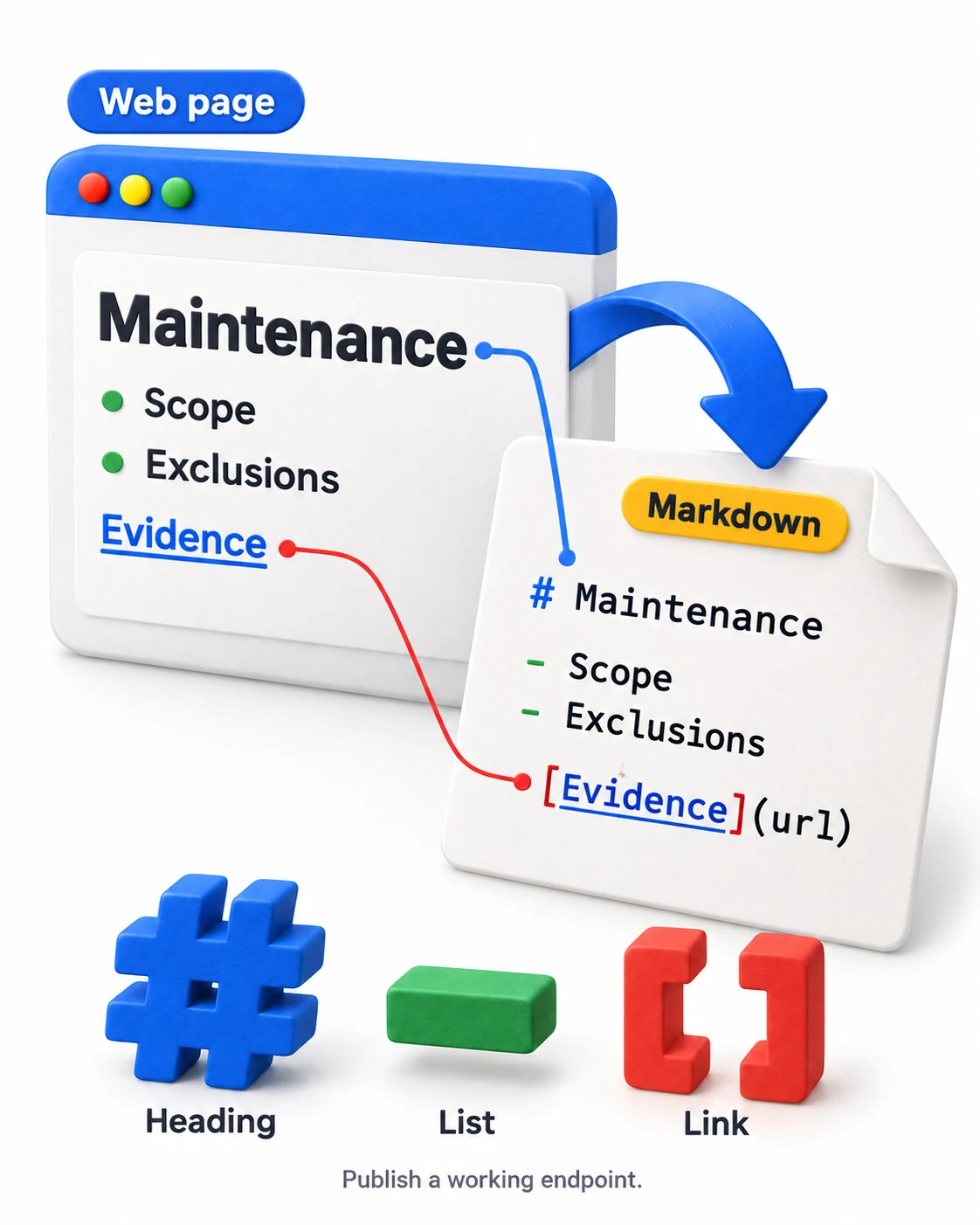
For example, an ordinary service page might have a corresponding Markdown address:
Normal page:      https://example.com/services/maintenance/
Markdown page:    https://example.com/services/maintenance.md
These are illustrative URLs. The exact address depends on the publishing system. A working endpoint must exist; adding .md to a URL does not create one.
Writing in Markdown and publishing Markdown are separate decisions. A site can store its articles as Markdown, convert them into HTML, and never expose the source files publicly. For AI access, the important question is what an assistant receives when it requests the public URL.
Vercel describes both serving existing Markdown source and converting CMS content into Markdown at request time. That makes Markdown a delivery format as well as an authoring format. See Vercel’s engineering explanation.
Where Markdown fits in a GEO strategy
Generative engine optimization, or GEO, concerns how a business appears in AI-generated answers. The desired outcome might be a source citation, an accurate product description, inclusion in a shortlist, or a recommendation that leads to a visit or sale.
Markdown can play a role in the information journey:
It can help provide readable content and a navigable path through a site. Those advantages do not settle the later decisions about relevance, credibility and source selection. An assistant could successfully retrieve your Markdown and still recommend a different business.
It also helps to define what “rank in AI” means. ChatGPT, Claude, Perplexity, Google’s AI features and task-specific agents are different surfaces. They do not present one shared ranking list. For a test, define a specific outcome: for example, whether your business appears in answers to a set of customer questions, which source URLs are cited, and whether the description is correct.
Markdown pages, llms.txt and other formats: what is the difference?
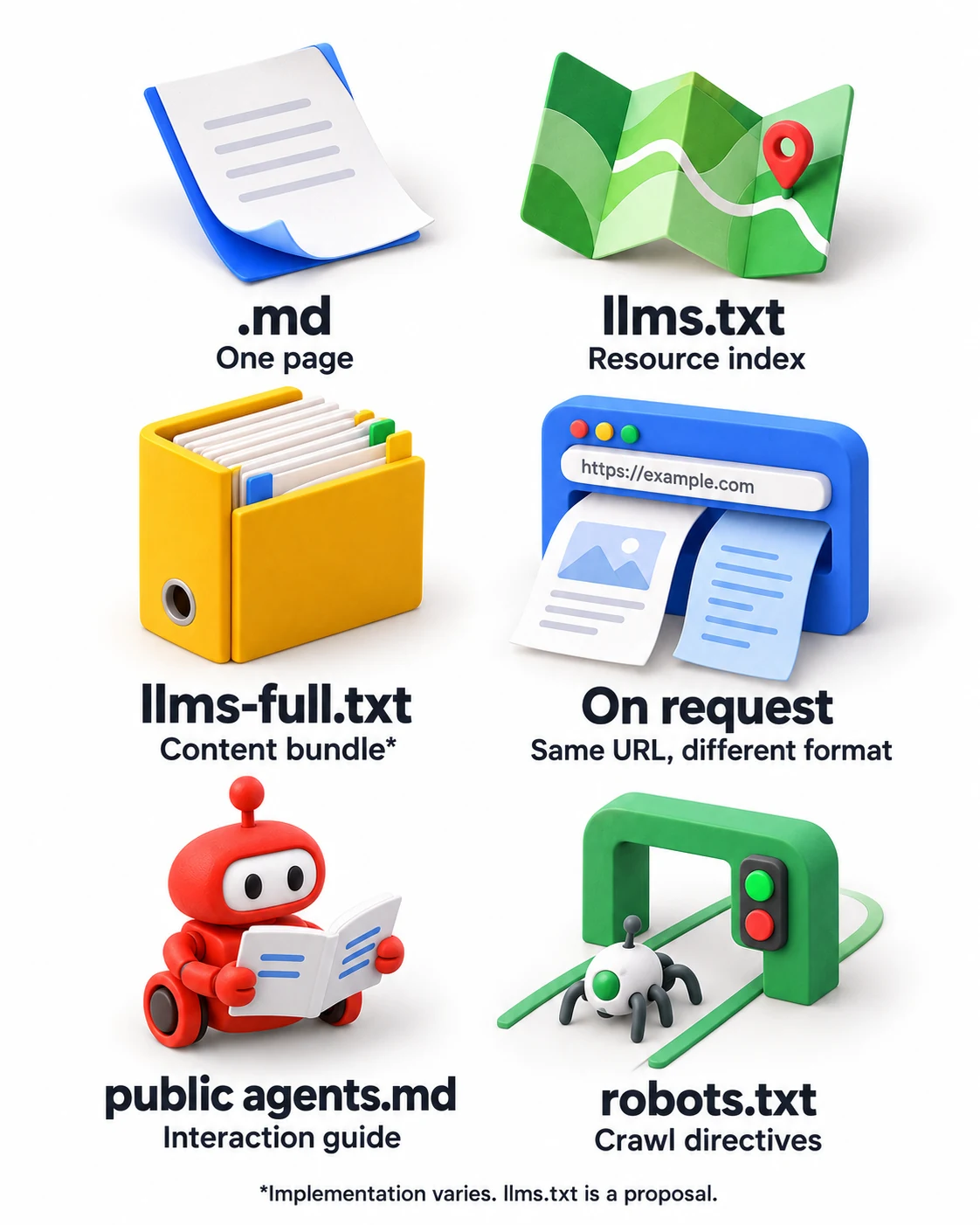
| Format | What it contains | Main purpose |
|---|---|---|
Page-level .md |
The substance of one page. | Let a tool read a specific resource. |
llms.txt |
A Markdown overview with selected resource links. | Guide navigation into the site. |
llms-full.txt |
Often a combined collection of content. | Offer a larger context bundle; implementation varies. |
| Markdown on request | A Markdown representation of the normal URL. | Support compatible clients without a separate address. |
Public agents.md |
Information for interacting with a particular business or service. | Support agent discovery and actions. |
robots.txt |
Crawler directives. | Communicate crawl rules to compliant bots. |
The llms.txt proposal describes an index and links to agent-friendly resources. It remains a proposal, rather than a rule every AI system must follow. llms-full.txt is commonly used for a combined document, but do not assume the filename always guarantees that content.
How websites use Markdown for AI visibility
1Publish clean versions of important pages
A Markdown companion gives an assistant the actual information: definitions, instructions, specifications, qualifications and supporting links. A useful version preserves the page’s meaning instead of reducing it to promotional bullets.
Stripe makes documentation available as Markdown and describes pairing it with an index of offerings. Its agentic commerce guide connects that approach to helping agents understand products and policies. That is a documented strategy recommendation, rather than a measured promise of ranking improvement. Read Stripe’s technical field guide.
2Return Markdown from the page URL
With content negotiation, a compatible client requests text/markdown and the server responds with that representation. A normal browser can receive HTML from the same address.
Cloudflare documents this delivery pattern through Markdown for Agents. It is useful when the client supports it, but availability does not establish that every crawler will request it. See Cloudflare’s current documentation.
3Deliver lightweight content to recognized agents
Another implementation identifies agent traffic and returns a lightweight representation at the URL being requested. This places content where a tool is already looking, instead of relying entirely on discovery of a new .md file.
Keep the substantive facts consistent across representations. Product capabilities, exclusions and commercial terms should not change because the requester is a bot. Treat agent classification as a technical feature to verify, rather than assuming a user-agent string proves identity.
4Keep a useful navigation map
Removing menus can also remove the routes to other useful pages. A Markdown page should retain relevant links and a path to a resource index. Otherwise, an assistant may have clean text but no reliable way to explore further.
Mintlify tested this problem directly: its documentation benchmark found that adding an index link sharply reduced failed page requests. The practical lesson is to make the content navigable, rather than simply stripping HTML. Read the benchmark.
5Explain how an agent can interact with the business
Some Markdown documents describe capabilities as well as content. Shopify’s public /agents.md describes commerce discovery, browsing interfaces and policies. Its /llms.txt and /llms-full.txt mirror that document by default. This supports shopping-agent discovery and interaction; Shopify does not present it as a guaranteed recommendation boost. See Shopify’s specification.
Installed skills are a related distribution channel. Resend publishes Markdown-based skills that supply product expertise to assistants performing email tasks. That can help users work with a product, but an installed skill is a different mechanism from being selected in public AI search. See Resend’s approach.
Does Markdown help AI rankings? What the research actually shows
The studies answer different questions. A test of crawler visits cannot, by itself, establish recommendation gains. A successful coding-agent task does not establish better placement in consumer search answers.
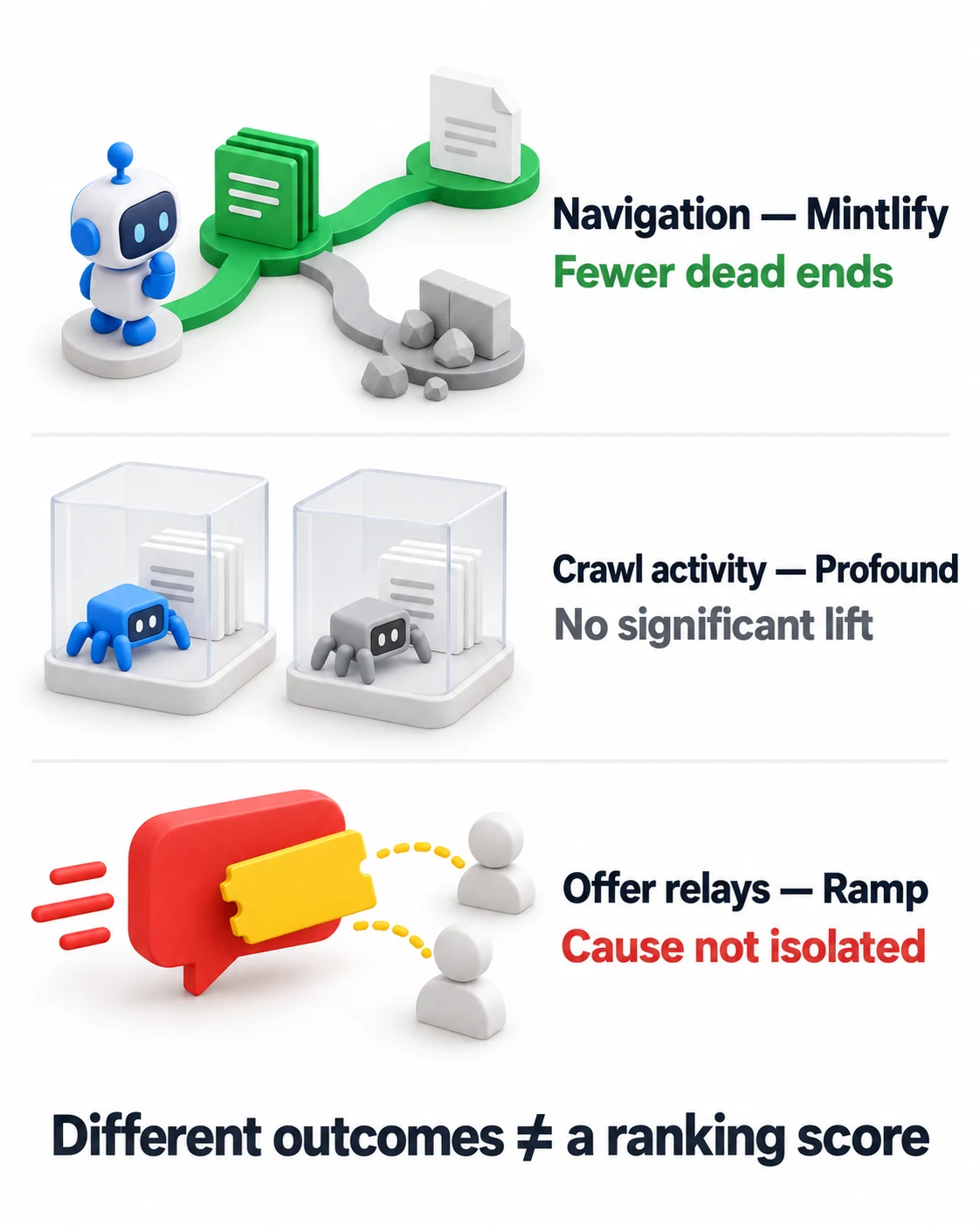
Ramp: a direct marketing experiment
Promising signal, cause not isolated
Ramp tested alternate formats across roughly 50 marketing pages carrying a tracked offer. It reported 370 monitored offer relays by day 32, mainly through Claude; ChatGPT did not surface the offer. Markdown was the consistently successful variant, but it reached a broader bot population than the alternatives, and another variant initially missed major bots. The result supports further testing of answer influence without isolating Markdown as the cause. These were offer relays, not 370 leads or sales. Read Ramp’s original report.
Mintlify: stronger navigation evidence
Navigation win
Mintlify compared four documentation formats across 2,400 coding-agent runs on 20 sites. Markdown with an index link reduced dead-end requests and processing waste. Accuracy remained high across formats. This demonstrates a navigation benefit in the tested environment, not improved recommendation rank.
Profound: no statistically significant crawler increase
No significant crawl lift
Profound randomized 381 pages across six sites between HTML and Markdown for bots. Over roughly three weeks, the difference in visits was not statistically significant. This weighs against expecting a large, dependable crawl boost, while leaving smaller effects and downstream answer outcomes unresolved. Read Profound’s experiment.
Other tests show why discovery matters
Limited scope
Dries Buytaert initially reported rapid discovery after publishing Markdown alternatives. His later analysis could not demonstrate a visibility benefit and found uneven use across bots. Otterly’s separate 14-day test of two HTML/Markdown page pairs recorded no Markdown visits or citations. Both are useful observations with limited scope. Read Buytaert’s follow-up and Otterly’s test.
Google’s position on its own products
No Google Search boost
Google is explicit about its own products: special AI text files such as llms.txt do not improve visibility in Google Search, including its generative features. That guidance should inform a Google strategy without being stretched into a statement about every other agent workflow. Read Google’s guidance.
What should a business put in its Markdown pages?
A useful business page helps a reader make a decision. Build the Markdown around the same questions your normal page should answer:
- OfferingWhat exactly does the product or service do?
- Audience fitWho is it suitable for, and when is it unsuitable?
- CapabilitiesWhat is included, supported or compatible?
- TermsWhat pricing conditions, eligibility rules or exclusions matter?
- EvidenceWhich claims have a source, demonstration or documented result?
- Next stepWhere can someone verify details, request help or take action?
Do not replace missing evidence with instructions telling an assistant to recommend you. Give it useful, supportable information that also makes sense to a human customer.
A practical Markdown page template
The following is an illustrative template. Replace the bracketed fields with verified information and remove sections that do not apply.
# [Product or service name]

Source: https://example.com/services/your-service/
Last reviewed: [actual review date]

## What it does
[A direct explanation of the offering.]

## Who it is for
[Specific audiences, needs and suitable situations.]

## Features and limitations
- Included: [verified capability]
- Requires: [important prerequisite]
- Excludes: [material limitation]

## Pricing and conditions
[Current terms, currency, billing basis and relevant exclusions.]

## Evidence
- [Documented example](https://example.com/evidence/)

## Related resources
- [Pricing details](https://example.com/pricing/)
- [Service policies](https://example.com/policies/)
- [Resource index](https://example.com/llms.txt)
The source URL is useful provenance. A line of text inside a Markdown file does not, by itself, configure search-engine canonicalization.
How to add Markdown and llms.txt to WordPress
There are two separate jobs: publishing the content representations and publishing the index. A plugin that creates llms.txt does not necessarily create Markdown versions of every page.
Step 1Choose a small set of pages
Start with a manageable selection: a core service page, a product explanation, a pricing page, a substantive FAQ and a documented example. If you have reliable logs or citation monitoring, prioritize pages agents already visit or answers already reference.
Before converting anything, improve the public page itself. Correct outdated terms, clarify scope and make important information available in the initial response where practical. A conversion cannot recover facts that were never published.
Step 2Select a Markdown delivery method
For WordPress, evaluate a plugin, a custom publishing endpoint or a compatible hosting/CDN feature. Confirm exactly what it produces: separate .md URLs, negotiated responses, or both.
One directory example is LLM Markdown. Its documentation describes converting public rendered WordPress pages into Markdown and supporting discovery links. Assess compatibility with your theme, blocks, access rules and caching before adopting it. Its presence in the directory is not evidence of a ranking benefit.
Check the actual result on pages built with your normal editor. A page builder’s visual layout, a complex table or content loaded only through browser JavaScript may not convert into useful text automatically.
Step 3Review the generated page
Compare HTML and Markdown side by side. Verify headings, lists, table relationships, destinations of links, pricing qualifications and meaningful image descriptions. Remove duplicate menus or footers if they obscure the article, but retain useful navigation.
A good review question is: Could someone make the same informed decision from either version? If a limitation appears only in the HTML version, the Markdown version is incomplete.
Also test access while logged out. Markdown endpoints and combined exports should exclude drafts, private posts, password-protected pages and membership-only material. Confirm that the new representation preserves your actual access rules.
Step 4Publish or enable llms.txt
If you already use Yoast SEO on a supported single-site installation, its documented route is:
Enable the feature, save, and review which resources the generated file includes. Yoast’s instructions note that this feature is unavailable for multisite. Follow Yoast’s current instructions.
A manually published file is another option if your host allows it. Serve it as text at the intended public address, rather than creating a normal WordPress page that happens to be titled “llms.txt.” Avoid having a plugin and a physical file compete for the same route.
Step 5Connect the index and page alternatives
Use your publishing layer to advertise the Markdown alternative and the applicable index. Add a normal navigational pointer inside the Markdown output as well, so the resource remains understandable when a tool reads only its text.
Putting discovery markup into an article’s body is not a substitute for configuring the site’s document head or response headers. Ask your developer or hosting provider to implement it at the appropriate layer.
Step 6Test through your real cache and CDN
If the same URL can return different formats, the cache must distinguish them correctly. Otherwise, a visitor could receive Markdown intended for a tool, or the tool could keep receiving the cached HTML response.
Test both request types through the live hosting stack after clearing relevant caches. Recheck after changes to the theme, optimization plugins, content converter or CDN rules.
llms.txt best practices and an example you can adapt
Keep the index useful and focused. Group resources by purpose, describe the destination, and link to addresses that actually work.
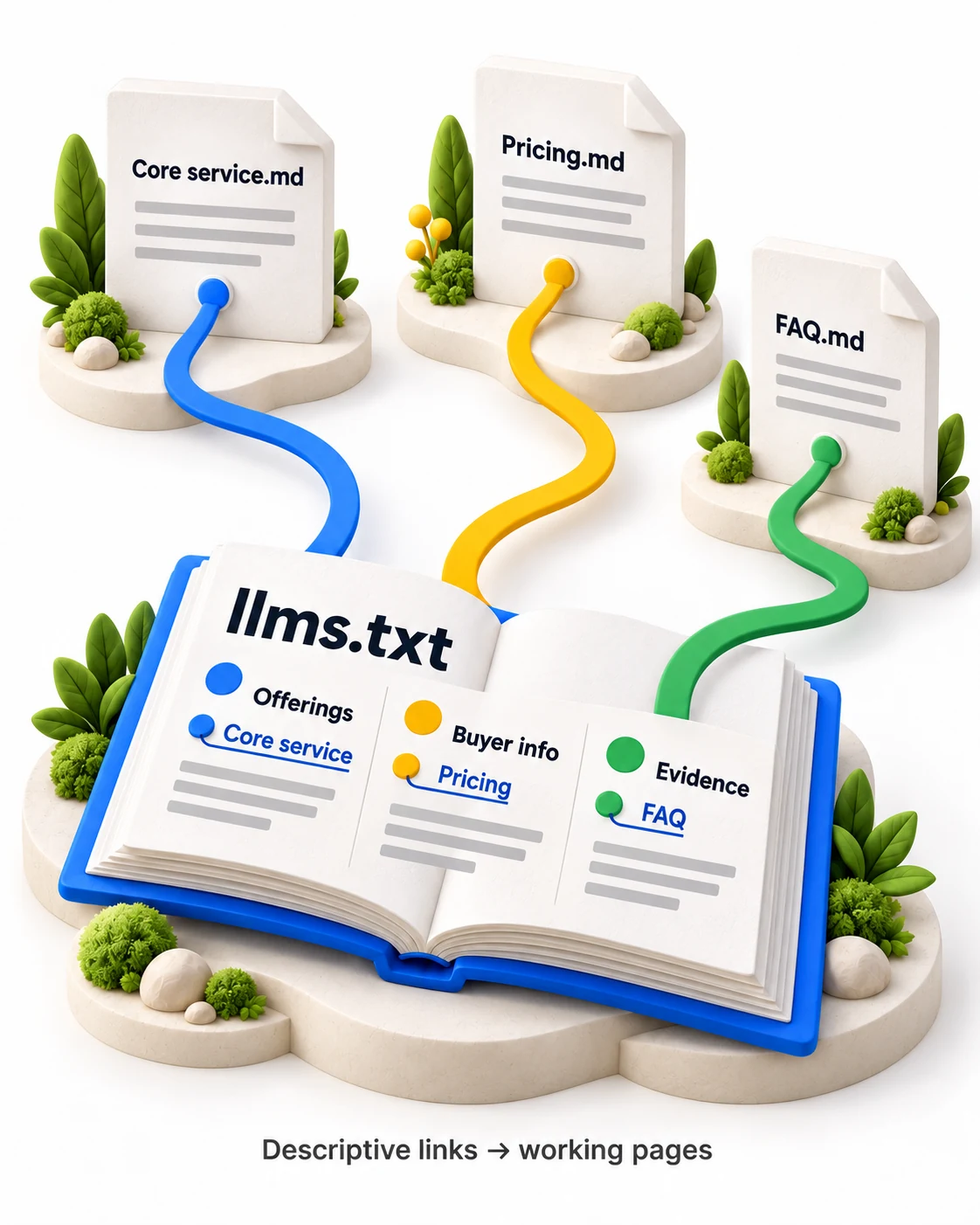
# Example Company

> A short, factual description of the business and its audience.

## Offerings
- [Core service](https://example.com/services/core.md): Scope and exclusions.
- [Product guide](https://example.com/product/guide.md): Capabilities and requirements.

## Buyer information
- [Pricing](https://example.com/pricing.md): Plans and conditions.
- [Policies](https://example.com/policies.md): Published service terms.

## Evidence and support
- [Documented examples](https://example.com/examples.md): Supporting evidence.
- [FAQ](https://example.com/faq.md): Specific customer questions.
This is an example, not a list of live resources. Replace every destination before publishing.
- ✓Use descriptive link text instead of generic labels such as “click here.”
- ✓Include concise context that helps a reader choose the right page.
- ✓Remove dead URLs and resources that no longer describe the business accurately.
- ✓Automate updates where possible, with an editorial review of the output.
- ✓Use product- or topic-specific collections when a single bundle becomes unwieldy.
The goal is an understandable route to information. It does not need to reproduce every URL in your XML sitemap.
Technical checks before launch
Check the response, not just the address
A URL ending in .md could return an error, an HTML wrapper or an unrelated page. Confirm a successful response and inspect the body. If you support negotiation, test it explicitly:
# Test a dedicated Markdown resource
curl -i https://example.com/services/core.md

# Test Markdown at the ordinary page URL
curl -i -H "Accept: text/markdown" https://example.com/services/core/
These commands are inspection examples for your own implementation. For negotiated Markdown, verify the expected Content-Type and appropriate cache variation, commonly Vary: Accept.
Advertise alternatives accurately
The current llms.txt proposal recommends alternate-format and index relationships. For example, a developer can add the following to the HTML head, using your real URLs:
<link rel="alternate" type="text/markdown"
      href="https://example.com/services/core.md">
<link rel="describedby"
      href="https://example.com/llms.txt">
Equivalent discovery information can also be supplied through HTTP link headers. A discovery hint helps a compatible client find a resource; it does not force a crawler to fetch it.
Separate search access from training access
Classify the traffic you measure. For example, OpenAI documents different roles for OAI-SearchBot, GPTBot and ChatGPT-User: search support, potential training collection and user-triggered retrieval. A training crawler visit does not demonstrate inclusion in a current answer. See the official crawler documentation.
Review existing crawl permissions and access controls alongside the new endpoints. Publishing an index does not override a firewall, a login requirement or crawler restrictions.
How to measure AI citations, recommendations and business impact
Write down what success would look like before deployment. “More AI traffic” is too imprecise if the intended result is appearing in a product shortlist.
| Outcome | What to record | What it tells you |
|---|---|---|
| Successful access | URL, response status, representation and verified agent identity where available. | A tool reached the intended content. |
| Accurate representation | Correct capabilities, limitations, pricing conditions and source links. | The answer uses the information correctly. |
| Citations | Which URLs appear as sources in repeated answer samples. | Your material is attributed in those answers. |
| Recommendations | Brand inclusion in relevant shortlists, plus context and position when meaningful. | The brand appears during the tested decision. |
| Business results | Attributable visits, inquiries, trials or purchases. | Visibility is associated with useful actions. |
Choose customer questions such as “What options suit [specific need]?” and “Does [product] support [requirement]?” Include category questions without the brand name as well as branded verification questions. Do not use only prompts that tell the assistant which business to mention.
Repeat the same question set, record the platform and date, and preserve answer transcripts. Where practical, compare matched page groups while keeping content, audience targeting and other major changes consistent. If you change the format, content and bot access simultaneously, you cannot isolate the format’s contribution.
Track the source relationship, not just the filename. An assistant may read a Markdown representation while citing the ordinary page URL. Conversely, a crawl log alone does not prove the information appeared in an answer.
Common mistakes that make the strategy less useful
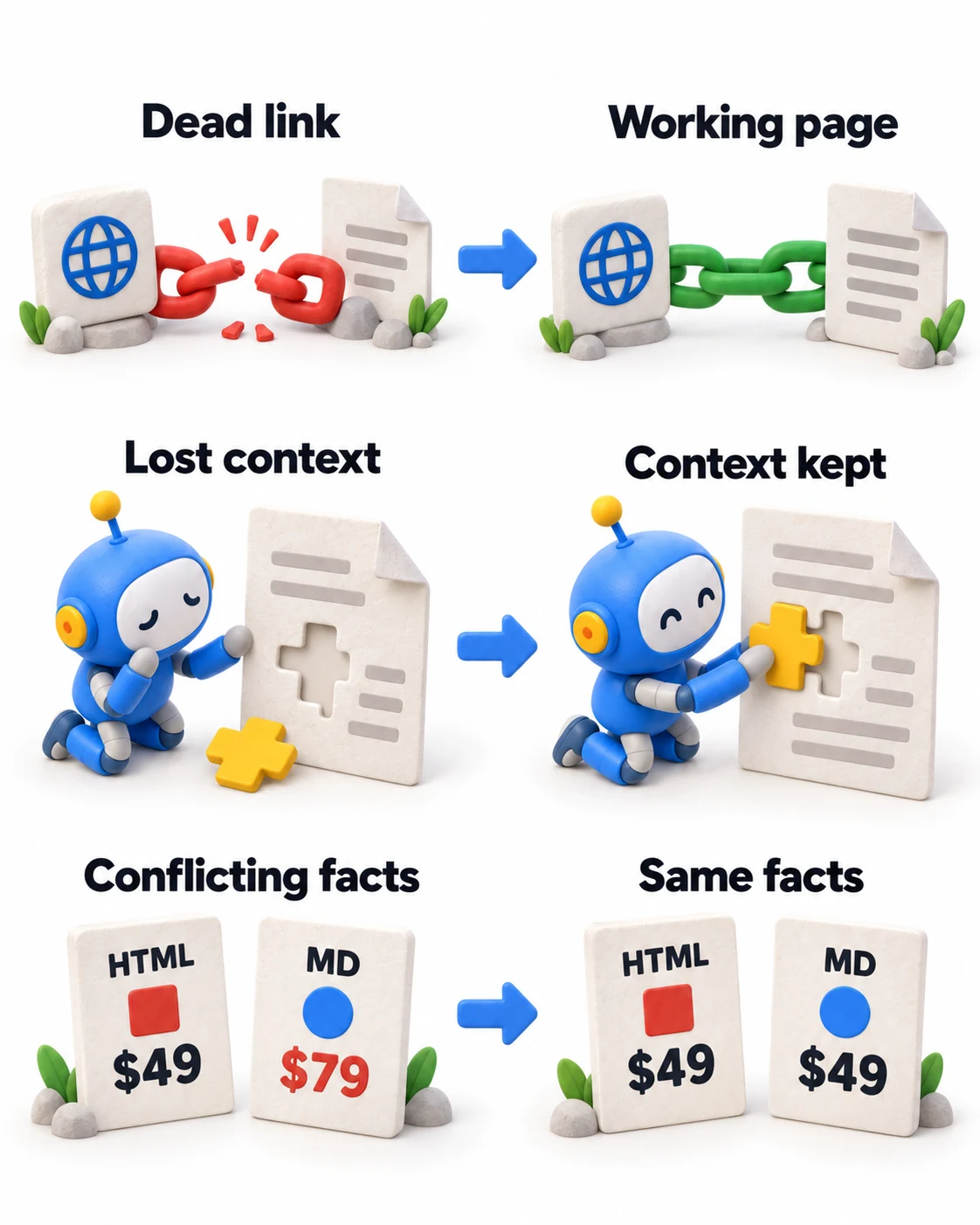
- ✕Publishing an index without useful destinations. A map cannot compensate for missing or inaccessible content.
- ✕Stripping away important context. Exclusions, table relationships and citations matter as much as the headline claims.
- ✕Letting the versions disagree. Keep prices, features and policies synchronized.
- ✕Making one enormous content dump. Offer manageable, clearly described resources instead.
- ✕Confusing requests with results. Separate retrieval, attribution, recommendation and conversion.
- ✕Generalizing from one AI platform. Record what each tested system actually does.
- ✕Forgetting ordinary publishing quality. Clear explanations, accurate claims and working links remain essential.
Frequently asked questions about Markdown for AI and GEO
People also ask
Will Markdown help me rank in ChatGPT?
It may make information easier for a compatible agent to retrieve and use, but the reviewed evidence does not establish a universal ranking advantage. Test whether the change affects relevant recommendations, accurate descriptions or citations on the specific surface you care about.
How do I get cited by ChatGPT using this approach?
Start with useful public pages that answer real questions, verify appropriate search access, and provide discoverable Markdown if you are testing that delivery method. Keep evidence and source links intact. Then monitor repeated answer samples. None of these steps guarantees selection as a source.
Is Markdown better than HTML for AI search?
Markdown can be compact and convenient for text retrieval. HTML remains the normal public web format and can carry content and navigation effectively. Keep a useful HTML website and add Markdown when it solves a specific access or workflow problem; the comparison depends on the reader and implementation.
Does llms.txt replace robots.txt or a sitemap?
No. It is a guide to content, whereas robots.txt communicates crawler directives and an XML sitemap lists URLs for discovery. Adding llms.txt does not override access restrictions or submit a website to every AI platform.
Should I create llms-full.txt?
Consider it when a manageable collection would be useful as one context bundle. For a large or frequently changing website, a focused index and smaller topic resources may be easier to maintain. Check your platform’s implementation, because the filename does not always represent a full-site export.
Does every WordPress site need a Markdown plugin?
No. Choose it when there is a clear use case, a maintainable implementation and a way to evaluate results. An existing SEO tool may already provide an index, while a separate solution may be needed for page-level Markdown. Avoid installing overlapping tools merely to accumulate features.
Is agents.md the same thing as AGENTS.md in a project?
Not necessarily. Shopify’s public agents.md describes a storefront to shopping agents. A theme-root AGENTS.md provides coding instructions and is not the public storefront document. Check the file’s location, audience and actual response rather than relying on its name.
A practical launch checklist
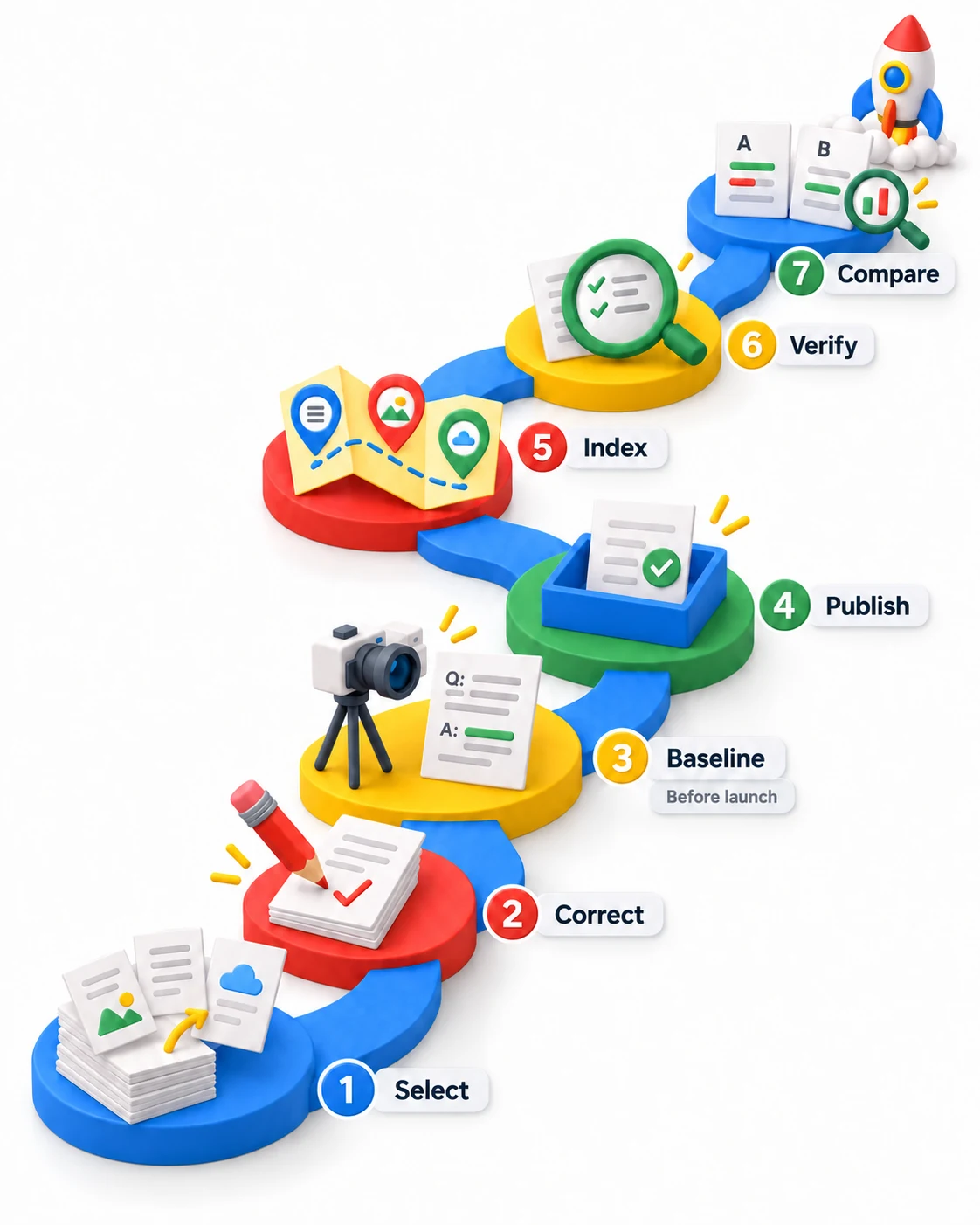
- 1Select a small set of useful, decision-relevant pages.
- 2Correct the public information before converting it.
- 3Record a baseline and a repeatable customer-question set before launch.
- 4Publish working Markdown representations with consistent facts.
- 5Preserve navigation and provide a concise resource index.
- 6Verify access, content, headers and caching.
- 7Compare recommendations, citations, accuracy and business actions over time.
The useful GEO question is whether this publishing work helps the right people and their assistants find, understand and act on accurate information about your business. Build the implementation around that outcome, and keep the measurement strong enough to tell you what changed.
More Writing & Research by Jourdan Rombough
View all research

If AI can't find you, understand you and trust you, it won't recommend you.
Keywords tell you what they typed. Intent tells you what they meant. Fan-out tells you what they'll ask next.
Be a thing, not a string. AI remembers entities, not keywords.
The click isn't dead. It just has to be earned twice.
Schema is the business card you hand to every machine that reads your site.
If Googlebot can't reach it and AI can't parse it, it doesn't exist.
Good SEO grows quietly. Then all at once.
