

Free infographic · 2026 editionSee the Google search operators infographicEvery operator that still works, the ones Google killed and 12 SEO power stacks, on one tall page. Tap to open, then scroll.View the infographic ▼Hide the infographic ▲

Updated October 2026 · Optimization Theory · Checked against Google’s own documentation
Search operators are still the fastest free audit tool in SEO, but the list has quietly changed. cache: is gone. related: is gone. &num=100 is gone. And AI features in the results can quietly ignore your exclusions. This is the 2026 field guide to Google search operators: a cheat sheet, the full list of what still works, what Google killed and when, and
44 stacked queries for real SEO work, 12 of them decoded operator by operator.
What Are Search Operators?
Search operators are special commands and characters, such as site:, quotation marks and the minus sign, that you add to a search to filter the results. Google search operators narrow results by site, URL, title, file type, date or exact wording. For SEO they work as an instant, free audit tool: no crawl, no login, no API units. These are the ones that earn their keep in 2026:
site:to scope a search to one domain, subdomain or folder."quotes"to force an exact word or phrase.-to exclude a word, a site or another operator.intitle:to match words in the title tag.inurl:to match words in the URL.filetype:to find PDFs, spreadsheets and other documents.before:andafter:to filter by date.
Google Search Operators Cheat Sheet (2026, Free PDF)
The whole picture at a glance. Green works, amber works with caveats, red is dead.
Download this cheat sheet as a PDF Prints cleanly. Free, no email required.
Search Operators vs Boolean Operators
Boolean operators are the logic layer: AND, OR and NOT. Google supports all three, just not always with those words. Every other search operator on this page, like site: or intitle:, is a filter that sits on top of that logic. If you know Boolean search from LinkedIn, library databases or an ATS, this is the translation.
| Boolean logic | In Google | Example | Watch out for |
|---|---|---|---|
| AND | A space | technical seo audit |
Google matches every term by default, so typing AND adds nothing. |
| OR | OR or | |
"log file analysis" OR "server log analysis" |
Must be uppercase. Lowercase or is read as a word. |
| NOT | - |
seo audit -jobs |
No space between the minus and the term. |
| Grouping | ( ) |
(checklist OR template) "technical seo" |
Without brackets, OR can swallow the rest of the query. |
| Exact phrase | " " |
"crawl budget" |
Forces the phrase, but the match can sit outside the snippet. |
| Proximity | AROUND(X) |
canonical AROUND(4) noindex |
Never documented by Google. Treat results as a hint. |
Prefer forms to syntax? Google’s Advanced Search page at google.com/advanced_search builds most of these for you, then shows the operator version in the search box so you can learn it.
How to Use Google Search Operators: Anatomy of a Stacked Query
Most useful SEO queries stack three or four parts: a scope, a filter or two, and an exclusion to strip the noise. Here is one that finds every indexed page on a site that targets a phrase in its title, ignoring tag archives.
1. Scope
site: limits everything to one domain. Add a path to narrow it to a folder.
2. Filter
intitle: only matches words in the title tag, where Google weights them most.
3. Exact match
Quotes keep a multi-word value together. Without them, only the first word is filtered.
4. Exclusion
A minus in front of any operator removes its matches. Here, tag archives.
site:example.com Wrong: site: example.comNo space after the colon, ever.
seo OR sem Wrong: seo or semOR must be uppercase, or Google reads it as a word.
-site:pinterest.com Wrong: - site:pinterest.comThe minus sits directly against what it removes.
intitle:"search operators" Wrong: intitle:search operatorsQuote any multi-word value.
Advanced Search Operators for SEO: 44 Power Stacks
44 stacked queries, sorted by the job they do. Each tab opens with two power stacks, decoded operator by operator against a situation SEOs run into all the time, followed by quick stacks you can paste straight in. Replace example.com with your domain and the quoted topics with your own. The situations are illustrations; the queries are real.
What Google has indexed that it should not have.
Power stacks, decoded
Index bloat after a theme update
Run on your siteThe situationSay a store’s Page indexing report jumps from about 900 indexed URLs to more than 6,000 in a month, and nobody published anything new. Something is generating pages.
The stack
What each part does
- 1
site:example.comKeeps every result on the one domain you are auditing. - 2
inurl:tagTag archives, the classic WordPress bloat. - 3
OR inurl:authorAuthor archives, often thin copies of the blog index. - 4
OR inurl:pagePaginated archives such as /page/2/. - 5
OR inurl:filterFiltered product listings from faceted navigation.
You’ll seeHundreds of near-empty archive and filter URLs, each a slightly different list of the same products or posts.
NextNoindex thin archives and canonical filtered URLs to their parent category. Only block them in robots.txt after they have dropped out, or Google can never see the noindex.
A dev copy that went public
Run on your siteThe situationA developer built the redesign at example.com/dev/ and forgot the noindex tag. Now half-finished pages are showing up for your brand name.
The stack
What each part does
- 1
site:example.comScopes the search to your live domain. - 2
inurl:stagingAny indexed URL with staging in the path. - 3
OR inurl:devDevelopment folders like /dev/. - 4
OR inurl:testTest pages and test folders.
You’ll seeDuplicate versions of real pages, placeholder copy and test forms sitting in Google’s index.
NextPut the environment behind a password, then request removal in Search Console. If staging lives on a subdomain instead of a folder, use the subdomain stack below.
Quick stacks
Rough index size
FindsGoogle’s estimate of indexed pages.
NextCompare with your sitemap URL count. A big gap either way is worth a look in the Page indexing report.
WordPress attachment pages
FindsThin image attachment pages that got indexed.
NextRedirect attachment URLs to the file or the parent post in your SEO plugin.
Staging on a subdomain
FindsEvery indexed subdomain other than www.
NextPassword protect staging, then remove it with the Removals tool.
Pages in one folder
FindsWhat Google has indexed in one section of the site.
NextCompare it with the pages that section should have, and check any missing ones with URL Inspection.
Internal search pages
FindsInternal search results sitting in the index.
NextNoindex the search results template.
Login and admin URLs
FindsLogin and admin pages Google can see.
NextNoindex them, and confirm nothing behind them loads without a login.
Crawl waste, forgotten files and broken templates, found without opening a crawler.
Power stacks, decoded
Faceted navigation eating the crawl
Run on your siteThe situationCrawl stats in Search Console show Googlebot spending most of its visits on URLs that never appear in your menu, while new products take weeks to get indexed.
The stack
What each part does
- 1
site:example.comScopes the search to your store. - 2
inurl:sortSorted versions of listing pages, such as ?sort=price. - 3
OR inurl:filterFilter combinations such as ?filter=color.
You’ll seeDozens of copies of each category, one per sort order or filter combination.
NextCanonical them to the clean category URL and stop linking to sort orders. Match the parameter name, not the ?, because Google ignores most punctuation in inurl:.
Documents nobody remembers publishing
Run on your siteThe situationYou are planning a site migration. The CMS export lists every page, but none of the PDFs, spreadsheets and Word files Google has quietly indexed over the years.
The stack
What each part does
- 1
site:example.comOnly files on your domain. - 2
filetype:pdfIndexed PDF documents. - 3
OR filetype:xlsxIndexed Excel spreadsheets. - 4
OR filetype:docxIndexed Word documents.
You’ll seePrice lists, old brochures, forms and the occasional internal document that was never meant to be public.
NextAdd every file that earns traffic or links to the redirect map. Remove anything private, and request removal in Search Console.
Quick stacks
Soft 404s
FindsError and empty search pages returning a 200.
NextReturn a real 404, or noindex internal search results.
Parameter and tracking URLs
FindsComment reply and campaign URLs that slipped into the index.
NextCheck canonicals, and stop linking internally to tagged URLs.
Placeholder text left live
FindsTemplate pages that went live unfinished.
NextFinish them or unpublish them.
Recurring title templates
FindsPages sharing one title pattern, a common source of duplicate titles.
NextRewrite each title to say what makes that page different.
Ecommerce category pages
FindsCategory pages targeting one commercial term.
NextIf several compete for it, pick one and consolidate the rest.
Product pages for one topic
FindsProduct URLs about one topic.
NextLink the strongest ones from the matching category page.
Overlap, decay and research on your own site and beyond it.
Power stacks, decoded
Two of your pages fighting over one term
Run on your siteThe situationYour main technical SEO guide slips from position 4 to 11, and Search Console shows an old blog post picking up impressions for the same query.
The stack
What each part does
- 1
site:example.comOnly your pages. - 2
"technical seo"Every page that uses the exact phrase. - 3
-inurl:technical-seo-guideRemoves the page you want to rank, so only the competition is left.
You’ll seeEvery other page on your site that talks about the topic, including the ones Google might be confusing with your guide.
NextMerge and redirect the weakest overlap, re-angle the rest, and point their internal links at the guide with descriptive anchor text.
Picking which posts to refresh
Run on your siteThe situationYou have budget to update ten posts this quarter. The question is which ten.
The stack
What each part does
- 1
site:example.comOnly your pages. - 2
intitle:seoPosts with SEO in the title tag. - 3
before:2024-01-01Pages Google dates before 2024. - 4
-inurl:categoryRemoves category archives from the list.
You’ll seeYour older SEO posts, oldest to newest, without archive pages in the way.
NextCross-check each one in Search Console and refresh the posts that still get impressions but are losing clicks first. To catch posts that advertise an old year, swap the date filter for intitle:2025. Google dates pages its own way, so treat the date filter as a shortlist, not a verdict.
Quick stacks
Internal link sources
FindsPages that mention the topic but are not about it.
NextLink each one to your target page with descriptive anchor text.
Scrapers and copies
FindsSites republishing your writing.
NextAsk for a credit link first. File a DMCA request if they refuse.
Real questions for your FAQ
FindsHow real people phrase the problem.
NextAnswer the recurring ones on the page, in their words.
Title competition snapshot
FindsA rough count of pages with every word in the title.
NextTreat it as a sanity check next to keyword difficulty, not instead of it.
What the web published this year
FindsFresh pages on your topic.
NextCheck what they cover that you do not.
Government references
FindsAuthoritative pages on your topic.
NextCite them where your content makes claims they support.
What they built, and who vouches for them.
Power stacks, decoded
Mapping a competitor’s topic cluster
Run on other sitesThe situationOne competitor outranks you for almost every audit-related search, and you want to see everything they have built around the topic.
The stack
What each part does
- 1
site:competitor.comOnly their site. - 2
intitle:"seo audit"Pages targeting the phrase in the title tag. - 3
-inurl:categoryRemoves category archives. - 4
-inurl:tagRemoves tag archives.
You’ll seeTheir real content pages on the topic: guides, checklists, templates and case studies.
NextList the subtopics they cover that you do not, and the formats they use. That is your content gap, straight from the source.
Finding where a competitor gets recommended
Run on other sitesThe situationA competitor keeps showing up in “best of” lists and roundups. You want to know exactly which pages are sending them that trust.
The stack
What each part does
- 1
"Competitor Brand"Pages that name them. - 2
-site:competitor.comRemoves their own site from the results. - 3
(intitle:reviewReview pages... - 4
OR intitle:resources)...or resource pages. The brackets keep the OR from swallowing the rest.
You’ll seeThird-party reviews and curated lists that mention the competitor.
NextEvery one of these is a page that already covers your category. Pitch the ones that would genuinely be better with you on them.
Quick stacks
What they published lately
FindsTheir recent output and publishing pace.
NextNote the topics they are doubling down on.
Their linkable assets
FindsReports, templates and datasets that attract links.
NextBuild a better one, then pitch it to the pages linking to theirs.
Comparison pages
FindsThe bottom-of-funnel terms they target.
NextDecide which comparisons you can answer more honestly.
Blog footprint
FindsA rough count of their real articles.
NextScan the titles for topics you have not covered.
Their guest posts
FindsWhere a competitor’s writers have published.
NextThose editors already take outside contributors in your niche.
Pages that already link to content like yours.
Power stacks, decoded
Getting a new guide onto resource lists
Run on other sitesThe situationYou just published a guide that is genuinely useful, and you want it on the lists people in your niche already use.
The stack
What each part does
- 1
intitle:resourcesPages with resources in the title. - 2
inurl:resourcesAnd in the URL, which filters out passing mentions. - 3
"technical seo"On your exact topic. - 4
-site:wikipedia.orgRemoves a site you are never going to get added to.
You’ll seeCurated link pages maintained by schools, associations, agencies and bloggers.
NextCheck each list for dead links first. Reporting a broken link and suggesting your guide as the replacement is the most welcome pitch there is. Add site:.edu to narrow the list to universities.
Placing an infographic
Run on other sitesThe situationYou have a finished infographic and want sites that actually publish contributed graphics, not a feed of pins.
The stack
What each part does
- 1
intitle:infographicPages about infographics. - 2
("submit"That mention submitting... - 3
OR "contribute")...or contributing. Grouped, so the OR stays inside. - 4
-site:pinterest.comRemoves Pinterest. - 5
-site:facebook.comRemoves Facebook.
You’ll seeDirectories, blogs and publications with submission pages or contributor guidelines.
NextCheck the date of each site’s latest post before you submit. A submission page on a dead site costs you nothing but time.
Quick stacks
Who is using your images
FindsPages using your image file. Run it in Google Images.
NextAsk anyone without a credit link to add one. They already like the work.
Your own infographics
FindsEvery infographic you have published.
NextRun the image search above on each file to see who is using it.
Sites that publish infographics in your niche
FindsBlogs that post embeddable graphics on your subject.
NextPitch your graphic to the ones that published recently.
Pages that need a data source
FindsFresh stats roundups that cite sources.
NextOffer your original data or chart as a citation.
Exact-phrase citations
FindsPages using a phrase your content could be the link for.
NextPitch the ones where your page is the better source.
Sponsorship pages
FindsOrganizations that list sponsors and partners.
NextSponsor what genuinely fits your business, and expect the link to carry rel="sponsored".
People and sites worth contacting, with the noise stripped out.
Power stacks, decoded
Guest posts without the job boards
Run on other sitesThe situationYou want bylines on real marketing blogs, but every search comes back full of job listings and Medium posts.
The stack
What each part does
- 1
intitle:"write for us"Contributor pages, by their title. - 2
"digital marketing"In your niche. - 3
-jobs -careersRemoves employment pages. - 4
-site:medium.comRemoves an open publishing platform.
You’ll seeGenuine contributor guidelines from blogs that take outside writers.
NextRead three recent posts on each site, then pitch one specific idea that fits what they already publish.
Turning brand mentions into links
Run on other sitesThe situationA podcast host mentioned your brand in their show notes months ago, without a link. How many more mentions like that are out there?
The stack
What each part does
- 1
"Optimization Theory"The exact brand name. - 2
-site:optimizationtheory.comRemoves your own site. - 3
-site:linkedin.comRemoves LinkedIn, where most hits are your own posts. - 4
-site:facebook.comThe same for Facebook.
You’ll seeThird-party pages that name the brand. Some link, many do not.
NextSend a short, friendly note to each unlinked mention asking for the link. Then run it again with your domain in quotes, "optimizationtheory.com", to catch mentions written as a URL. Swap in a competitor’s domain and you have a list of sites that already cover your space.
Quick stacks
Reporters covering your topic
FindsA publisher’s coverage of your subject. Run it in Google News.
NextFind the reporter and pitch data, not a product.
Expert roundups
FindsRoundups that collect expert quotes.
NextOffer one specific, quotable answer, not a bio.
Interviews and podcasts
FindsShows and blogs that interview people in your field.
NextPitch one topic you could talk about for thirty minutes.
site:example.com -inurl:httpsdoes not reliably match the protocol, so it will not find leftover HTTP pages. Use a crawl or the Page indexing report.inurl:"?s="fails because Google ignores most punctuation. Match the word instead:inurl:search,inurl:sort,inurl:filter.-pdfremoves pages containing the word pdf. To drop PDF files, use-filetype:pdf."write for us" OR "guest post" intitle:seolets the OR leak. Wrap the alternatives in brackets:("write for us" OR "guest post") intitle:seo.
Google Search Operators List: Every Operator That Still Works in 2026
The full list in four groups, one tab each. Every example is ready to paste; swap in your own domain or topic.
The building blocks. Everything else gets combined with these.
| Operator | What it does | Example | Status |
|---|---|---|---|
"..." |
Forces an exact word or phrase | "technical seo audit" |
Works |
- |
Excludes a word, a site or another operator | seo audit checklist -site:pinterest.com |
Works |
OR / | |
Matches either term. OR must be uppercase | "log file analysis" OR "server log analysis" |
Works |
( ) |
Groups terms so OR applies to the right part | (checklist OR template) "technical seo" |
Works |
* |
Wildcard for a missing word, best inside quotes | "best * for rank tracking" |
Works |
AROUND(X) |
Two terms within X words of each other. Never documented by Google, results are inconsistent | canonical AROUND(4) noindex |
Unofficial |
Where SEO work lives. The allin versions require every word that follows.
| Operator | What it does | Example | Status |
|---|---|---|---|
site: |
Results from one domain, subdomain or URL prefix | site:support.example.com |
Works |
inurl: |
One word in the URL | inurl:write-for-us seo |
Works |
allinurl: |
Every following word in the URL | allinurl:seo case study |
Works |
intitle: |
One word or quoted phrase in the title tag | intitle:"write for us" seo |
Works |
allintitle: |
Every following word in the title tag | allintitle:seo audit checklist |
Works |
intext: |
One word or phrase in the body text | intext:"core web vitals" |
Works |
allintext: |
Every following word in the body text | allintext:hreflang x-default example |
Works |
inanchor: |
Words in anchor text pointing at a page. Results are too patchy to trust | inanchor:seo |
Unreliable |
Dates accept a year or a full date. Google’s own help page uses both 2025/11/01 and 2019-03-01 formats.
| Operator | What it does | Example | Status |
|---|---|---|---|
filetype: |
Matches the file extension or the content-type header | search quality rater guidelines filetype:pdf |
Works |
ext: |
Alias for filetype: | ext:xlsx keyword research |
Works |
before: |
Results dated before a year or date | google algorithm update before:2025 |
Works |
after: |
Results dated after a year or date | ai overviews study after:2026-01-01 |
Works |
after: + before: |
A date range | core update after:2026-03-01 before:2026-04-01 |
Works |
.. |
A number range | seo audit $500..$2000 |
Works |
Two of these only run in Google Images, which Google’s own Search Central documentation spells out. src: is the one link builders should know.
| Operator | What it does | Example | Status |
|---|---|---|---|
src: |
Pages whose src attribute references an image URL |
src:https://example.com/images/logo.png |
Images only |
imagesize: |
Images of an exact pixel size | seo infographic imagesize:1000x2000 |
Images only |
source: |
Filters by publisher | algorithm update source:reuters |
News only |
define: |
Dictionary definition | define:pareidolia |
Works |
weather: stocks: map: movie: |
Utility lookups. Handy, rarely SEO | weather:cooperstown |
Works |
Do Google Search Operators Still Work? The Graveyard of What Google Killed
Most still work: 21 of the operators on this page run fine in 2026, 3 are unreliable and 8 are dead. If a tutorial still tells you to run cache: or link:, it was written before these dates.
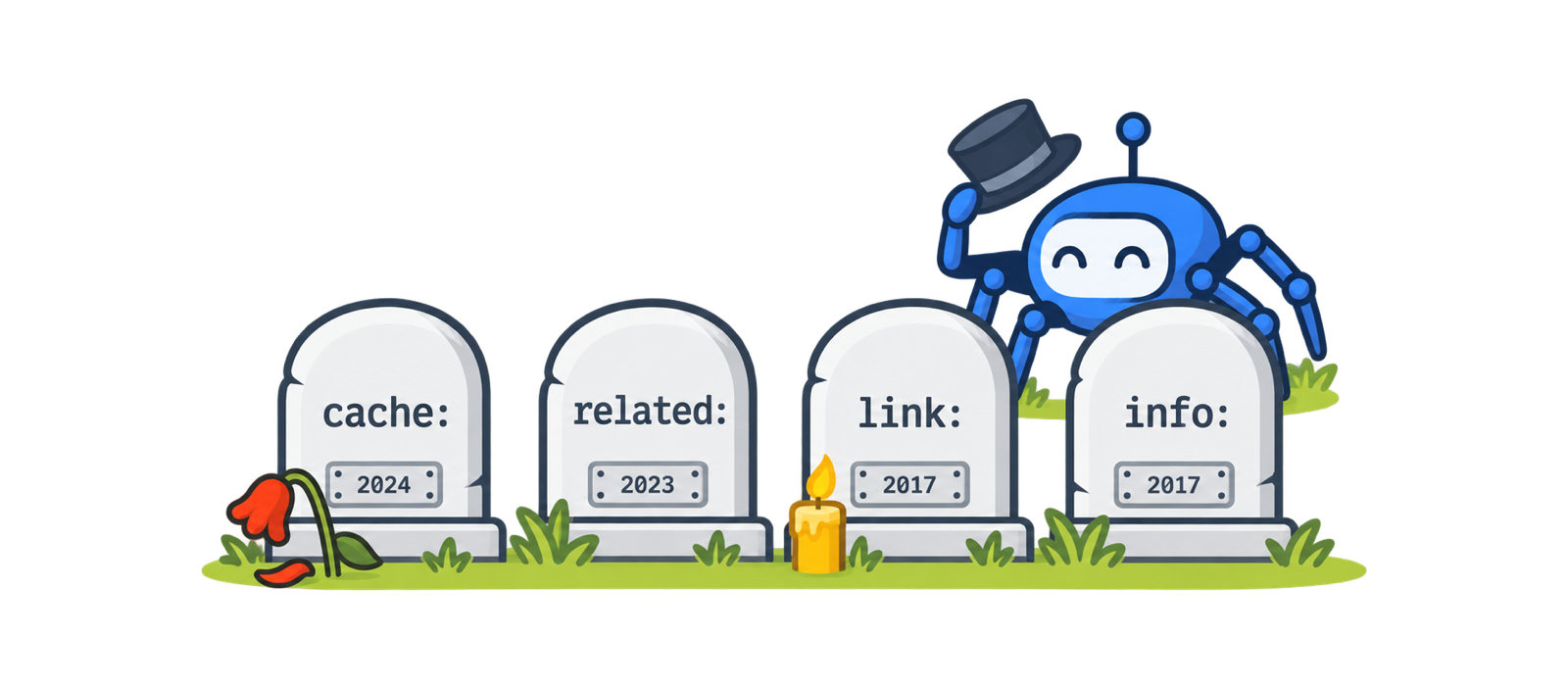
The + operator retires
Plus used to force a word into results. Quotes took over the job.
The ~ synonym operator goes
Google now folds synonyms into ordinary queries on its own.
link: and info: stop being useful
link: only ever showed a sample of backlinks and is now treated as unreliable. info: was deprecated.
related: is removed
Google confirmed it: “It hasn’t really worked that well for some time, as in some cases, the information was dated. It’s also rarely used.”
The cached link leaves the results
The “Cached” link disappears from result snippets.
cache: is switched off
The operator itself stops working. Google added links to the Internet Archive’s Wayback Machine under “About this result” instead.
&num=100 stops working
You can no longer load 100 results on one page. Rank trackers had to rebuild, and Search Console impressions shifted for most sites.
What to use instead of the dead operators
Search Console’s Links report shows the links Google knows about for your own site. For anyone else’s site, use a third-party backlink index such as Semrush Backlink Analytics.
For your own pages, the URL Inspection tool in Search Console shows the crawled HTML and a live test. For any page, the Wayback Machine at web.archive.org keeps dated snapshots.
Organic competitor reports in an SEO suite show which domains share your keywords, which is what related: was trying to guess at.
URL Inspection tells you whether a URL is indexed, which canonical Google chose and when it was last crawled.
They accept plain dates, so there is no Julian date arithmetic to do.
Six Things That Change How Search Operators Behave in 2026
These catch out experienced SEOs, because the operator still runs and simply returns something different from what you expect.
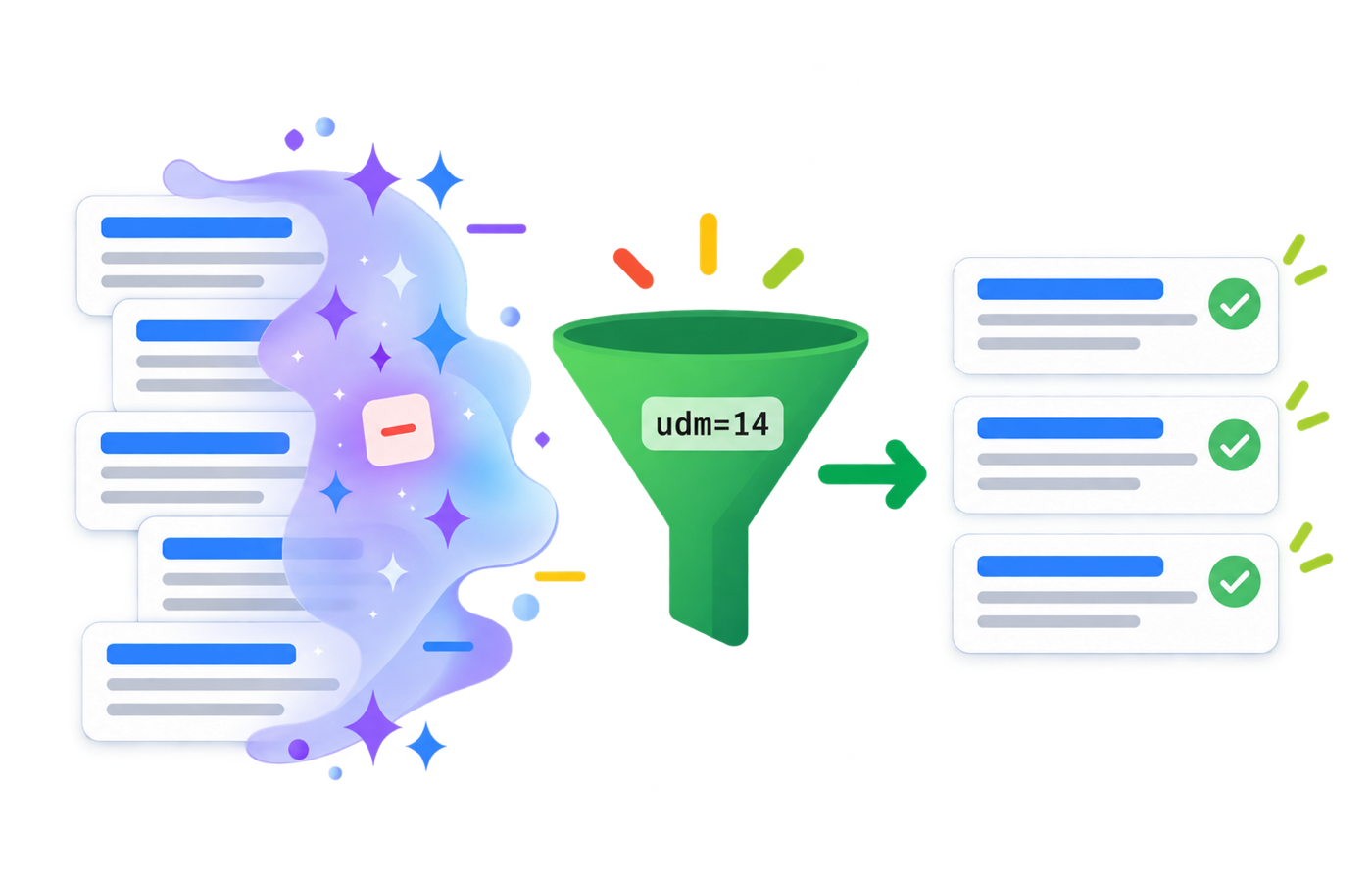
AI Overviews can override exclusions
Users have reported the minus operator being quoted and ignored when an AI Overview fires. The fix: add &udm=14 to the search URL, or pick the Web filter, for plain web results where operators behave. Set https://www.google.com/search?q=%s&udm=14 as a custom search engine in your browser and every query skips the AI layer.
More on how AI search reads queries: AI query fan-out and SEO vs GEO vs AEO.
num=100 is gone
Since mid September 2025 one results page holds far fewer results. One study of 319 sites found 87.7% lost Search Console impressions, much of it likely scraper noise. Do not compare impressions across that date without saying so.
site: counts are estimates
Google’s own documentation calls site: “not comprehensive” and points to URL Inspection as more reliable. Use it to spot patterns, not to count indexed pages.
Quotes match text you cannot see
Quoted searches still force an exact match, but the match can sit outside the visible snippet. Since 2022 Google tries to show where it found the phrase. For no synonyms at all, use Tools, then Verbatim.
allin operators eat the query
Everything after allintitle: is read as a title word, including your other operators. Put it last, or use several intitle: operators instead.
Long queries get cut off
Google stops reading after 32 words, and operators count toward that. Long OR chains quietly lose their tail. Split them into two searches.
Google Dorks: The Same Operators, Pointed at Your Own Exposure
A Google dork is the security community’s name for a stacked operator query that surfaces files or pages a site never meant to make public. There is no special dork syntax and no separate dork command list: every dork is built from the operators above, usually site:, intitle:, inurl: and filetype:. The best-known archive of them is the Google Hacking Database maintained by Exploit Database.
For site owners and SEOs, the useful part is running a few of them against your own domain before anyone else does. Each of these is a real check from a technical audit.
Open directory listings
FindsFolders your server lists file by file.
NextTurn off directory indexing: Options -Indexes on Apache, autoindex off on Nginx.
Config, log and backup files
FindsFiles that should never be web accessible.
NextRemove or block them at the server, rotate any credentials inside, then request removal.
Spreadsheets marked internal
FindsDocuments that leaked into the index.
NextTake them down and use the Removals tool in Search Console.
Injected spam pages
FindsPages a hack has injected into your site.
NextCheck the Security issues report in Search Console, clean the site, then request a review.
Run these against sites you own or are authorized to test. Finding an exposed file on someone else’s site does not give you permission to open it.
Google Search Operators FAQ
What are Google search operators?
Commands you type into Google’s search box to filter results by site, URL, title, file type, date or exact wording, such as site:, intitle:, filetype: and quotation marks.
What is a stacked search query?
A search that combines several operators to answer one specific question: usually a scope such as site:, one or more filters such as intitle: or inurl:, and exclusions with the minus sign to strip out the noise.
Do Google search operators still work in 2026?
Most of them do. site:, quotes, the minus sign, OR, intitle:, inurl:, intext:, filetype:, before: and after: all work. cache:, related:, link:, info:, the plus sign and the tilde are dead or unreliable.
Which Google search operators were removed?
The plus sign in 2011, the tilde in 2013, related: in mid 2023 and cache: in September 2024. link: and info: stopped being useful around 2017. The &num=100 URL parameter stopped working in September 2025.
How many Google search operators are there?
There is no official count. Google documents only a few, and published lists range from about 40 to more than 60 because they count aliases, utility lookups and dead operators. This guide counts 21 that work for everyday research, 3 that are unreliable and 8 that are dead.
What are the most useful search operators for SEO?
site:, quotation marks, the minus sign, intitle:, inurl:, filetype: and before: or after:. Stacked together they cover index audits, cannibalization checks, content gaps, competitor research and link prospecting.
Is there a Google search operators cheat sheet PDF?
Yes. The cheat sheet on this page is available as a free PDF download, with no email required. It lists the operators that work, the ones to use with care and the ones Google killed.
What is the difference between search operators and Boolean operators?
Boolean operators are the logic: AND, OR and NOT. In Google, AND is a space, OR is typed in uppercase and NOT is the minus sign. Search operators such as site: and intitle: are filters that sit on top of that logic.
Why does a site: search show a different page count than Search Console?
The site: count is an estimate. Google’s own documentation calls it not comprehensive and recommends the URL Inspection tool in Search Console for anything you need to rely on.
Why is my minus operator being ignored?
When an AI Overview appears, some users see the excluded term treated as a search word. Add &udm=14 to the search URL or choose the Web filter to get plain web results, and check there is no space between the minus sign and the term.
Is Google dorking the same as using search operators?
It uses the same operators. Dorking usually means using them for security research, such as finding exposed files. Only investigate sites you own or are authorized to test.
Do search operators work in Gmail or Bing?
Each has its own set. Gmail uses commands such as from:, to:, subject: and has:attachment. Bing supports site:, filetype: and intitle:, plus its own inbody: and contains:. The same habits carry over: no space after the colon and an uppercase OR.
Sources
- Google Search Central: Debugging with search operators
- Google Search Help: Refine Google searches
- Search Engine Roundtable: Google removes the related search operator
- Search Engine Land: Google Search completely kills the cache feature
- Search Engine Land: num=100 impact data
- Exploit Database: Google Hacking Database
- Gmail Help: Refine searches in Gmail
- Microsoft Support: Advanced search keywords for Bing
If AI can't find you, understand you and trust you, it won't recommend you.
Keywords tell you what they typed. Intent tells you what they meant. Fan-out tells you what they'll ask next.
Be a thing, not a string. AI remembers entities, not keywords.
The click isn't dead. It just has to be earned twice.
Schema is the business card you hand to every machine that reads your site.
If Googlebot can't reach it and AI can't parse it, it doesn't exist.
Good SEO grows quietly. Then all at once.
