

- October 23, 2026
- Artificial Intelligence, SEO
By Jourdan Rombough, Optimization Theory · Updated · Built and tested on four live GA4 properties
GA4 finally has real dashboards. Most SEOs will fill them with the same five charts the Reports snapshot already shows. Here are the six I built instead, the exact cards in each, and what they found on my own sites in the first hour.
This is Part 2 of my GA4 power user series. Part 1: How I changed my GA4 settings to become a GEO power user covers the tracking: retention, Tag Manager, Consent Mode, the AI Assistants channel, ai_source, real-read events and junk-traffic labels. Part 2 is what you do with that data once it is flowing.
Part 1 ended with the GEO reports I use in Explorations and Looker Studio. Then Google shipped native dashboards, and most of those reports no longer need to leave GA4. Collected data is only useful if you can see it without building an exploration every morning. This part is the reporting layer, built entirely inside GA4: key events, audiences and calculated metrics pushed through the Admin API, then six SEO dashboards modeled on the paid "SEO dashboard templates" people buy for Looker Studio, rebuilt natively on every property.
Dashboard launch details from Google's About Google Analytics dashboard help page and PPC Land. Engagement and 404 figures are from my vuss.io property, last 28 days (September 25 to October 22, 2026).
| Dashboard | Answers | Cards |
|---|---|---|
| SEO & GEO Power Center | How is the site doing, and how much comes from AI assistants? | Full |
| Organic Search Performance | What does organic traffic look like on its own? | 11 |
| Content Decay & Wins | Which pages are slipping or rising, and is it age, topic, length or author? | 11 |
| Conversions & Lead Paths | Which channels, landing pages and events produce key events? | 10 |
| Technical SEO Health | 404s, site search, outbound links, downloads, device and browser problems | 12 |
| Traffic Quality & Bots | How much of this traffic is real? | 11 |
| Network Flow (multi-site only) | Which pages send visitors to my other sites? | 7 |
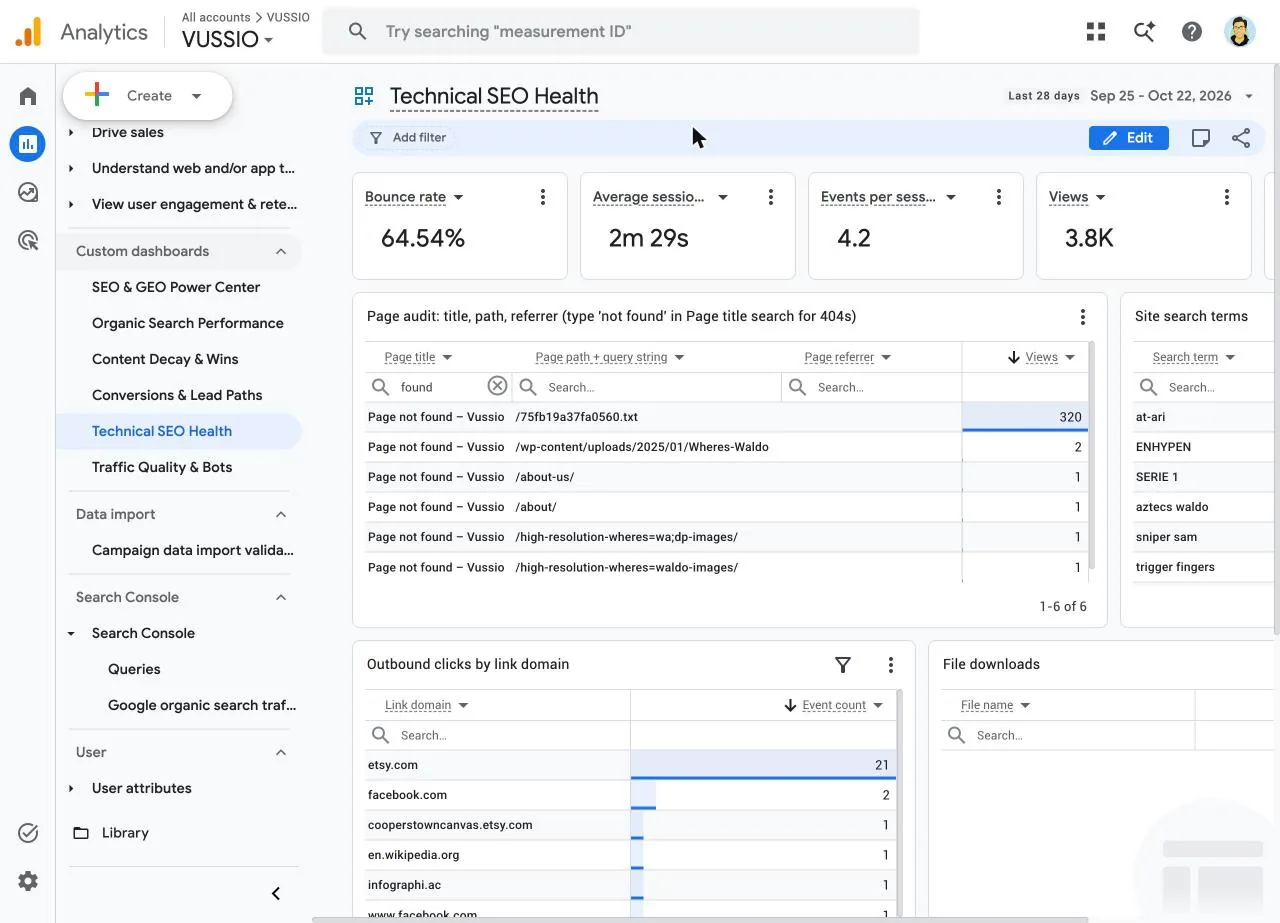
What the dashboards found in the first hour. A text file at the root of vuss.io was requested 320 times in 28 days and returned a 404 every time. Direct traffic on the same site was 1,649 sessions at an 11.6% engagement rate and 88% bounce, the profile of bots, not people. Infographi.ac was counting my own local preview server (127.0.0.1:8768) as a referral source. None of these show up in the default reports unless you already know where to look.
What GA4 dashboards can and cannot do
Google released dashboards in Google Analytics on September 9, 2026. They are single-page, drag-and-drop canvases that sit next to your reports. You build one in Reports › Create › Dashboard, and once you publish it, it shows up under Custom dashboards in the left navigation for everyone with access to the property.
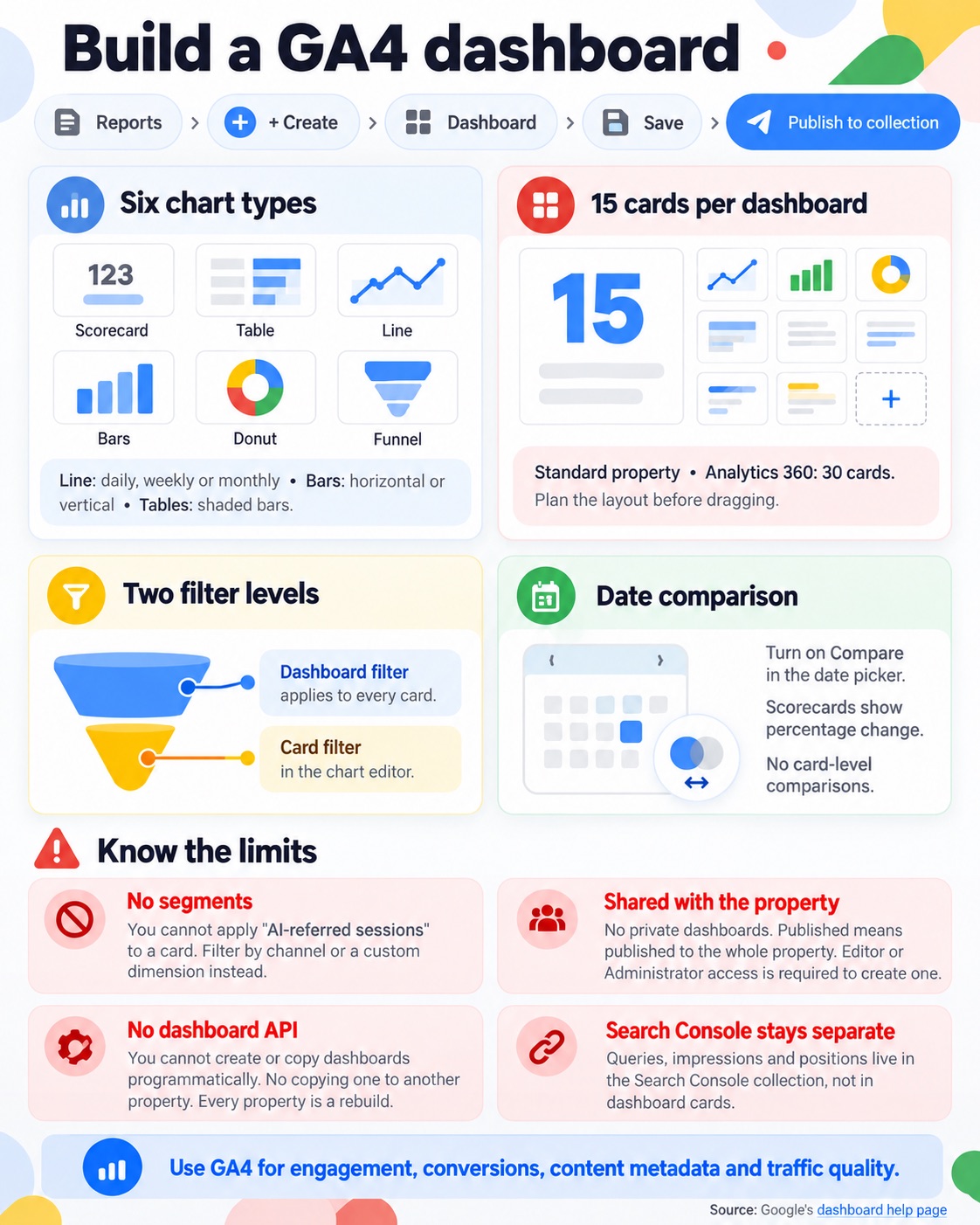
- Six chart typesScorecards, tables with shaded bars, line charts (daily, weekly or monthly), horizontal and vertical bars, donuts and funnels.
- 15 cards per dashboardOn a standard property. Analytics 360 gets 30. Plan your layout around the cap before you start dragging.
- Filters at two levelsA dashboard filter in the top bar applies to every card. Each card also has its own filter in the chart editor.
- Date comparisonTurn on Compare in the date picker and scorecards show percentage change. Card-level comparisons are not supported.
The limits matter for SEO work:
- ✕No segments. You cannot apply "AI-referred sessions" to a card. Use a dashboard filter on a channel or a custom dimension instead.
- ✕No private dashboards. Published means published to the whole property. Editor or Administrator access is needed to create one.
- ✕No API. You cannot create or copy dashboards programmatically, and you cannot copy one to another property. Every property is a rebuild.
- ✕Search Console data stays out. Queries, impressions and positions live in the Search Console collection, not in dashboard cards.
Source: Google's dashboard help page. That is why the dashboards below lean on GA4 data that Search Console cannot give you: engagement, conversions, content metadata and traffic quality.
Set up the property with the Admin API first
A dashboard can only chart what the property collects and labels. Before building any cards, I pushed the setup to all four properties through the Google Analytics Admin API. Doing this by hand is 45 audiences, 28 key events and a dozen settings screens. Through the API it is a short script per property.
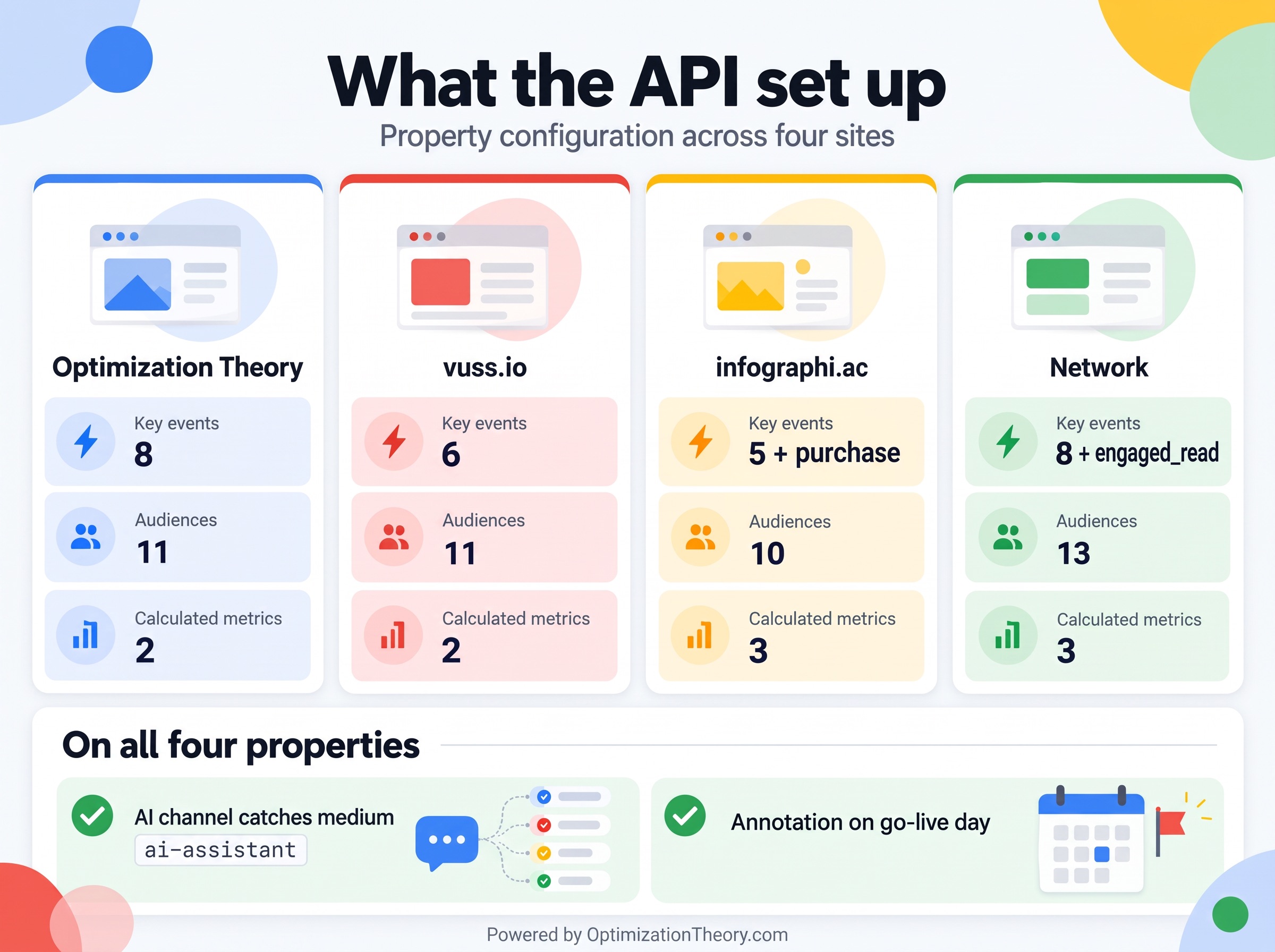
| Item | Optimization Theory | vuss.io | infographi.ac | Network |
|---|---|---|---|---|
| Key events | 8 | 6 | 5 + purchase | 8 + engaged_read |
| Audiences | 11 | 11 | 10 | 13 |
AI channel also catches medium ai-assistant |
Yes | Yes | Yes | Yes |
| Calculated metrics | 2 | 2 | 3 | 3 |
| Annotation on go-live day | Yes | Yes | Yes | Yes |
AuthorizeGet an access token with the edit scope
Enable the Google Analytics Admin API in a Google Cloud project, then sign in with the analytics.edit scope. With the gcloud CLI that is one command, and every call below sends the token as a Bearer header. Never paste the token into a doc or a chat.
gcloud auth application-default login \
  --scopes=https://www.googleapis.com/auth/analytics.edit,https://www.googleapis.com/auth/cloud-platform
TOKEN=$(gcloud auth application-default print-access-token)Key eventsMark the events that mean something
Key events (formerly conversions) are the metric every conversion card reads. I set reading and tool events to count once per session, so a single visitor scrolling five articles does not look like five leads.
curl -s -X POST \
  -H "Authorization: Bearer $TOKEN" -H "Content-Type: application/json" \
  "https://analyticsadmin.googleapis.com/v1beta/properties/PROPERTY_ID/keyEvents" \
-d '{"eventName":"engaged_read","countingMethod":"ONCE_PER_SESSION"}'AudiencesCreate the SEO audiences
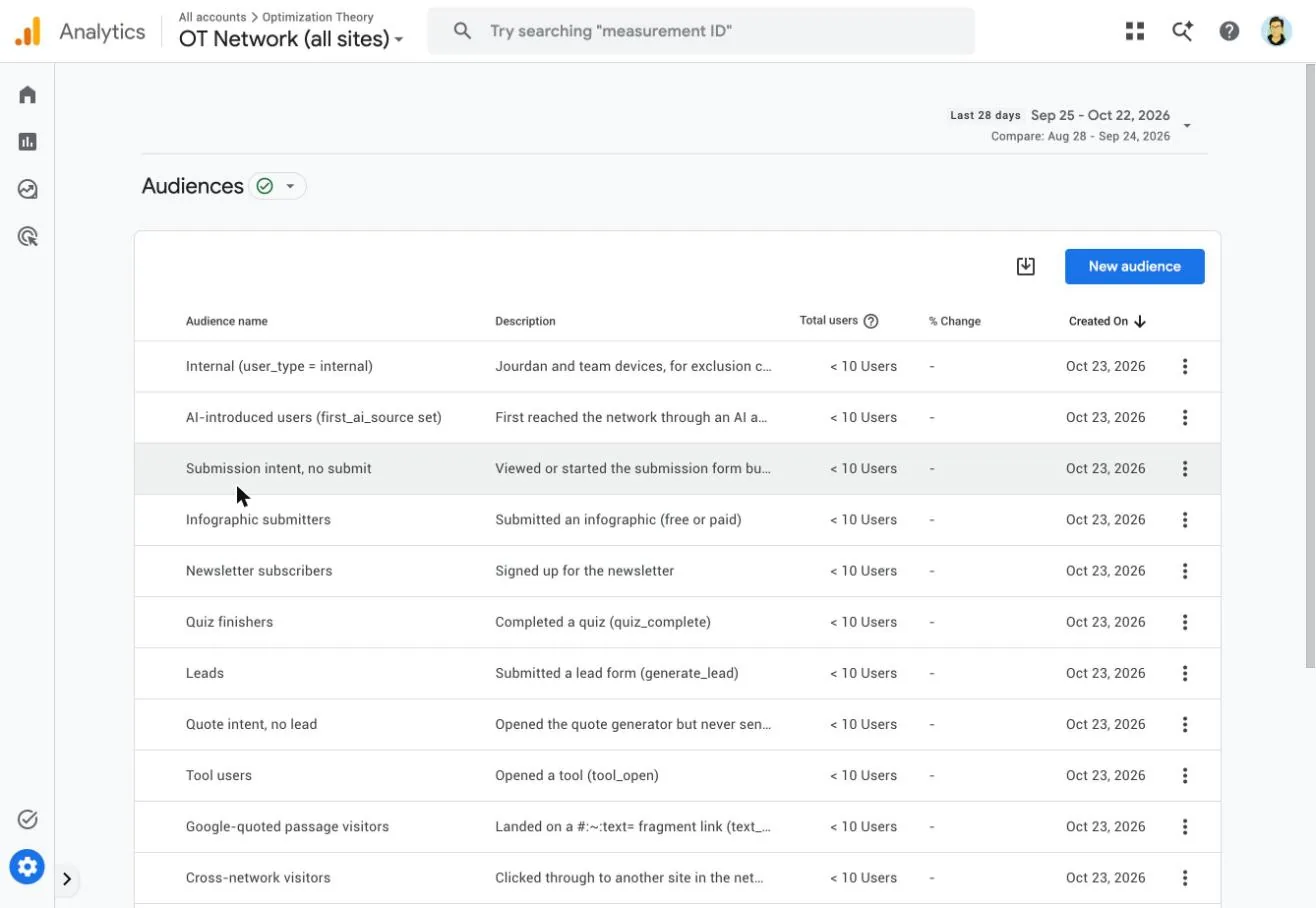
Audiences use the v1alpha endpoint. These are the ones every site got, plus site-specific intent audiences such as "Quote intent, no lead" and "Submission intent, no submit."
- ✓AI-referred visitors: session source matches the AI assistant list from Part 1.
- ✓AI-introduced users: the
first_ai_sourceuser property is set. People an assistant introduced, even if they came back through Google later. - ✓Engaged readers: triggered
engaged_read(75% scroll plus 60 active seconds). - ✓Google-quoted passage visitors: landed on a
#:~:text=fragment link. - ✓Cross-network visitors: clicked through to one of my other sites.
- ✓Internal:
user_type = internal, for exclusion comparisons.
One gotcha: an audience condition on event count ("engaged_read at least 3 times") needs a lookback window in the API, or the request fails. I kept those simple.
MetricsAdd calculated metrics
Pages per session and Key events per 100 sessions, plus Revenue per session on the store property. Formulas reference metric API names in braces.
curl -s -X POST \
  -H "Authorization: Bearer $TOKEN" -H "Content-Type: application/json" \
  "https://analyticsadmin.googleapis.com/v1alpha/properties/PROPERTY_ID/calculatedMetrics?calculatedMetricId=pagesPerSession" \
-d '{"displayName":"Pages per session","metricUnit":"STANDARD","formula":"{screenPageViews} / {sessions}"}'ChannelMake the AI channel catch Google's own label
Google's native AI Assistant channel (May 2026) tags recognized assistants with the medium ai-assistant. I patched the custom AI-Aware channel group so its AI Assistants rule is my source regex or medium exactly matches ai-assistant, which keeps both definitions in one channel. That is a PATCH to the channel group with updateMask=groupingRule.
ContextAnnotate the go-live date
A reporting annotation on October 22 ("Power Setup live, GTM + Consent Mode") marks the day the numbers change. Anyone who sees a step change in a chart six months from now gets the reason on the chart itself.
The retroactivity trap that breaks AI channel charts
This one cost me a rebuild. My first dashboard charted Session primary channel group, and every day before October 22 showed Google's default labels: no AI Assistants row, just Referral. Setting a custom channel group as primary only relabels data from that day forward.
The custom group's own dimension, Session AI-Aware Channels in my case, applies to historical data too. Same rules, full history. So every channel card in these dashboards uses the custom group dimension, and the tables below call it out.
| Setting | Applies to past data? | What it means for dashboards |
|---|---|---|
| Custom channel group dimension | Yes | Chart this one |
| Primary channel group | No, from the day you switch | Mixed labels across the date range |
| Key events | No | Conversion cards read 0 until new data arrives |
| Audiences | No | Membership builds from creation |
| Custom dimensions | No | "(not set)" before registration |
| Calculated metrics | Yes | Computed from existing metrics |
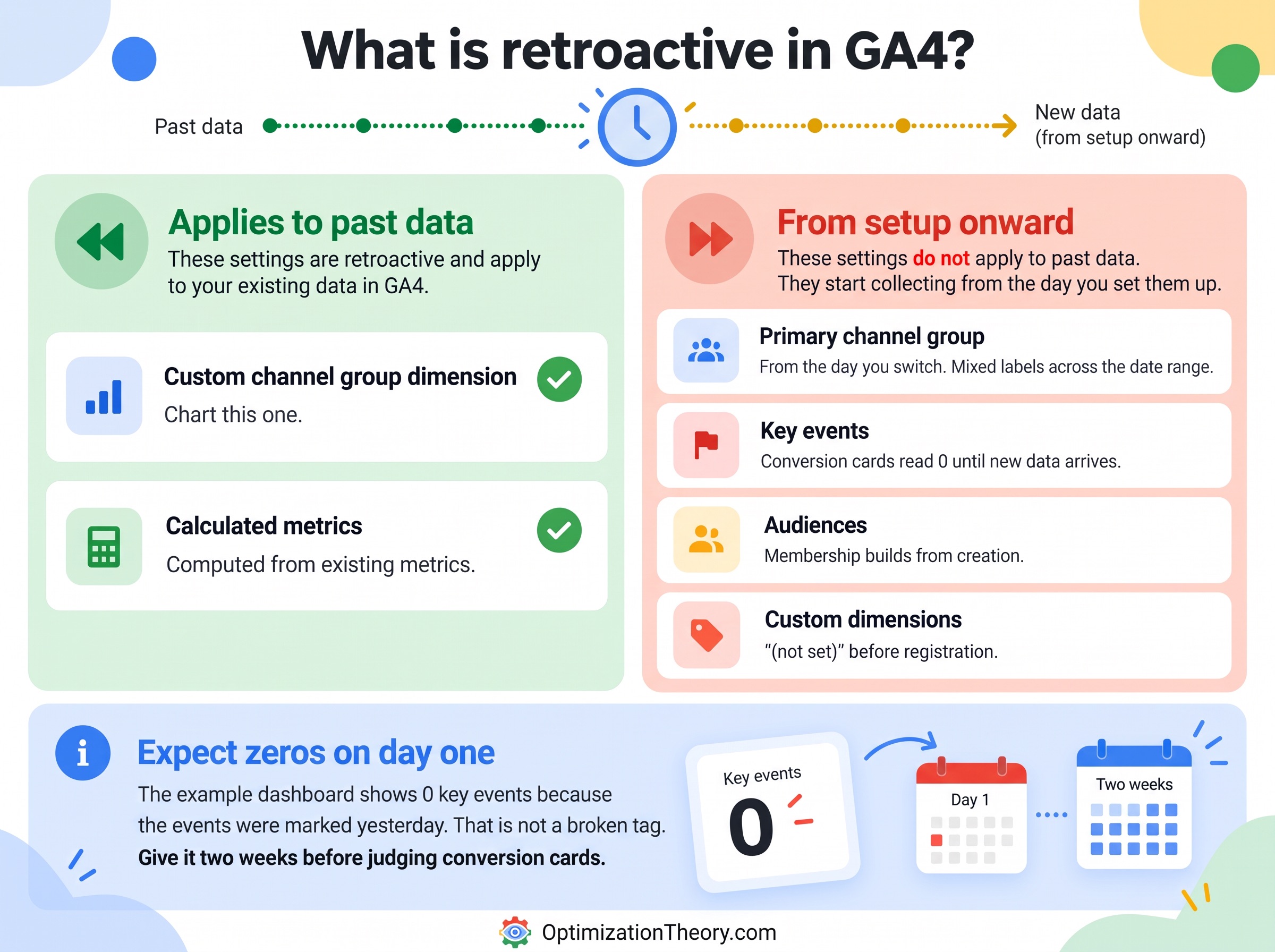
Expect zeros on day one. The Conversions dashboard below shows 0 key events because the events were marked as key events yesterday. That is not a broken tag. Give it two weeks before judging any conversion card.
Dashboard 1: SEO & GEO Power Center
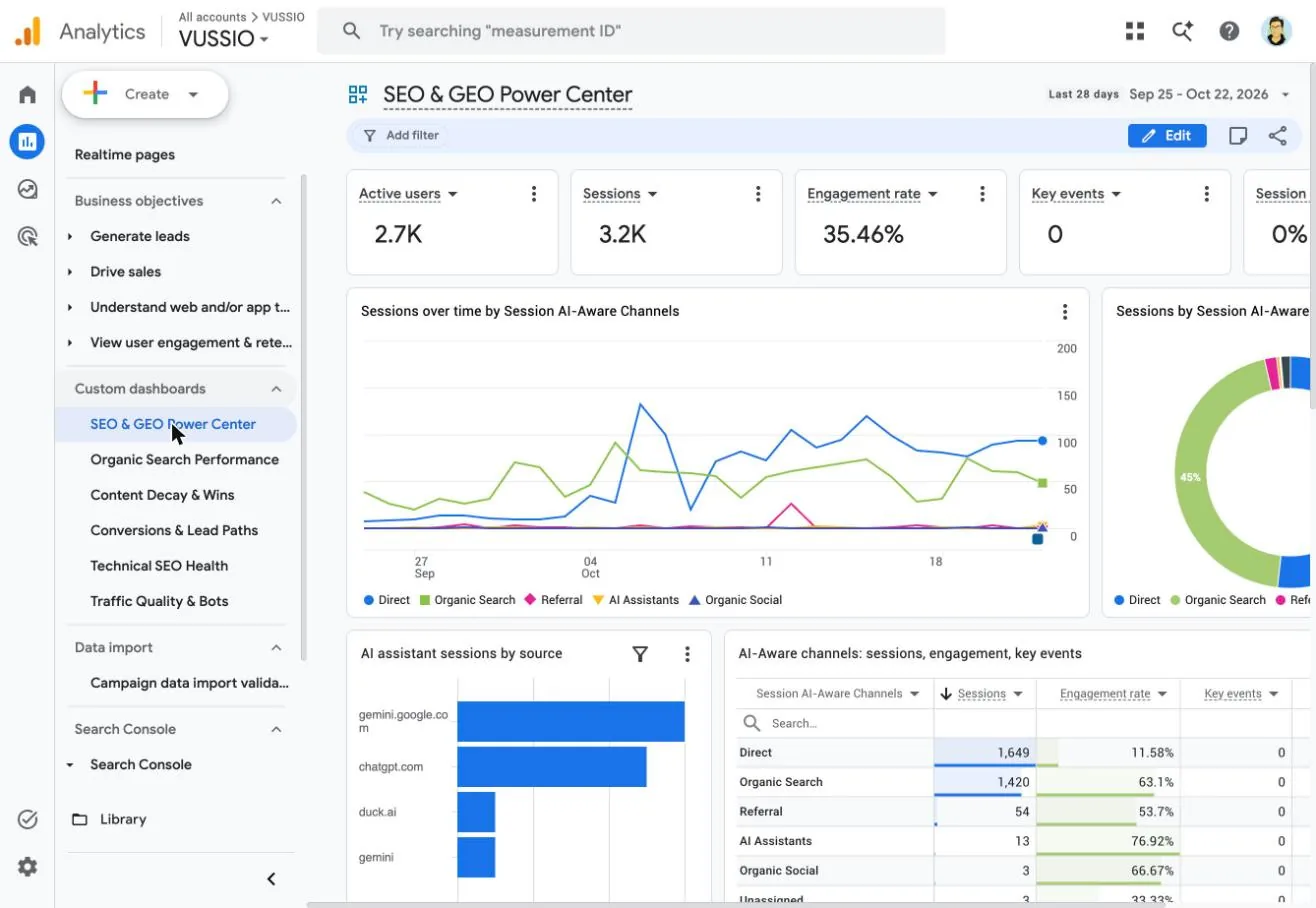
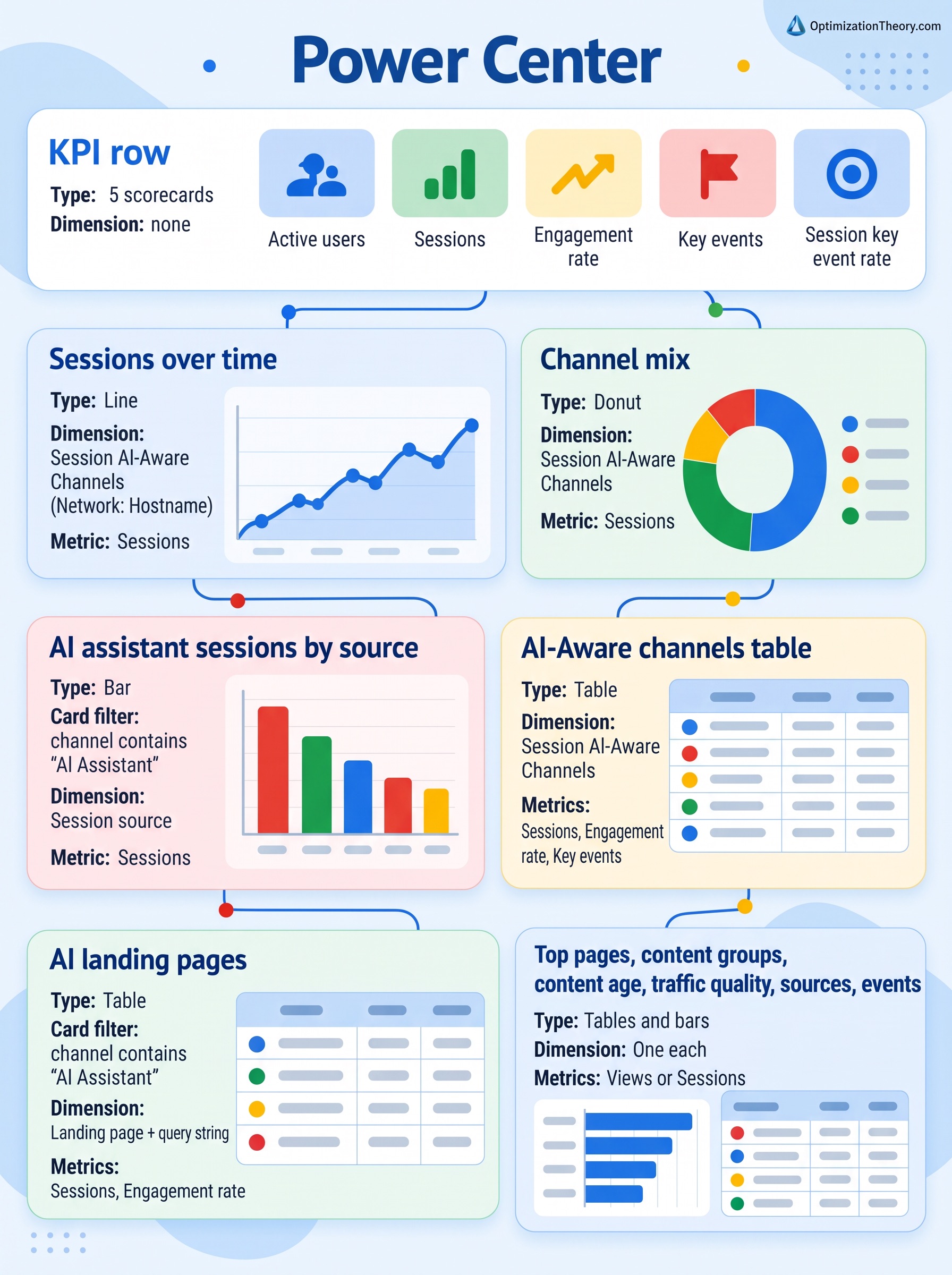
The home screen. It uses the full card allowance, built to answer "is anything wrong, and what are AI assistants doing?" in one scroll.
| Card | Type | Dimension | Metrics |
|---|---|---|---|
| KPI row | 5 scorecards | none | Active users, Sessions, Engagement rate, Key events, Session key event rate |
| Sessions over time | Line | Session AI-Aware Channels (Network: Hostname) | Sessions |
| Channel mix | Donut | Session AI-Aware Channels | Sessions |
| AI assistant sessions by source | Bar, card filter: channel contains "AI Assistant" | Session source | Sessions |
| AI-Aware channels table | Table | Session AI-Aware Channels | Sessions, Engagement rate, Key events |
| AI landing pages | Table, same card filter | Landing page + query string | Sessions, Engagement rate |
| Top pages, content groups, content age, traffic quality, sources, events | Tables and bars | One each | Views or Sessions |
The card filter uses contains "AI Assistant", not "exactly matches", so it catches both my "AI Assistants" channel and any session Google labelled "AI Assistant" before my rule took over. Notice the source bar: gemini.google.com and a bare gemini source are separate rows, and the source table shows Google's native label at work as gemini.google.com / ai-assistant and chatgpt.com / ai-assistant. That is the difference between a referrer and a UTM tag, and it is why the channel rule matters more than any one source name.
Dashboard 2: Organic Search Performance
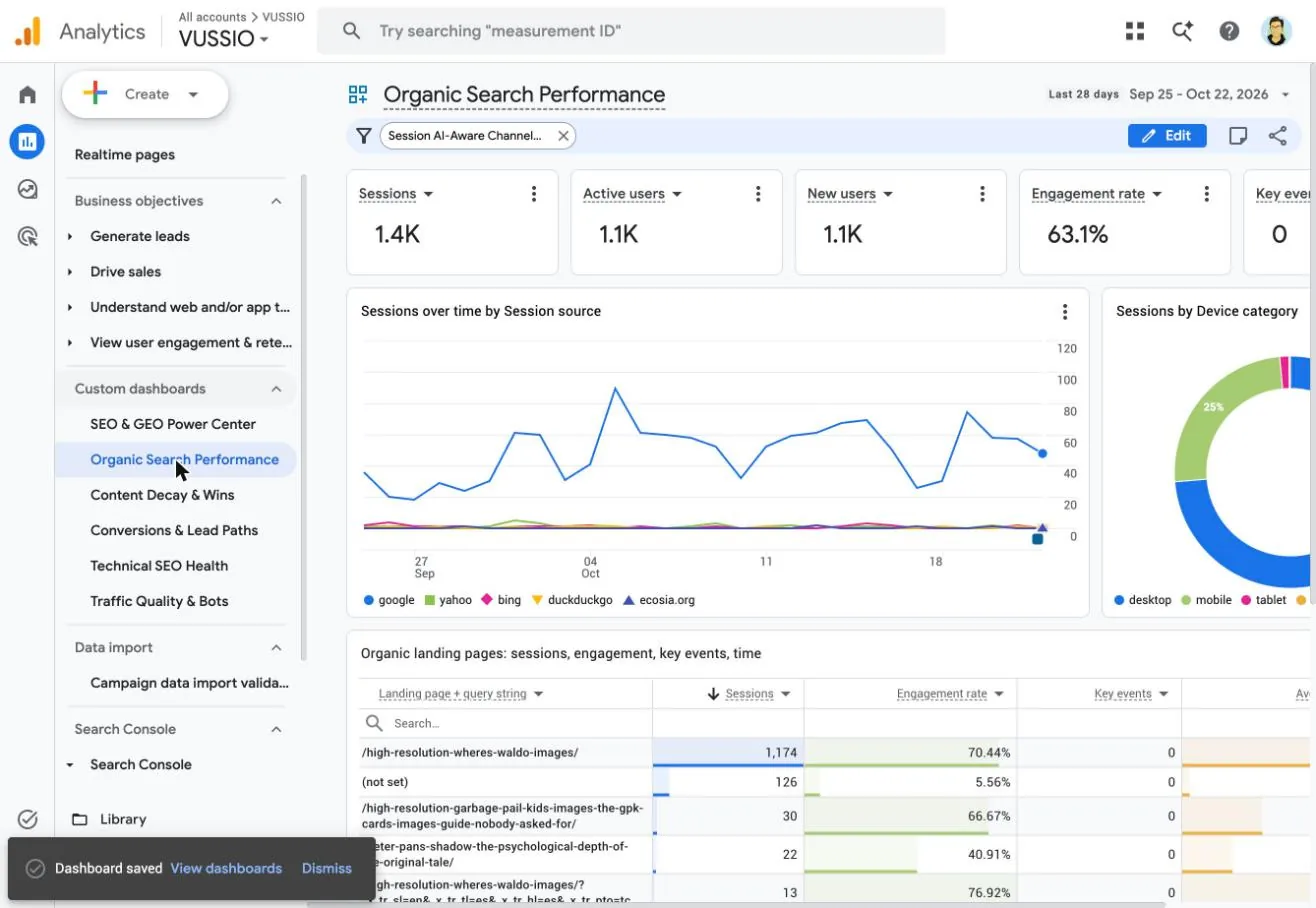
This is the dashboard the paid "GA4 SEO dashboard" templates sell: organic only, by source, device, landing page and country. The trick is the dashboard-level filter.
- KPI rowSessions, Active users, New users, Engagement rate, Key events.
- Line + donutSessions over time by Session source (Google, Bing, Yahoo, DuckDuckGo, Ecosia), and a device donut.
- Landing page tableLanding page + query string × Sessions, Engagement rate, Key events, Average session duration.
- Bottom rowCountry bar, New vs returning donut, and Engagement rate by search engine.
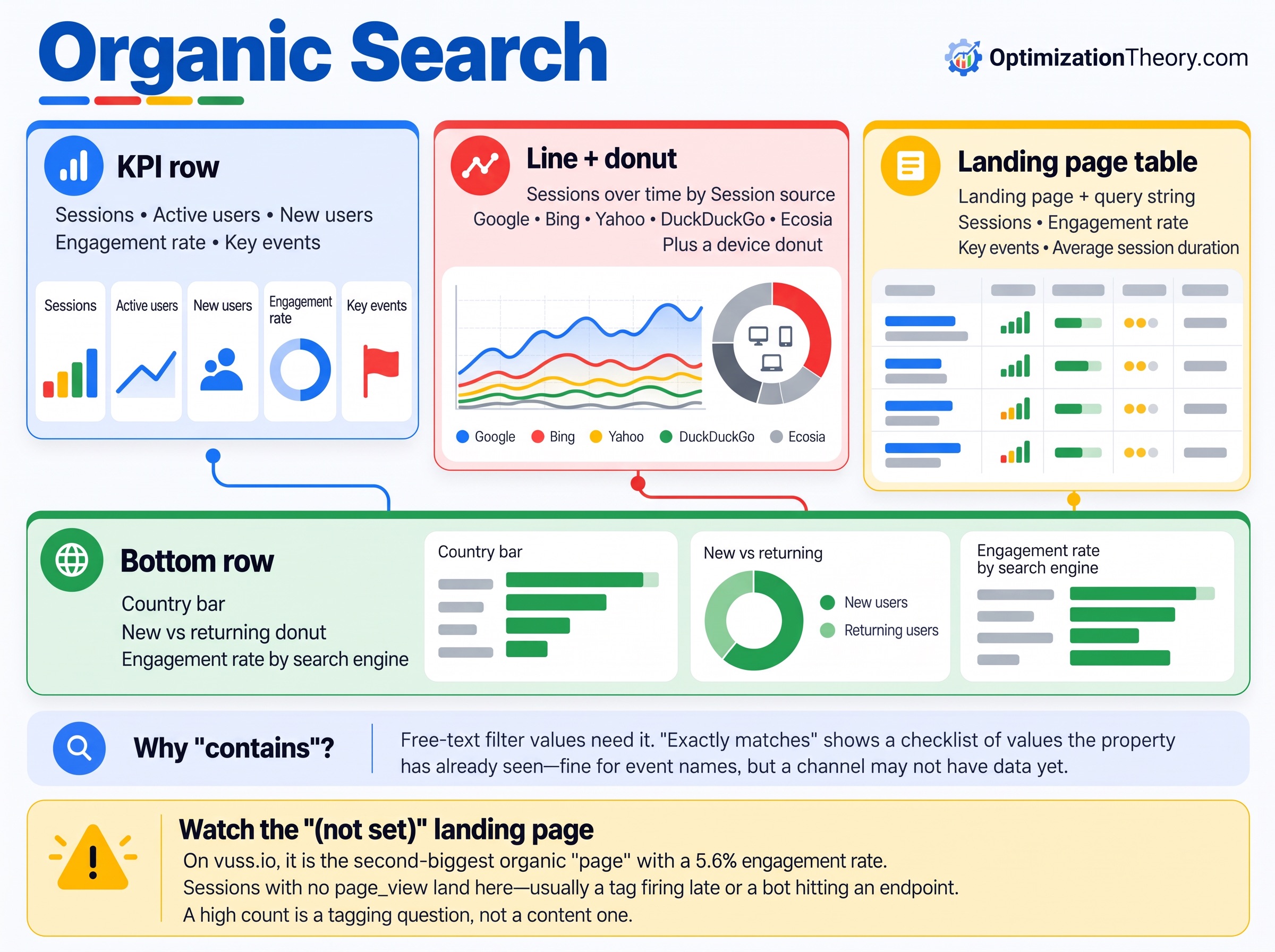
Why "contains" again: free-text filter values need it. Choosing "exactly matches" switches the field to a checklist of values the property has already seen, which is fine for event names and useless for a channel that might not have data yet.
Watch the "(not set)" landing page. On vuss.io it is the second-biggest organic "page" with a 5.6% engagement rate. Sessions with no page_view (usually a tag firing late or a bot hitting an endpoint) land there. A high count is a tagging question, not a content one.
Dashboard 3: Content Decay & Wins
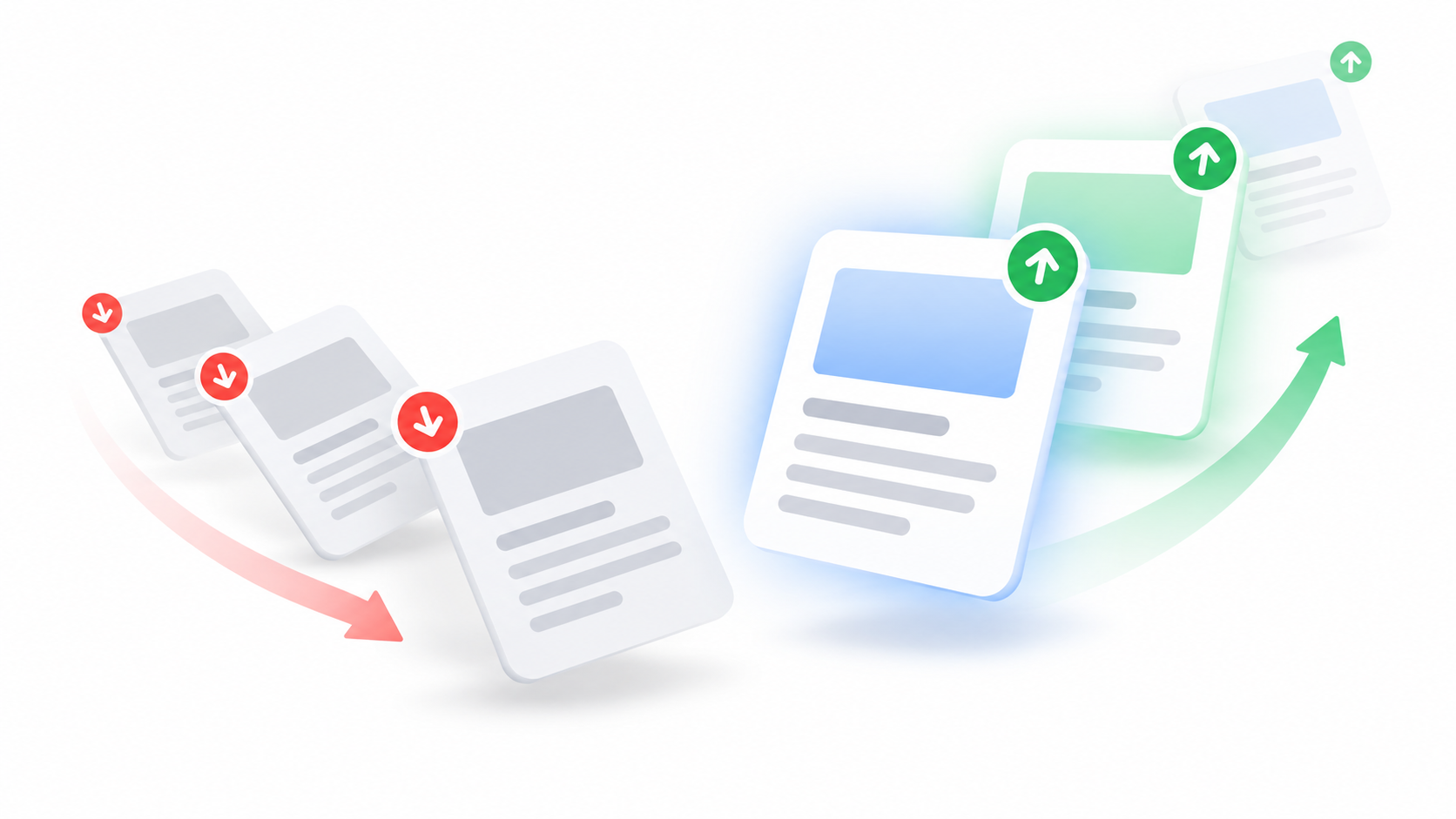
Content decay is the SEO question default GA4 handles worst. This dashboard uses the content metadata from Part 1 (content_age_bucket, primary_category, word_count_bucket, author) to explain why a page is slipping, not just that it is.
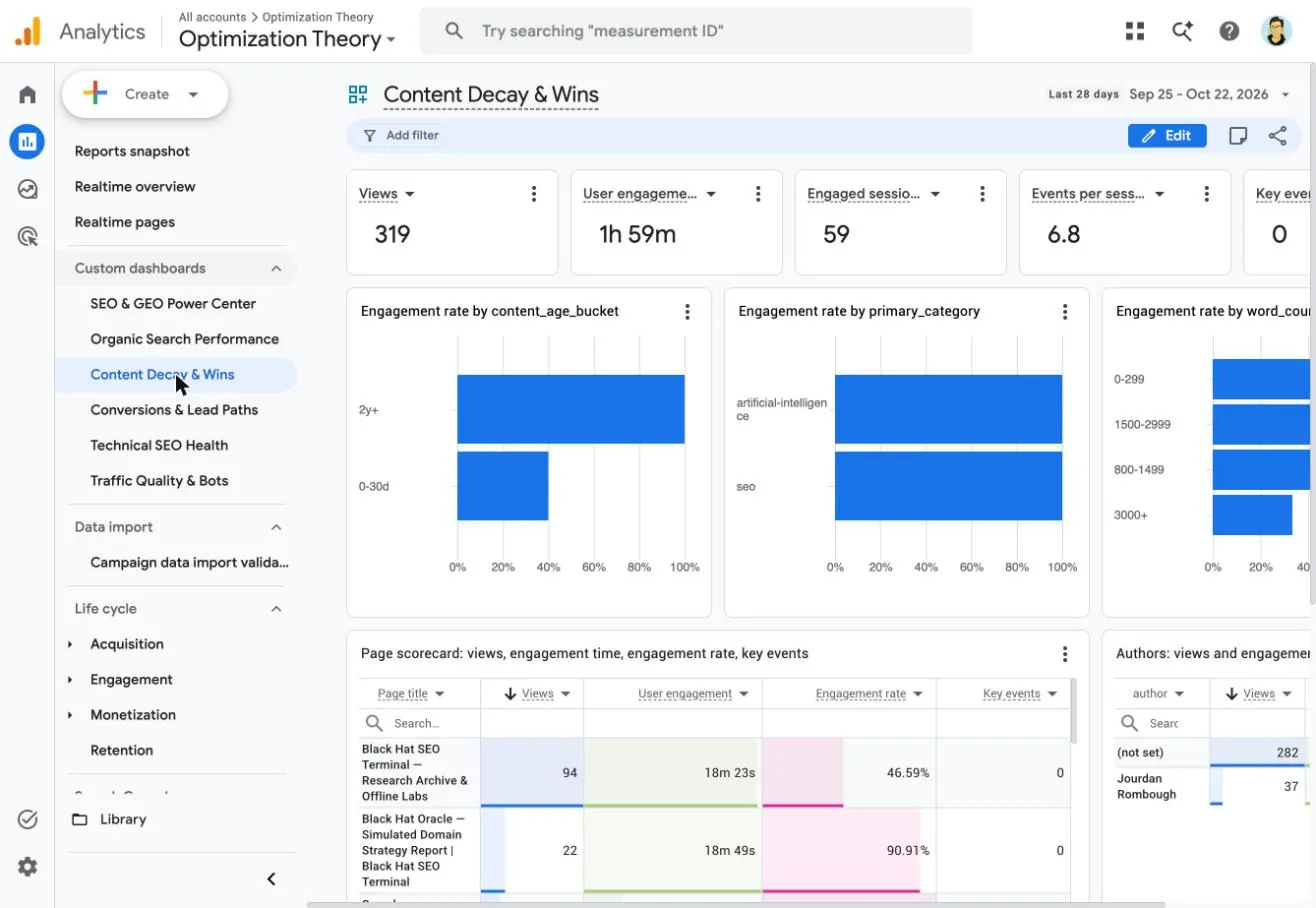
| Card | Dimension | Metrics |
|---|---|---|
| KPI row | none | Views, User engagement, Engaged sessions, Events per session, Key events |
| Three bars | content_age_bucket, primary_category, word_count_bucket | Engagement rate |
| Page scorecard | Page title | Views, User engagement, Engagement rate, Key events |
| Authors | author | Views, Engagement rate |
| Views by day | Date | Views (vertical bars) |
Turn on Compare › Previous period (match day of week) in the date picker. The page scorecard then shows a % change row under every page, which is the decay list: sort by views, read down the red rows. Keep in mind the compare setting follows the date picker, so set it each session if it does not stick.
Check every custom dimension card on every property. On vuss.io the age and length charts were still empty while the category chart already had data. Custom dimensions are not retroactive, and a parameter that is missing on one site shows up here as a blank card, not an error.
Dashboard 4: Conversions & Lead Paths
SEO reporting falls apart when it stops at sessions. This dashboard ties channels, landing pages and events to key events.
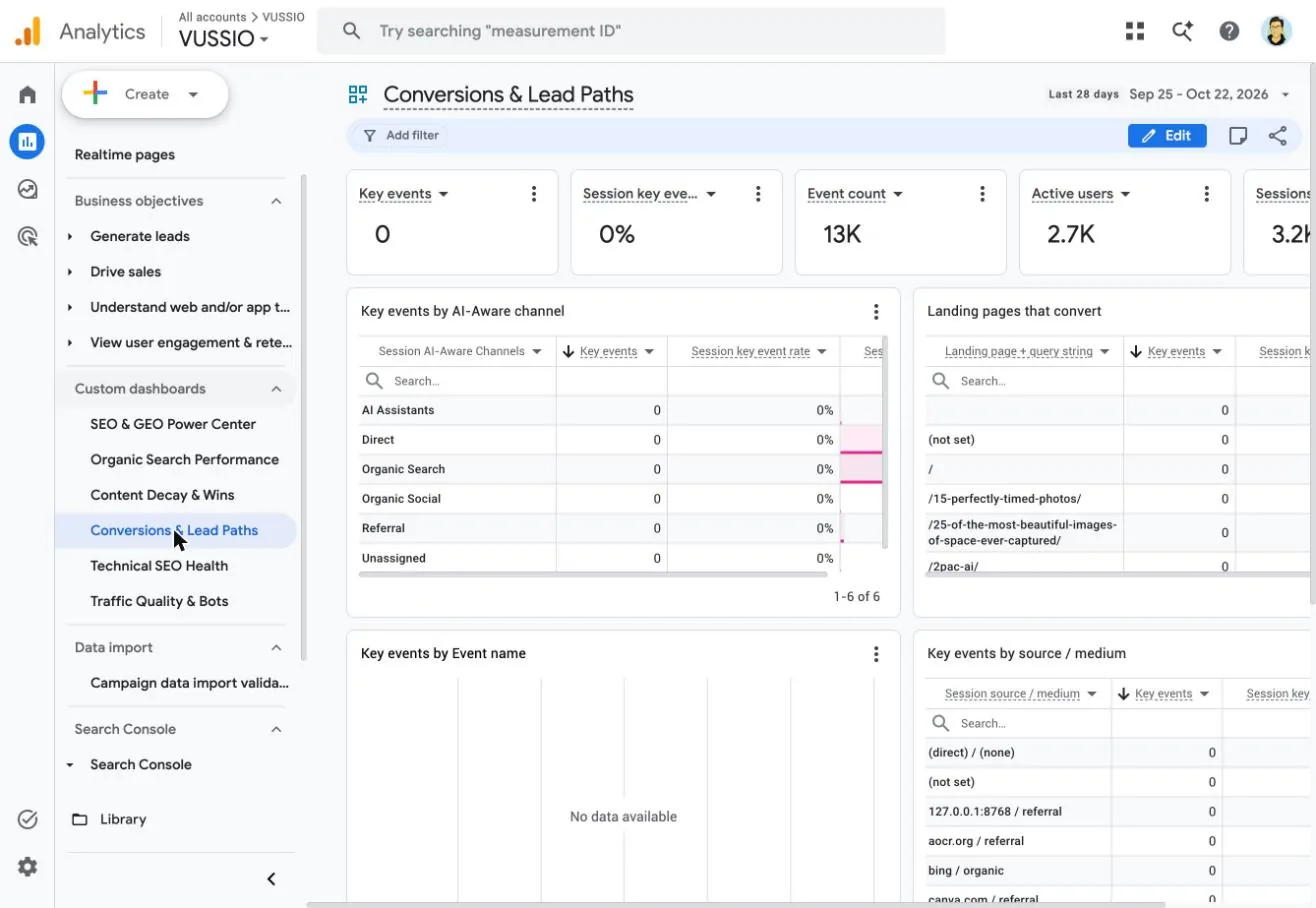
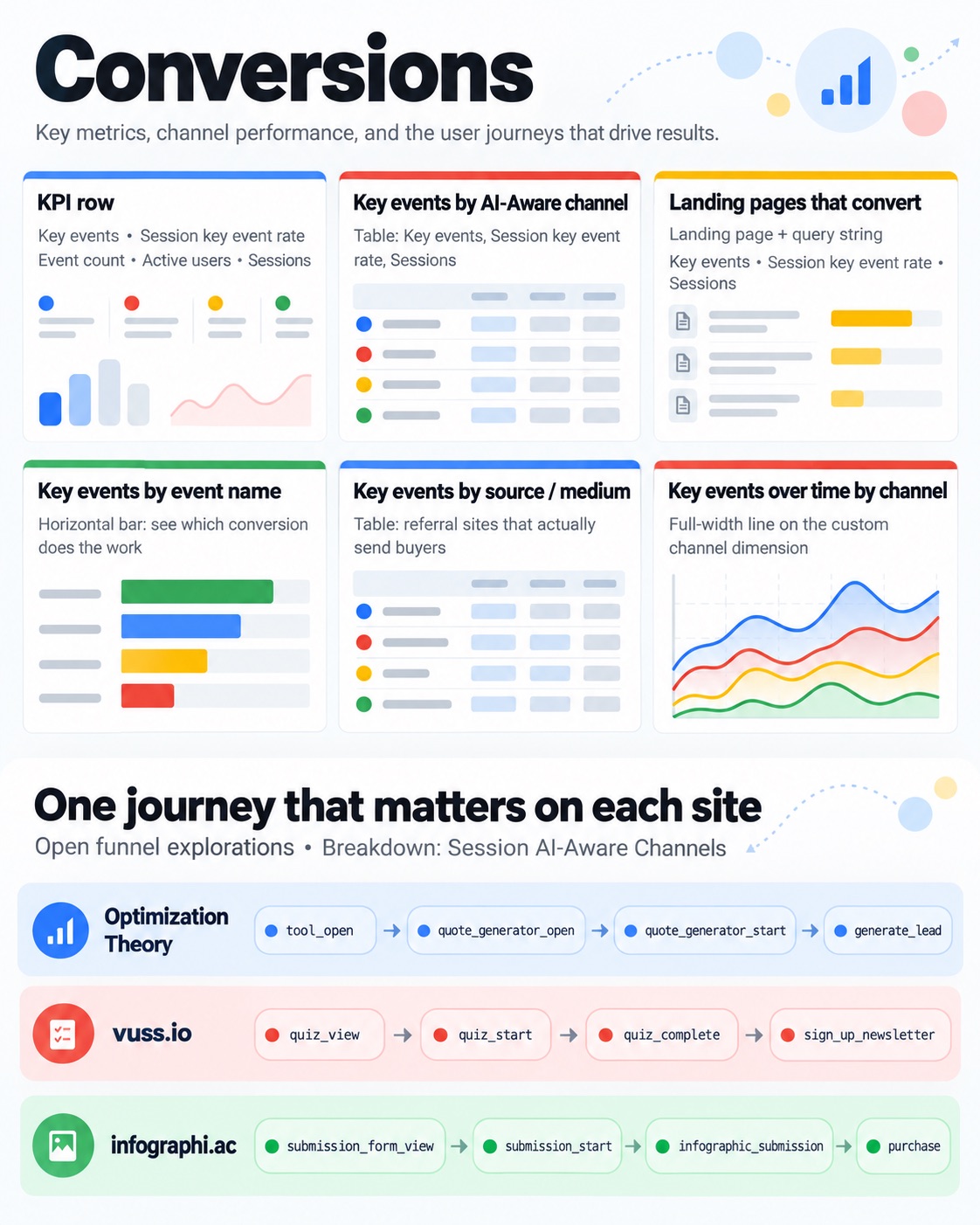
- KPI rowKey events, Session key event rate, Event count, Active users, Sessions.
- Key events by AI-Aware channelTable with Key events, Session key event rate and Sessions.
- Landing pages that convertLanding page + query string, same three metrics.
- Key events by event nameHorizontal bar, so you see which conversion is doing the work.
- Key events by source / mediumTable, for the referral sites that actually send buyers.
- Key events over time by channelFull-width line on the custom channel dimension.
Pair it with a funnel exploration for the one journey that matters on each site. Mine are open funnels broken down by Session AI-Aware Channels: tool_open › quote_generator_open › quote_generator_start › generate_lead on Optimization Theory, quiz_view › quiz_start › quiz_complete › sign_up_newsletter on vuss.io, and submission_form_view › submission_start › infographic_submission › purchase on infographi.ac.
Dashboard 5: Technical SEO Health

This is the one I would build first on a client site. It turns GA4 into a lightweight crawl-error log based on what real visitors hit, not what a crawler found.
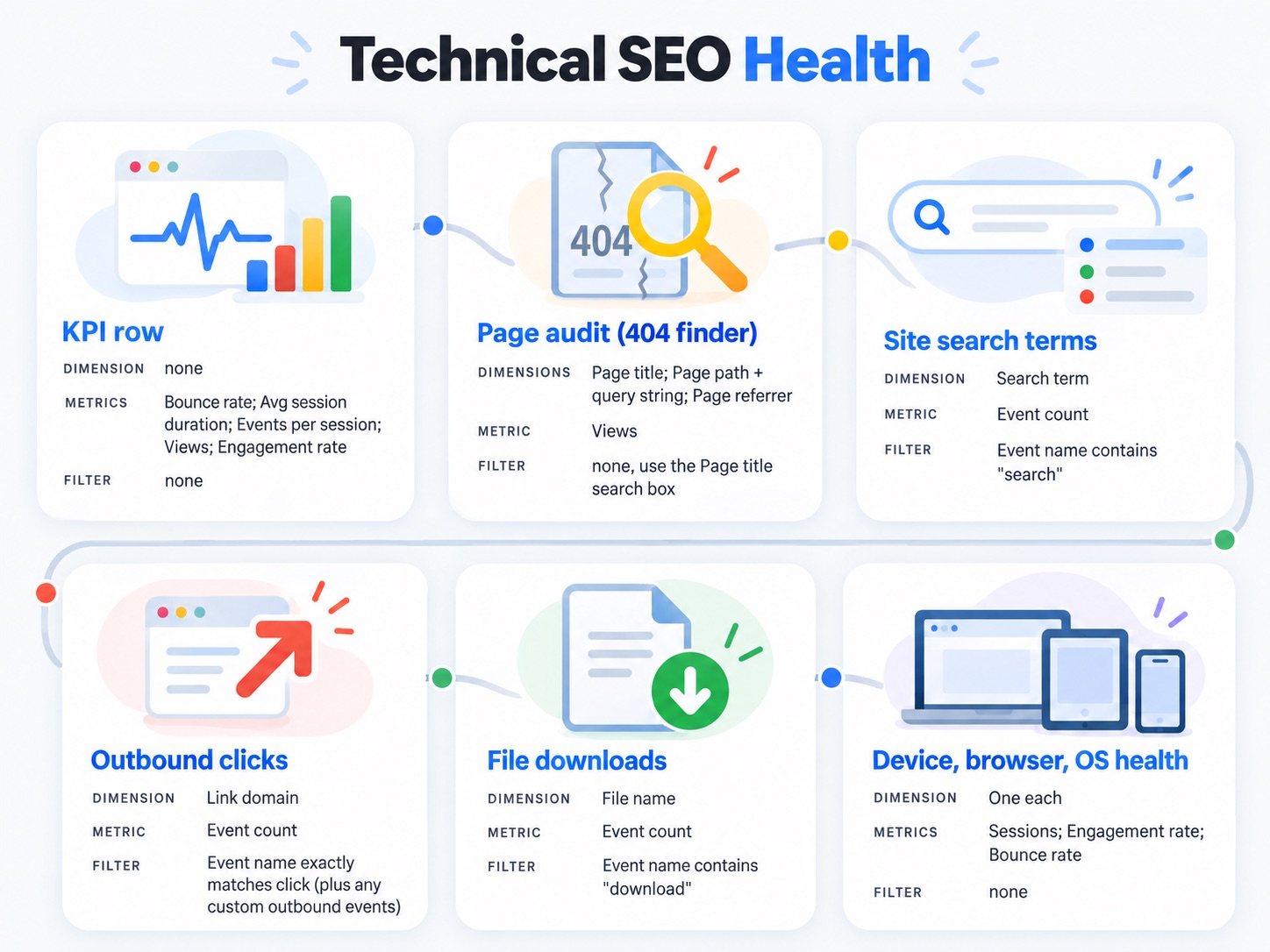
| Card | Dimension | Metric | Card filter |
|---|---|---|---|
| KPI row | none | Bounce rate, Avg session duration, Events per session, Views, Engagement rate | none |
| Page audit (404 finder) | Page title, Page path + query string, Page referrer | Views | none, use the Page title search box |
| Site search terms | Search term | Event count | Event name contains "search" |
| Outbound clicks | Link domain | Event count | Event name exactly matches click (plus any custom outbound events) |
| File downloads | File name | Event count | Event name contains "download" |
| Device, browser, OS health | One each | Sessions, Engagement rate, Bounce rate | none |
The 404 finder works because WordPress and most CMSs title the error page "Page not found." I wanted to put that in a card filter, but Page title is not offered as a chart filter dimension, so the table carries Page title as its first column and the built-in search box does the filtering. The referrer column tells you who is linking to the dead URL.
What it found. /75fb19a37fa0560.txt was requested 320 times in 28 days and returned the 404 page every time. A random hex filename at the root is the pattern of a verification or key file, the kind IndexNow and some site-verification tools ask you to host. Something is checking for it daily and failing. The same table showed broken internal paths like /about-us/ and a mangled /high-resolution-wheres=wa;dp-images/.
Without the filters, the outbound and download tables would be swamped by a blank row: every event that has no link domain or file name. Filtering each card to its own event is what makes them readable. The "exactly matches" checklist also shows you which outbound events exist on the property, which is how I found a separate outbound_link_click event on vuss.io and a click_linktree_outbound event on Optimization Theory that belonged in the same card.
Dashboard 6: Traffic Quality & Bots
Part 1 labelled every hit with traffic_quality (clean, bot_suspect, hostname_mismatch) and hit_source instead of filtering junk out. This dashboard is where those labels pay off.
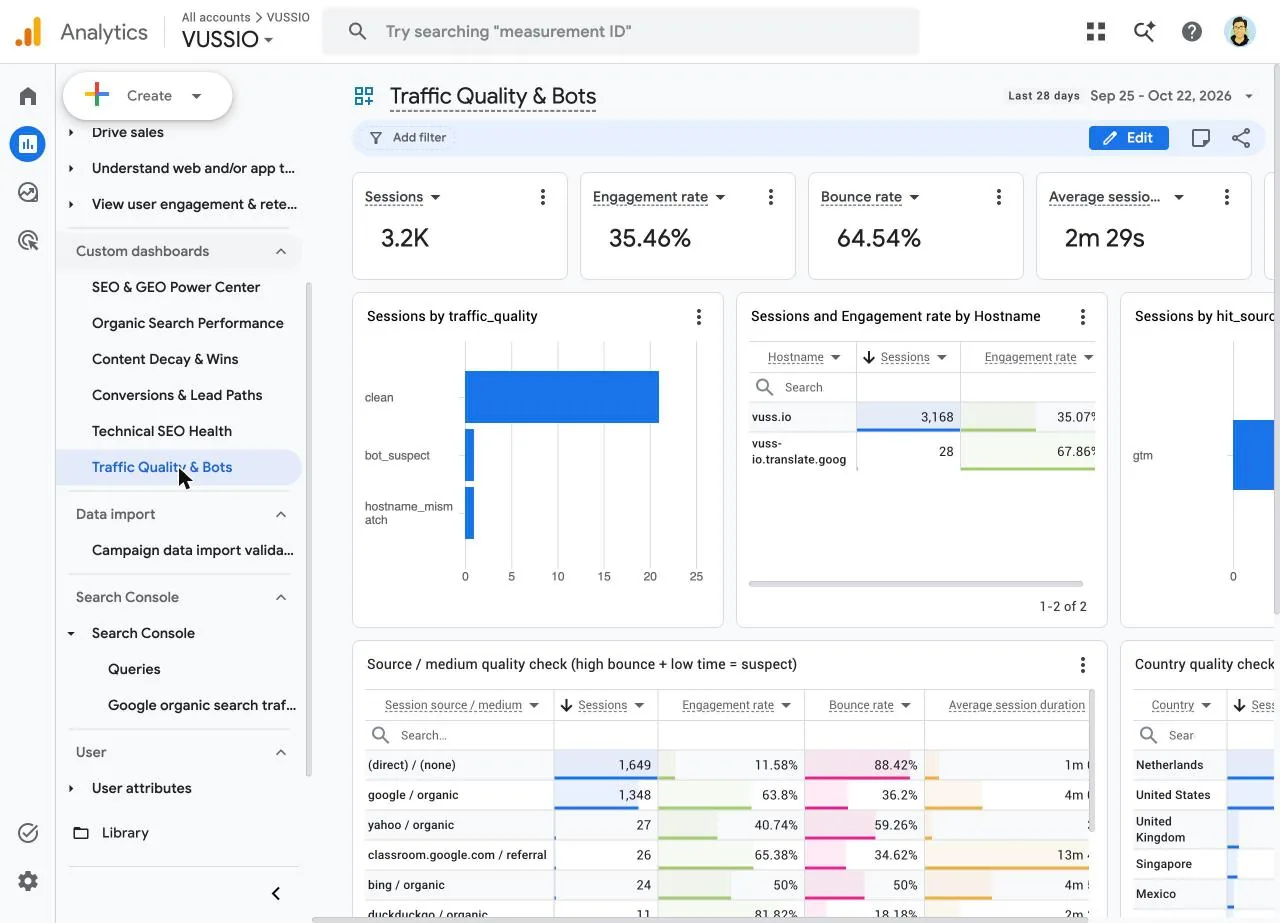
- Sessions by traffic_qualityBar. The labels from the GTM engine: clean, bot_suspect, hostname_mismatch.
- Hostname tableSessions and Engagement rate. Any hostname that is not your domain is a ghost, a proxy or a translation wrapper.
- Sessions by hit_sourceBar. Hits that did not come through Tag Manager stand out immediately.
- Source / medium quality checkSessions, Engagement rate, Bounce rate, Average session duration. High bounce plus near-zero time is the bot signature.
- Country quality checkSame metrics by country. On vuss.io the Netherlands outranks the United States.
- Sessions over time by traffic_qualityFull-width line, so a bot wave shows up as a spike in one color.
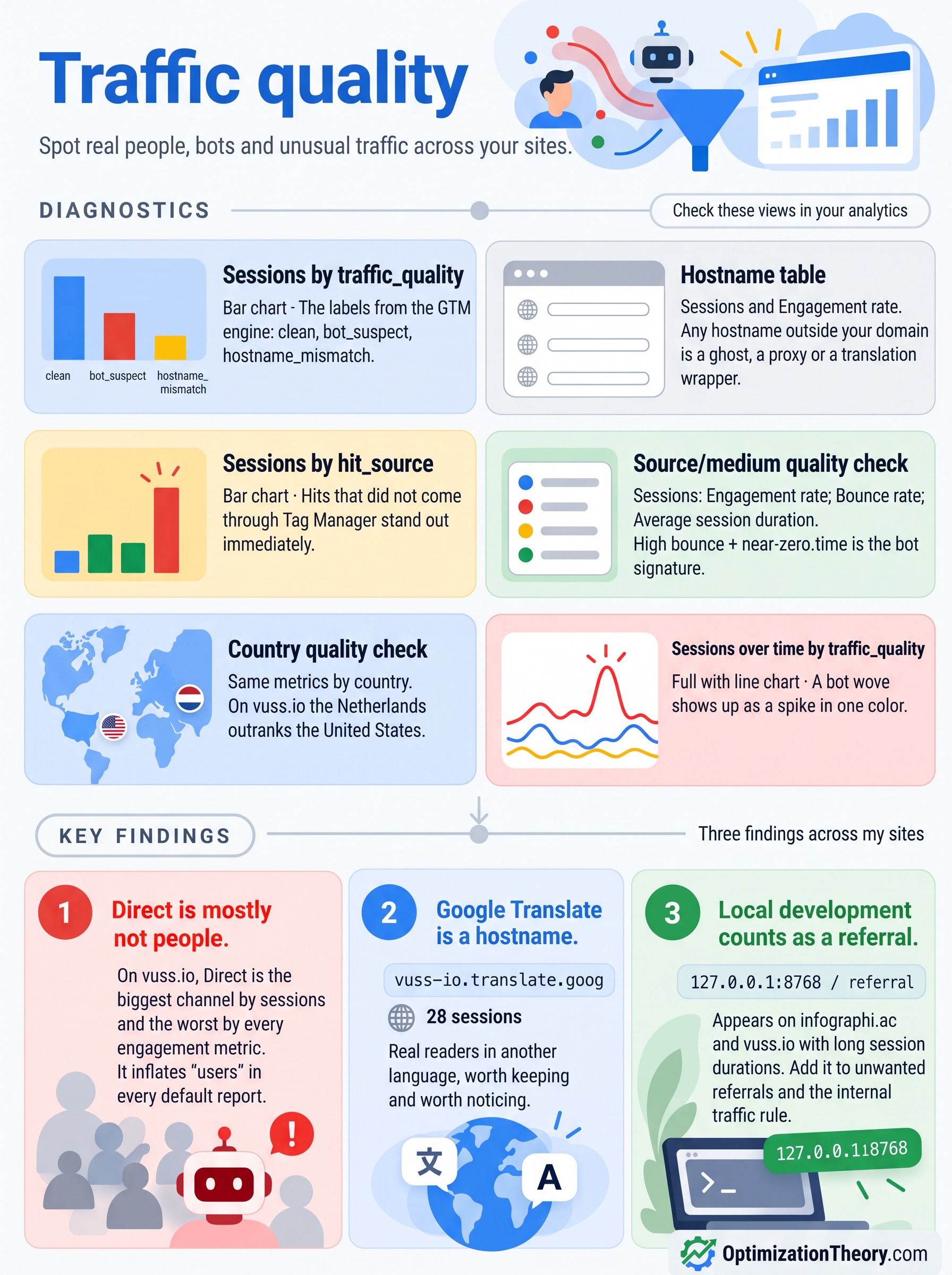
Three findings from this one dashboard across my sites:
- ✕Direct is mostly not people. On vuss.io, Direct is the biggest channel by sessions and the worst by every engagement metric. It inflates "users" in every default report.
- ✕Google Translate is a hostname.
vuss-io.translate.googappears as its own host with 28 sessions. Those are real readers in another language, worth keeping and worth noticing. - ✕Local development counts as a referral.
127.0.0.1:8768 / referralshows up on infographi.ac and vuss.io with long session durations. Add it to unwanted referrals and the internal traffic rule.
Bonus: Network Flow, for multi-site owners
If you run more than one site with a roll-up property, as I set up in Part 1, this dashboard shows how visitors move between them. It is filtered at the dashboard level to Event name contains network_click.
- ✓KPI row: Event count, Total users, Events per session.
- ✓Bars: network clicks by
cta_location(where on the page) and bynetwork_destination(which site). - ✓Table: Hostname × Page path, so you see which pages send people across the network.
- ✓Line: network clicks over time by hostname.
It starts empty, because the network_click event is new. The point is to see, a month from now, whether cross-linking between related sites is a traffic source or a decoration.
Audiences, segments, comparisons and explorations
Dashboards cannot use segments, so the deeper questions live in the rest of the property. What I saved on each one:
- Saved segments"AI-referred sessions" and "Clean traffic only" (traffic_quality exactly matches clean), ready in every exploration.
- Saved comparison"AI Assistants traffic", one click in any standard report to see AI visitors next to everyone else.
- AI landing heatmapFree-form exploration: landing page rows, AI-Aware channel columns, sessions as a heat map.
- Conversion funnelOpen funnel per site, broken down by AI-Aware channel. Which channel drops off at which step.
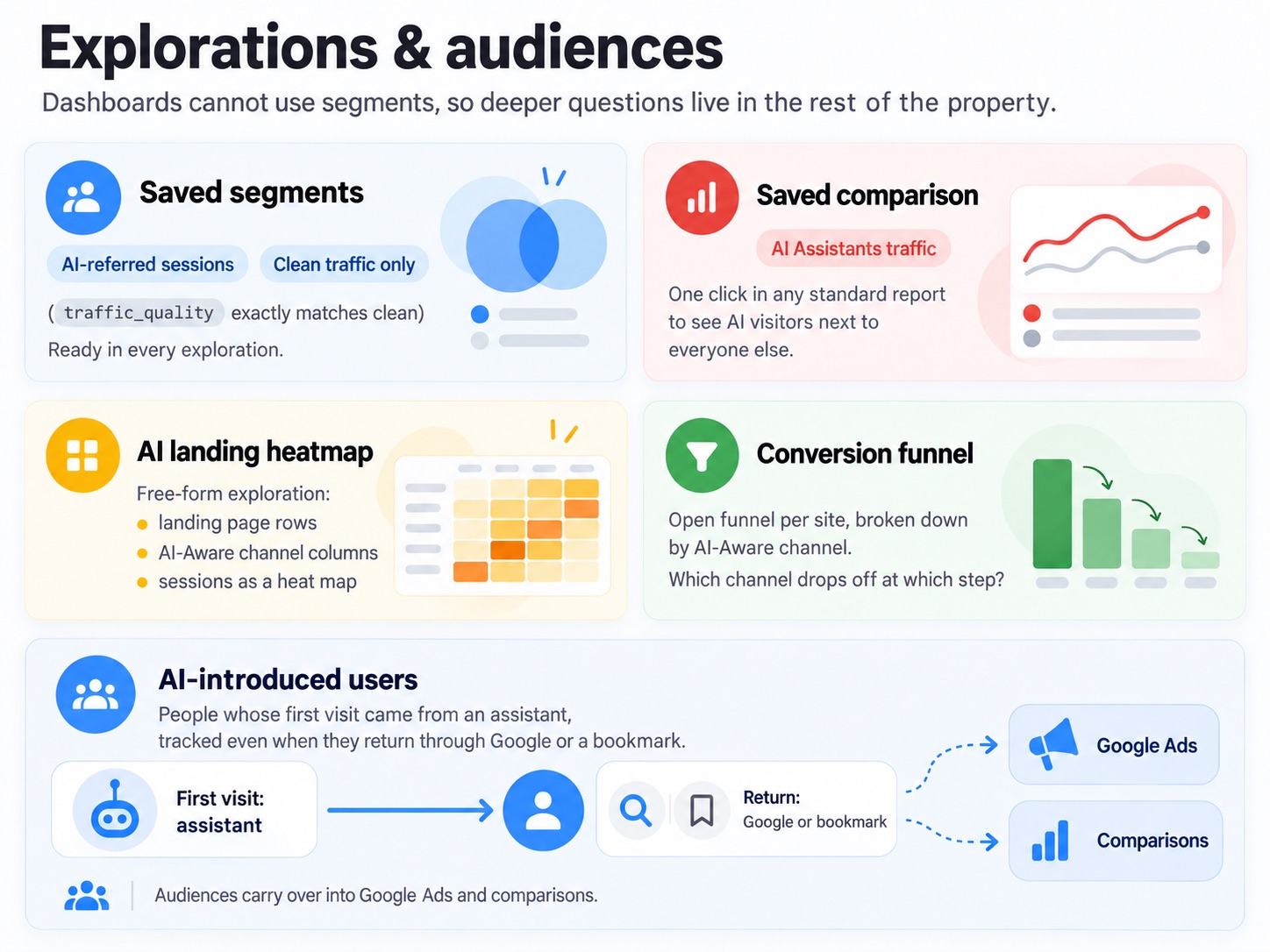
Audiences carry over into Google Ads and into comparisons. "AI-introduced users" is the one I watch: people whose first visit came from an assistant, tracked even when they return through Google or a bookmark.
Alerts that email you before a client does
Custom insights are the part of GA4 nobody sets up. They watch a metric and email you when it moves. I added the same alert to every property and two more on the roll-up.
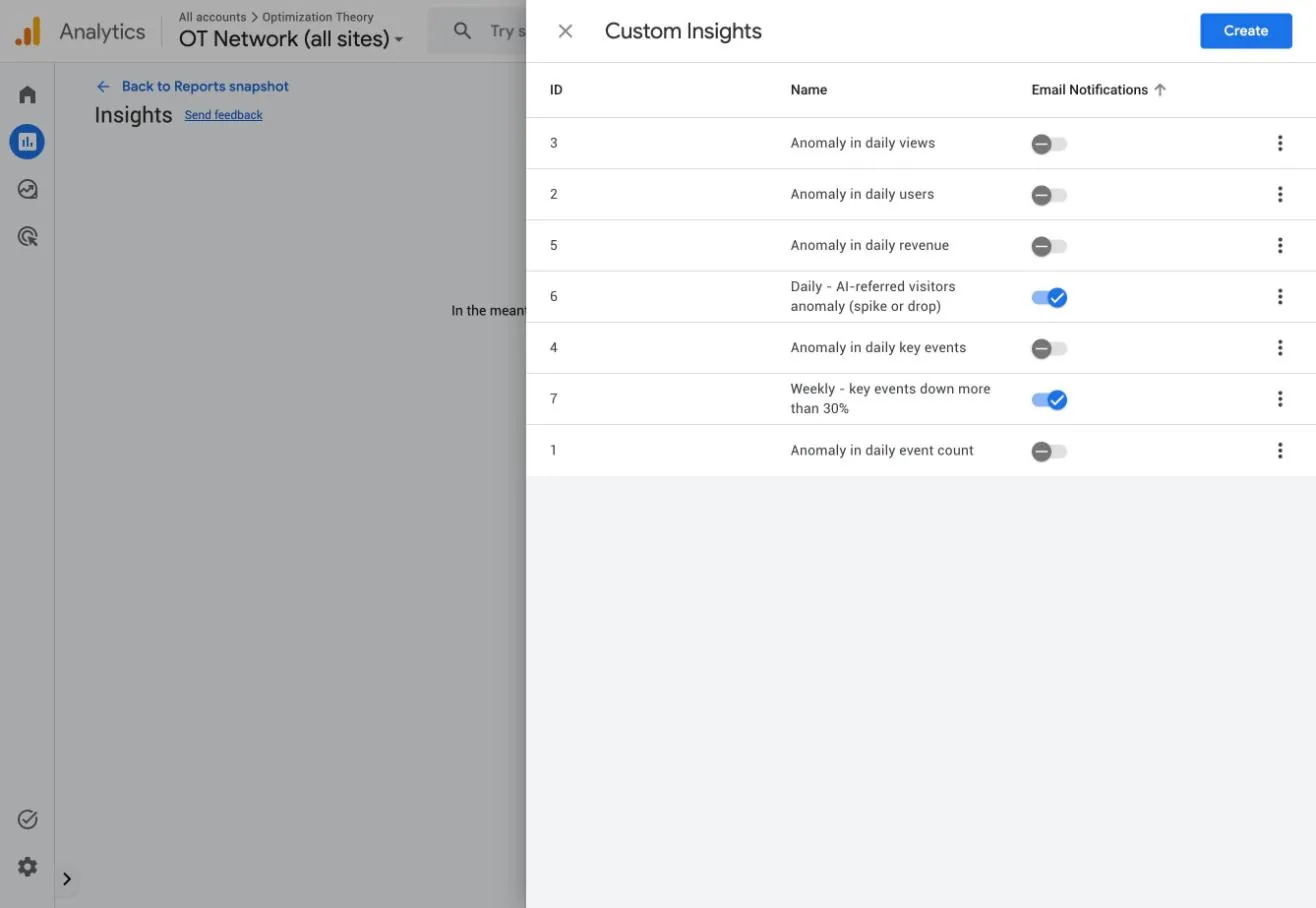
- ✓Daily, AI-referred visitors anomaly (spike or drop). Evaluated daily against the "AI-referred visitors" audience. A spike usually means an assistant started citing a page. A drop can mean it stopped.
- ✓Weekly, key events down more than 30%. Catches a broken form or tag within a week instead of at the monthly report.
Build them faster (and the checklist)
Since dashboards cannot be copied between properties, I rebuilt 21 of them. A few things made that bearable:
- ✓Sketch the 96-column grid first. The canvas is 96 units wide. Five scorecards fit at width 18, two charts at 47 and 48, three at 31, 31 and 32. Deciding that on paper saves most of the dragging.
- ✓Name every card. Tables with more than one metric are titled "Untitled card." Double-click the title to rename it, or your whole team reads "Untitled card" forever.
- ✓Swap custom dimensions last. Add a card with any standard dimension, then click the dimension chip in the chart editor and search for the custom one.
- ✓Power-user shortcut, undocumented. The builder keeps its whole state, including every card's dimension, metrics, chart type and grid position, in the page URL. Build one dashboard, then reuse that URL pattern on another property ID to lay out all the standard cards at once. Google can change this at any time, so treat it as a convenience, not a workflow.
- 1Key events are marked through the API or Admin before any conversion card is built
- 2Channel cards use the custom channel group dimension, not Session primary channel group
- 3Free-text filters use "contains"; event filters use the "exactly matches" checklist
- 4Outbound, download and site search cards each have their own event filter
- 5The page audit table leads with Page title so the search box finds every 404
- 6No card is left as "Untitled card," and each dashboard has a description
- 7Every dashboard is published to Custom dashboards, under the 15-card limit
- 8Audiences, saved segments and a saved comparison exist for AI-referred traffic
- 9At least one custom insight emails you about AI traffic and one about key events
- 10A reporting annotation marks the day tracking changed
Frequently asked questions
People also ask
How do I create a dashboard in GA4?
Go to Reports, select Create, then Dashboard. Drag scorecards and charts onto the canvas, set each card's dimensions and metrics in the chart editor, then Save. Check "Publish to collection" to add it to the left navigation for everyone on the property. You need the Editor or Administrator role.
What is the best GA4 dashboard for SEO?
Start with an organic search dashboard filtered to the Organic Search channel, then add a technical SEO dashboard that lists 404 pages by title, site search terms and outbound clicks. A content decay dashboard with a previous-period comparison and a traffic quality dashboard that separates bots from people cover the rest.
How many cards can a GA4 dashboard have?
Up to 15 cards per dashboard on a standard property and 30 on Analytics 360. Scorecards, tables, line charts, bar charts, donut charts and funnel charts all count toward the limit.
Can I copy a GA4 dashboard to another property?
Not today. Dashboards have no API and no copy option between properties, so each property needs its own build. Planning the layout on a 96-column grid and naming every card first makes the rebuild much faster.
How do I find 404 errors in GA4?
Build a table with Page title, Page path and Page referrer as dimensions and Views as the metric, then search the Page title column for "not found." Most CMSs title their error page "Page not found," so every 404 URL appears with its views and the page that linked to it.
Why does my GA4 dashboard show 0 key events?
Key events are not retroactive. If an event was marked as a key event recently, cards only count it from that date forward. Give new key events a week or two before judging conversion cards.
Why is my custom channel group not showing in older GA4 data?
Setting a custom channel group as the primary group only relabels data going forward. The custom group's own dimension, for example "Session AI-Aware Channels," applies to historical data, so use that dimension in dashboards and reports.
Want this on your properties?
I build these dashboards on client GA4 properties.
Admin API setup, key events, SEO audiences, the six dashboards and email alerts, built and verified on your sites. Call or text 973.985.6930.
More Writing & Research by Jourdan Rombough
View all research


If AI can't find you, understand you and trust you, it won't recommend you.
Keywords tell you what they typed. Intent tells you what they meant. Fan-out tells you what they'll ask next.
Be a thing, not a string. AI remembers entities, not keywords.
The click isn't dead. It just has to be earned twice.
Schema is the business card you hand to every machine that reads your site.
If Googlebot can't reach it and AI can't parse it, it doesn't exist.
Good SEO grows quietly. Then all at once.
