- October 29, 2026
- Artificial Intelligence, GEO & AEO, SEO Infographics
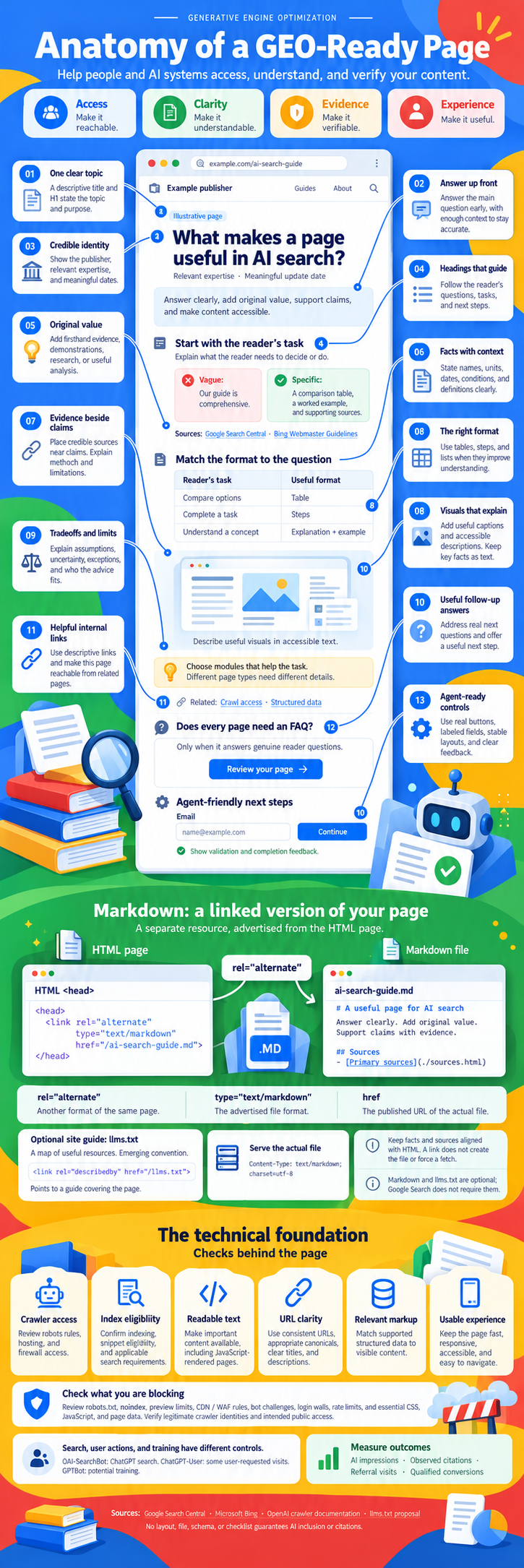
Anatomy of a GEO‑Ready Page
How to build pages that people, search engines, and AI systems can access, understand, and verify. A field guide to every element in the infographic, plus the technical checks that sit behind it.
The short version
- A GEO-ready page is mostly a very good SEO page: one topic, a direct answer near the top, real evidence, and a format that matches the reader's task.
- AI systems quote what they can reach, parse, and trust. Every element on the page should help with at least one of those three jobs.
- A linked Markdown version and an llms.txt file are optional extras. They help some agents, but Google Search does not require either one.
- The technical foundation still decides everything. If a crawler, firewall, or JavaScript render blocks the content, nothing else on this list matters.
- No layout, file, schema, or checklist guarantees AI inclusion or citations. Measure what actually happens.
Generative Engine Optimization gets sold as a brand new discipline with its own secret rules. It isn't. When Google, Bing, and OpenAI explain how their AI features pick sources, they describe the same things good pages have always done: be crawlable, be clear, back up what you say, and actually help the person who landed there.
What has changed is the reader. Your page is now read by three audiences at once: a human skimming on a phone, a search crawler deciding whether to index it, and a language model deciding whether a passage is safe to quote. The infographic above maps out a single page built for all three. This guide walks through each part, explains why it matters for AI search, and gives you something concrete to do with it.
The four pillars of a GEO-ready page
Every element in the infographic serves one of four jobs. If you can't say which job a block on your page is doing, it probably isn't doing one.
Access
Crawlers can fetch it, the index can store it, and an agent can move through it. Access failures are silent and total.
Clarity
One topic, an early answer, and headings that mirror the reader's questions. Clear pages produce clean, quotable passages.
Evidence
Named authors, dated updates, sources beside claims, and honest limits. Models lean on content that looks safe to repeat.
Experience
The right format, visuals that explain, real follow-up answers, and controls that work for people and agents alike.
The 13 elements of a GEO-ready page
Here is every callout from the example page, expanded. Filter by pillar to focus on one job at a time.
One clear topic
A descriptive title and H1 state the topic and purpose. Pages that try to rank for five intents end up being the best answer for none of them, and AI systems pull passages from pages whose purpose is obvious.
Answer up front
Answer the main question early, with enough context to stay accurate. The opening paragraph is the passage most likely to be lifted into an AI answer, so it has to stand on its own without the rest of the page.
Credible identity
Show the publisher, relevant expertise, and meaningful dates. Readers and models both weigh who is talking. An anonymous page with no update date gives them nothing to weigh.
Headings that guide
Follow the reader's questions, tasks, and next steps. Headings act as a table of contents for humans and as section labels for machines that chunk your page into passages.
Original value
Add firsthand evidence, demonstrations, research, or useful analysis. If your page says what fifty other pages say, a model has no reason to cite yours. Original data, screenshots, and tested results are what make a source worth naming.
Facts with context
State names, units, dates, conditions, and definitions clearly. "Fast" means nothing. "Loads in 1.8 seconds on a mid-range phone over 4G" can be checked, compared, and quoted.
Evidence beside claims
Place credible sources near claims. Explain method and limitations. A sources list buried at the bottom helps a little. A source sitting right next to the sentence it supports helps a lot more, for readers and for any system checking the claim.
The right format
Use tables, steps, and lists when they improve understanding. Format isn't decoration. Comparisons belong in tables, processes belong in numbered steps, and concepts need a plain explanation with an example.
Visuals that explain
Add useful captions and accessible descriptions. Keep key facts as text. A chart can make a point land, but if the only copy of a number is baked into an image, most crawlers and models never see it.
Tradeoffs and limits
Explain assumptions, uncertainty, exceptions, and who the advice fits. Pages that admit limits read as more trustworthy, and they protect you from being quoted out of context in situations your advice was never meant for.
Helpful internal links
Use descriptive links and make this page reachable from related pages. Internal links are how crawlers discover pages and how they understand which page owns which topic. An orphan page is close to invisible.
Useful follow-up answers
Address real next questions and offer a useful next step. Does every page need an FAQ? No. Only when it answers genuine reader questions. Padding a page with invented questions adds noise, not authority.
Agent-ready controls
Use real buttons, labeled fields, stable layouts, and clear feedback. AI agents are starting to fill forms and complete tasks for people. The same accessible markup that helps a screen reader helps an agent understand what a control does.
<button> and <label> elements, avoid layout shifts, and show validation and completion messages as text.Vague vs. specific: the rewrite that matters most
The example page in the infographic makes this point with one line. "Our guide is comprehensive" tells nobody anything. "A comparison table, a worked example, and supporting sources" tells the reader exactly what they'll get, and gives a model something concrete to describe. Click through a few more rewrites.
Vague
Our guide is comprehensive.
Specific
A comparison table, a worked example, and supporting sources.
Format matcher
Pick what the reader is trying to do. The right format follows from the task, not from what your template happens to include.
Table
Rows for options, columns for the criteria people actually compare on. Tables make differences scannable for readers and give AI systems clean, structured facts to pull from.
Choose modules that help the task. Different page types need different details. A product page needs specs and pricing. A how-to needs steps and requirements. Don't bolt the same FAQ, table, and summary box onto every page out of habit.
Markdown: a linked version of your page
Some sites now publish a clean Markdown copy of important pages and advertise it from the HTML version. The idea is simple: give agents and tools a lightweight, text-first copy without navigation, ads, or scripts. It's a separate resource, announced from the HTML page with a standard <link> tag.
<head> <link rel="alternate" type="text/markdown" href="/ai-search-guide.md"> </head>
rel="alternate"
Another format of the same page. Not a different page, not a canonical signal.
type="text/markdown"
The advertised file format, so a client knows what it's getting before it fetches.
href
The published URL of the actual file. It has to resolve and return the Markdown.
# A useful page for AI search Answer clearly. Add original value. Support claims with evidence. ## Sources - [Primary sources](./sources.html)
# Response header Content-Type: text/markdown; charset=utf-8 # Apache (.htaccess) AddType text/markdown .md # Nginx (inside http or server) types { text/markdown md; }
Optional site guide: llms.txt
llms.txt is an emerging convention, proposed in 2024, for a plain-text map of a site's most useful resources, written for language models. You place it at the root of your domain and can point to it from a page with rel="describedby".
<link rel="describedby" href="/llms.txt">
Keep facts and sources aligned with the HTML. If the Markdown copy drifts from the live page, you've created two versions of the truth. A link does not create the file or force a fetch, and Markdown and llms.txt are optional. Google Search does not require them, so treat them as a low-cost experiment, not a ranking lever.
The technical foundation
This is the part most GEO advice skips, and it's the part that fails most often. A perfect page that a firewall blocks is a page that doesn't exist.
Crawler access
Review robots rules, hosting, and firewall access. Make sure the bots you want can fetch the page and get a 200, not a challenge page.
Index eligibility
Confirm indexing, snippet eligibility, and applicable search requirements. AI Overviews and AI Mode draw from pages that are indexed and eligible to show a snippet.
Readable text
Make important content available as text, including JavaScript-rendered pages. Many AI crawlers don't execute JavaScript, so server-rendered HTML is the safe default.
URL clarity
Use consistent URLs, appropriate canonicals, clear titles, and descriptions. One page, one URL, one obvious purpose.
Relevant markup
Match supported structured data to visible content. Schema helps machines understand a page. It isn't a secret AI switch, and it should never describe things a reader can't see.
Usable experience
Keep the page fast, responsive, accessible, and easy to navigate. People who click through from an AI answer still judge you on the page they land on.
Check what you are blocking
Most sites that "aren't showing up in AI" aren't being ignored. They're blocking the fetch without realizing it. Review each of these, then verify legitimate crawler identities and confirm the public access you intended:
Search, user actions, and training have different controls
AI companies now split their crawlers by job. Blocking a training bot doesn't have to block search visibility, and the reverse is also true. Here's who does what for the major players.
| User agent | Company | Job | What blocking it does |
|---|---|---|---|
OAI-SearchBot |
OpenAI | Search | Keeps your pages out of ChatGPT search results and citations. |
ChatGPT-User |
OpenAI | User request | Covers some visits a user asks ChatGPT to make. Because a person triggers them, robots.txt rules may not apply the same way. |
GPTBot |
OpenAI | Training | Signals that content shouldn't be used to train OpenAI's foundation models. |
Googlebot |
Search | Removes you from Google Search, which includes AI Overviews and AI Mode. | |
Google-Extended |
Training | A robots.txt token, not a separate crawler. Controls use in Gemini models and grounding. It doesn't affect Google Search ranking or inclusion. | |
Bingbot |
Microsoft | Search | Removes you from Bing, which also feeds Copilot answers. |
Claude-SearchBot · Claude-User · ClaudeBot |
Anthropic | Search User Training | Same three-way split: search indexing, user-requested fetches, and model training. |
PerplexityBot · Perplexity-User |
Perplexity | Search User | Indexing for Perplexity answers, plus fetches triggered by user questions. |
# Let AI search engines find and cite you User-agent: OAI-SearchBot Allow: / User-agent: Claude-SearchBot Allow: / User-agent: PerplexityBot Allow: / # Opt out of model training User-agent: GPTBot Disallow: / User-agent: ClaudeBot Disallow: / User-agent: Google-Extended Disallow: /
This is one example policy, not a recommendation for every site. Decide on training access as a business question, then check your CDN or firewall isn't overriding what robots.txt says.
Measure outcomes, not checklists
The infographic ends with four metrics, and that order matters. Visibility first, then citations, then visits, then the conversions that pay for all of it.
Bing Webmaster Tools now has an AI Performance report for Copilot citations. Google folds AI Overviews and AI Mode into Search Console's Performance totals.
Track a fixed set of prompts across ChatGPT, Perplexity, Gemini, and Copilot on a schedule. Log whether you're cited and which URL.
Segment AI referrers in GA4. ChatGPT links often carry utm_source=chatgpt.com, which makes them easy to spot.
The number that matters. AI visitors often arrive further along in their decision, so judge them on outcomes, not raw volume.
.*(chatgpt\.com|openai\.com|perplexity\.ai|gemini\.google\.com|copilot\.microsoft\.com|claude\.ai|chat\.deepseek\.com|meta\.ai).*
Three GEO myths, flipped
Tap a card to see what the documentation actually says.
Score your page
Open one of your important pages in another tab and check off what it already does. Nothing is saved; this is just a quick self-audit.
Access
Clarity
Evidence
Experience
Frequently asked questions
Is GEO different from SEO?
Mostly in emphasis, not in fundamentals. Google's AI features use the same crawling and indexing as Search, and Bing's Copilot draws on Bing's index. GEO adds attention to passage-level clarity, citable evidence, crawler controls by purpose, and new ways of measuring visibility.
Does Google need an llms.txt file or a Markdown version of my page?
No. Google has said you don't need new machine-readable files or special markup to appear in AI Overviews or AI Mode. A Markdown alternate and llms.txt may help some agents and tools, so they're reasonable to test, but they aren't requirements.
Does structured data help with AI search?
It helps machines understand what a page is about and can make you eligible for rich results. It isn't a direct AI ranking factor, and it only helps when it accurately reflects content that's visible on the page.
Should I block AI crawlers?
Separate the decision by purpose. Blocking search bots like OAI-SearchBot removes you from that AI search product. Blocking training bots like GPTBot or the Google-Extended token opts you out of model training without touching search visibility. Choose based on your business goals.
Does every page need an FAQ section?
Only when it answers genuine reader questions. A forced FAQ with invented questions adds length without value. Pull questions from real search queries, support tickets, and conversations.
Can any of this guarantee my page gets cited?
No. No layout, file, schema, or checklist guarantees AI inclusion or citations. These practices make your page easier to reach, understand, and trust. Measure the results and adjust from there.
Sources
- Google Search Central: AI features and your website
- Google Search Central Blog: Top ways to ensure your content performs well in Google's AI experiences
- Google Search Central: Creating helpful, reliable, people-first content
- Google Search Central: Google common crawlers (Google-Extended)
- Microsoft Bing Webmaster Guidelines
- OpenAI: Overview of OpenAI crawlers
- The llms.txt proposal
No layout, file, schema, or checklist guarantees AI inclusion or citations. Infographic and article by Jourdan Rombough, Optimization Theory.
More Writing & Research by Jourdan Rombough
View all researchIf AI can't find you, understand you and trust you, it won't recommend you.
Keywords tell you what they typed. Intent tells you what they meant. Fan-out tells you what they'll ask next.
Be a thing, not a string. AI remembers entities, not keywords.
The click isn't dead. It just has to be earned twice.
Schema is the business card you hand to every machine that reads your site.
If Googlebot can't reach it and AI can't parse it, it doesn't exist.
Good SEO grows quietly. Then all at once.