I built a Make.com pipeline that turns any infographic into a full, publish-ready article in under 3 minutes.
AI vision reads the graphic and pulls out the data and structure. The system writes a keyword-targeted article around it, runs it through a humanizer, scores it, formats it with schema, and hands me a WordPress draft that pairs the infographic with the article. I review it, hit publish, and move on.
< 3 min
infographic to draft
6
automated steps
5
articles in 15 minutes
0
writers needed
The Problem: A New Site With No Content
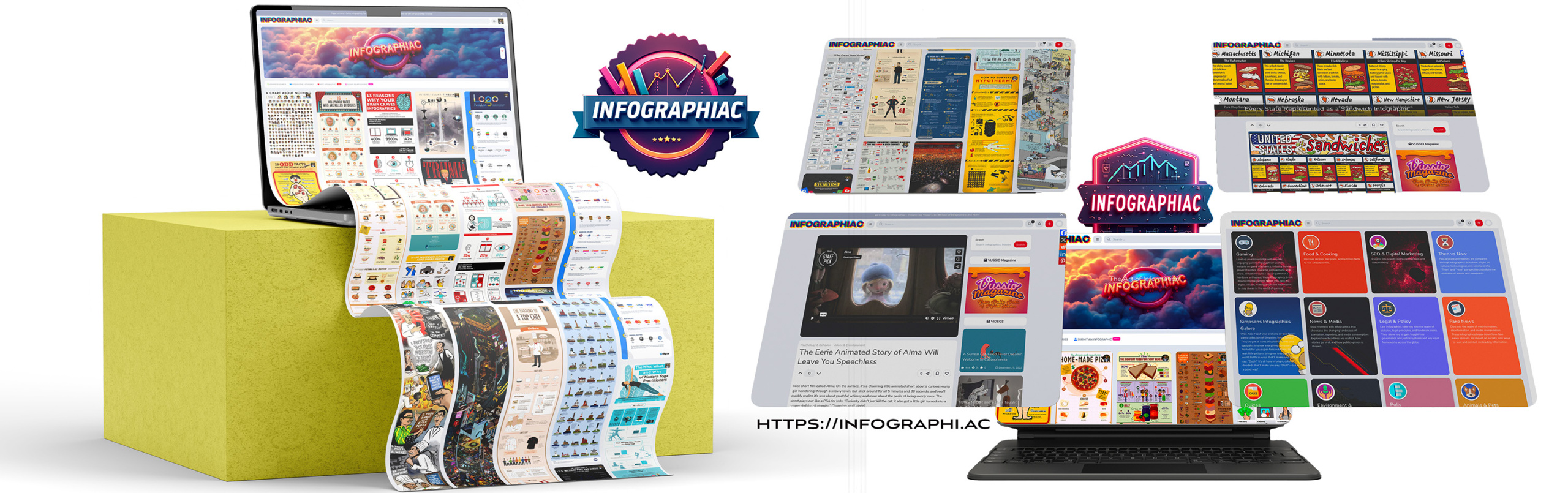
I had just launched infographi.ac, an infographic archive, and ran straight into the classic new-site problem: how do you fill it with quality, search-optimized content fast?
Infographics look great, but search engines and AI answer engines don't read pictures the way people do. They need crawlable text, clear structure and topical relevance. A standalone infographic is close to invisible in search, and writing a full article for every graphic by hand would take forever.
So I built a system to turn my growing infographic collection into a real content library that could actually rank.
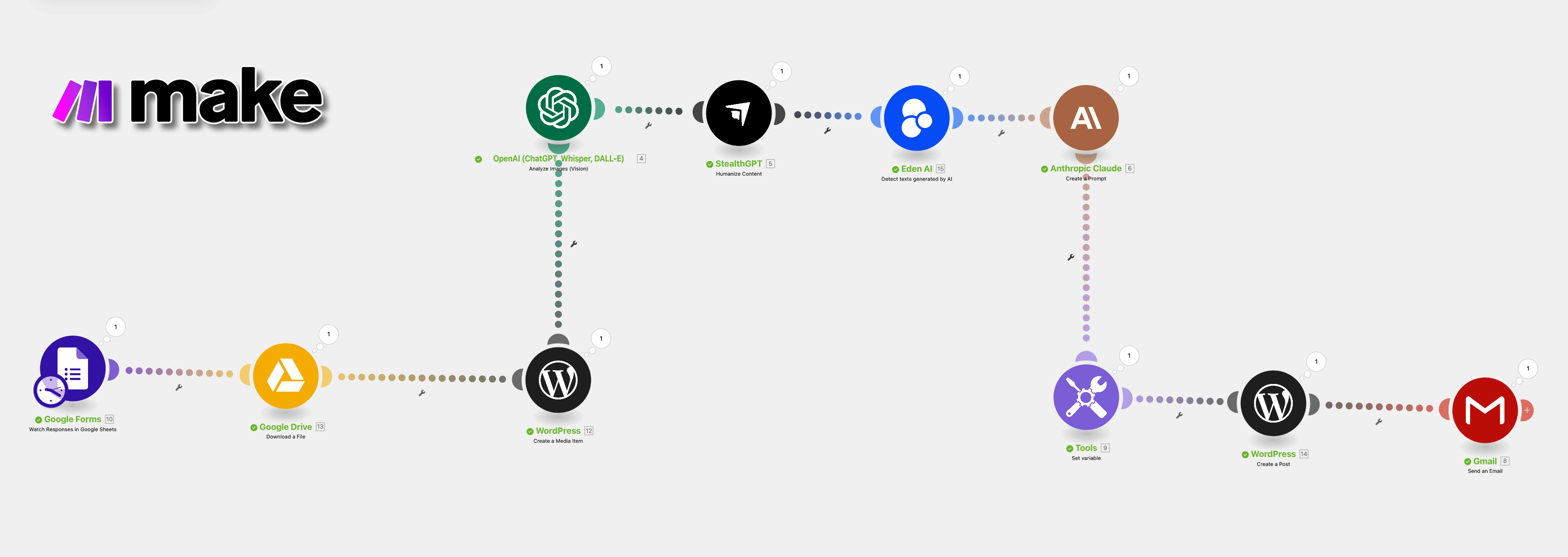
The full Make.com scenario, from form submission to WordPress draft.
How It Works: From Image to Article in 6 Steps
Each step hands off to the next automatically. Every tool has one job, and the article gets better at every stop.
1
Upload Google Forms + Drive
I submit the infographic through a Google Form with the target keyword, URL slug and any optional instructions (like a different writing voice). The image lands in Google Drive and the details land in a Sheet row that kicks off the scenario.
2
Analyze GPT-4o Vision
AI vision reads the infographic, identifies the data points and how they connect, then writes a draft article that goes beyond restating the numbers. It adds context, analogies and a story, built around the target keyword and its semantic variations.
3
Humanize StealthGPT
The draft gets rewritten to strip out the stiff, robotic AI tone so it reads like a person wrote it.
4
Score Eden AI
A detection check scores how human the text reads. Anything that still looks too synthetic gets flagged before it goes any further.
5
Structure Claude 3 Opus
Humanizing can knock keywords out, so Claude puts the primary keyword and its variations back where they belong, converts everything to clean WordPress HTML, adds schema, places the infographic, and writes six headline options (three SEO, three click-worthy) for me to pick from.
6
Publish WordPress + email
A complete draft shows up in WordPress, and I get an email with the edit and preview links plus the AI-detection score. I give it a human review, choose a headline and hit publish.
The whole process runs in under 3 minutes.
Drop in an infographic, grab a coffee, come back to a ready-to-review article.
Watch It Run
Here's the full workflow, start to finish.
Real SEO Impact: A Topic Cluster in 15 Minutes
I tested the system with a batch of yoga infographics. Within 15 minutes I had a full content cluster live on the new site: five articles, each built around its own keyword. Then I used LinkBoss' AI silo feature to internally link the whole cluster automatically, so the pages support each other as one topic.
What it delivered
✓Speed: topic clusters built in hours, not weeks
✓Site architecture: automatic internal linking across each cluster
✓Cost: no content writers required
✓Consistency: the same structure, formatting and tone on every article
✓Momentum: a brand-new site filled with SEO-ready pages, fast
Under the Hood: The Prompts
Here are the two prompts that do the heavy lifting (one for GPT-4o Vision, one for Claude) plus the email template the workflow sends when an article is ready. The {{10.`4`}} style tags are Make.com variables that pull in the keyword, slug and instructions from the form.
📊 INFOGRAPHIC ARTICLE GENERATOR
🎯 Core Objective
Transform the provided infographic into a compelling article that delivers deeper analysis and narrative context beyond the visual data.
🧱 Article Structure
Introduction (2 paragraphs):
Hook the reader with an engaging opening
Establish context and preview key insights
Main Body (4 to 7 sections):
Create clear, descriptive subheadings for each section
Develop a logical narrative progression
Ensure smooth transitions between sections
Conclusion (2 paragraphs):
Craft a powerful closing statement
Leave readers with a thought-provoking takeaway
📝 Writing Style
Maintain an upbeat, engaging tone
Use creative, accessible language
Incorporate cultural references when relevant
🔍 Content Approach
Analyze both explicit data and implicit design choices
Contextualize information within broader industry trends
Connect data points using storytelling techniques
Use analogies and metaphors to clarify complex ideas
Transform raw visuals into meaningful, insight-driven content
📈 SEO Requirements for Ranking
Primary Keyword Targeting:
Use this as the central phrase: {{10.`4`}}
This must appear in the:
Article title
First paragraph
Final paragraph
Semantic Keyword Integration:
Identify and include 3 to 5 semantic variations of {{10.`4`}}
Integrate naturally into headings, subheadings, and content
Keyword Distribution:
Distribute keywords evenly and organically
Frequency must feel natural, never forced
Intro & Outro Anchoring:
Ensure {{10.`4`}} is included in the first and last 100 words
These act as SEO anchor points for theme relevance
Topical Authority Signals:
Use relevant industry language and terminology
Incorporate semantic keyword variants in headings and subheadings
Show subject-matter depth to improve algorithmic trust
🧠 Article Title Reference
Reference Title (DO NOT include in article): {{10.`2`}}
This is a suggested topic direction for writing about the infographic.
If the value is NULL, you may choose your own direction.
✍️ Writing Voice
Write in the voice and lens of Veritasium, using an educational tone that blends curiosity, explanation, and intuitive analogies.
Keep the article fun, insightful, and well-paced.
Exception: If another voice is specified in {{10.`5`}}, follow that instead.
⚠️ Do not reference or name the person whose voice is being mimicked.
📌 Special Instructions
{{10.`5`}}
🌟 Quality Standards
Do not directly restate infographic data
Use bullet points sparingly or not at all
Ensure smooth, organic flow between data concepts
Offer insights beyond what is visually shown
Conclude with thought-provoking or reflective content
📌 Task Overview
You will receive a plain-text article that has undergone a "humanizing" process,
meaning the original keywords may have been replaced, removed, or altered slightly.
Your first critical task is to verify and ensure the correct primary keyword and its
semantic variations (outlined below) are present throughout the article according to specific guidelines.
Then you must convert this content into clean, structured HTML code suited for
direct placement into the WordPress editor, while also generating alternate,
SEO-optimized article titles at the top.
✅ Step 1: SEO Keyword Verification and Integration
Carefully check the provided humanized article text {{5.result}} for proper keyword integration. If the primary keyword or its semantic variations are missing or altered:
Restore the primary keyword and semantic keywords with minimal, subtle edits only.
📌 SEO Keyword Requirements to Validate & Enforce:
Primary Keyword:{{10.4}}
Must appear in:
The article's first paragraph
The final paragraph
Within the first 100 words and the last 100 words
Semantic Keyword Integration:
Identify and integrate 3 to 5 semantic variations of {{10.4}}
Place them naturally in headings, subheadings, and body copy
Keyword Density:
Distribute keywords evenly and organically
Do not keyword-stuff. Placements should feel subtle and natural
🔧 Step 2: Generate SEO-Optimized Alternate Titles
At the very top of the article, place exactly 6 alternate title suggestions
in a clearly labeled, light-red "DELETE THIS SECTION" box.
Box must contain:
3 Standard SEO Titles: Natural, keyword-rich, broad appeal
For a new website, the content gap is the biggest hurdle to getting any traction. This isn't about replacing writers. It's about replacing inefficiency.
The system combines AI vision, language generation, humanized rewriting and automation to produce SEO content without the manual grind, without the wait, and without cutting corners. Every page also ships with what search engines and AI answer engines need to understand a visual: real text that explains it, clean headings, and schema.
Frequently Asked Questions
What does the AI infographic-to-article tool do?
It turns a single infographic into a full, SEO-optimized WordPress article. AI vision reads the graphic, writes an article around a target keyword, humanizes and scores the text, formats it with schema, and creates a draft ready for review.
Which tools power it?
Make.com runs the workflow. Google Forms and Google Drive handle intake, GPT-4o Vision writes the draft, StealthGPT humanizes it, Eden AI scores it, Claude 3 Opus formats it and writes headline options, and WordPress receives the draft. LinkBoss handles internal linking across topic clusters.
How long does it take?
Under 3 minutes per article. In testing, a batch of five yoga infographics became a live, internally linked content cluster in about 15 minutes.
Does it publish without a human?
No. It stops at a WordPress draft and emails me the edit and preview links. I review every article, pick a headline and publish it myself.
Final Thought
Watching it run is oddly satisfying. What started as a half-baked idea to fill a new site is now a lean SEO machine. It takes infographics, turns them into articles, formats them for the web and ships them out while I go make coffee.
To provide the best experiences, we use technologies like cookies to store and/or access device information. Consenting to these technologies will allow us to process data such as browsing behavior or unique IDs on this site. Not consenting or withdrawing consent, may adversely affect certain features and functions.
Functional
Always active
The technical storage or access is strictly necessary for the legitimate purpose of enabling the use of a specific service explicitly requested by the subscriber or user, or for the sole purpose of carrying out the transmission of a communication over an electronic communications network.
Preferences
The technical storage or access is necessary for the legitimate purpose of storing preferences that are not requested by the subscriber or user.
Statistics
The technical storage or access that is used exclusively for statistical purposes.The technical storage or access that is used exclusively for anonymous statistical purposes. Without a subpoena, voluntary compliance on the part of your Internet Service Provider, or additional records from a third party, information stored or retrieved for this purpose alone cannot usually be used to identify you.
Marketing
The technical storage or access is required to create user profiles to send advertising, or to track the user on a website or across several websites for similar marketing purposes.