

By Jourdan Rombough, Optimization Theory · Updated · Field-tested on a three-site network
GA4 can tell you that ChatGPT sent a visit. It cannot tell you whether that visitor read anything, came back, converted, or was a bot. That gap is the difference between a GEO report and a GEO guess.
I just rebuilt the analytics on my own network (optimizationtheory.com, vuss.io and infographi.ac) to answer the questions SEOs are now getting from clients: which AI assistants cite us, what those visitors do next, which content actually gets read, and how much of the "traffic" is real. This is every setting I changed, the code I used, and the reports I built on top. If you already know where the GA4 admin menu is, this is for you.
Sources: AI share range across Contentsquare, Ahrefs, SE Ranking and Conductor studies compiled by Mission Growth. ChatGPT share and growth from BrightEdge. Click rates from Pew Research Center.
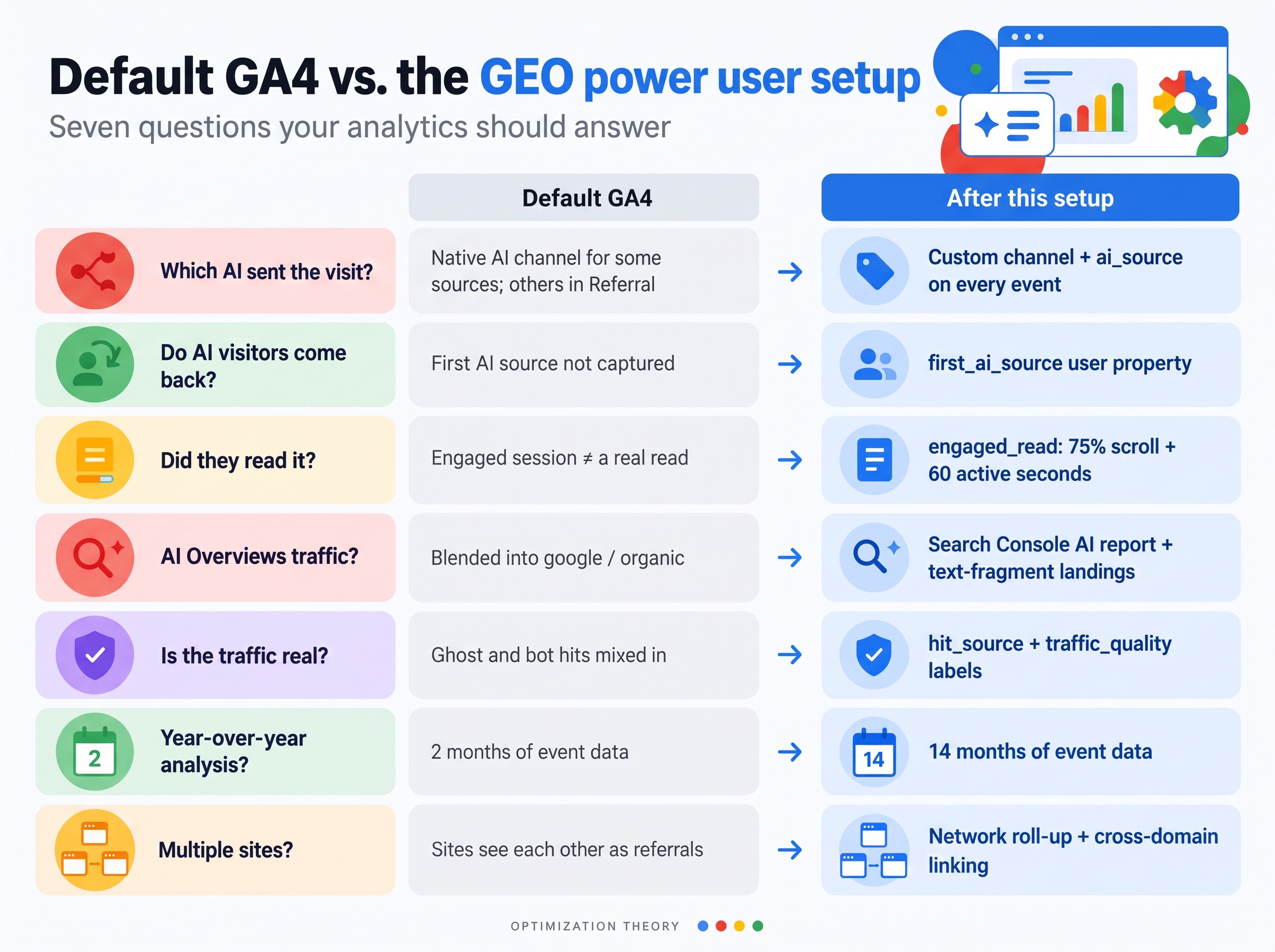
| Question | Default GA4 | After this setup |
|---|---|---|
| Which AI sent the visit? | AI Assistant channel for some sources since May 2026, the rest in Referral | Custom channel plus an ai_source dimension on every event |
| Do AI visitors come back? | No way to tell | first_ai_source user property |
| Did they read it? | "Engaged session" after 10 seconds | engaged_read: 75% scroll and 60 active seconds |
| AI Overviews traffic? | Blended into google / organic | Search Console AI report plus text-fragment landings |
| Is the traffic real? | Ghost and bot hits mixed in | hit_source and traffic_quality labels |
| Year-over-year explorations? | 2 months of event data | 14 months |
| Multiple sites? | Each site sees the others as referrals | Network roll-up property with cross-domain linking |
What my own audit turned up. All three properties were still on 2-month event retention. On one site, the WordPress pages had no GA4 tag at all, and only a set of static HTML pages were reporting. Another site had a static page outside WordPress carrying its own hardcoded tag. Cloudflare was caching full pages for 31 days, so tag changes would not have shown up for a month. Local development visits were landing as referrals. If that can happen on an SEO's own sites, it is happening on your clients' sites.
What GA4's native AI Assistant channel misses
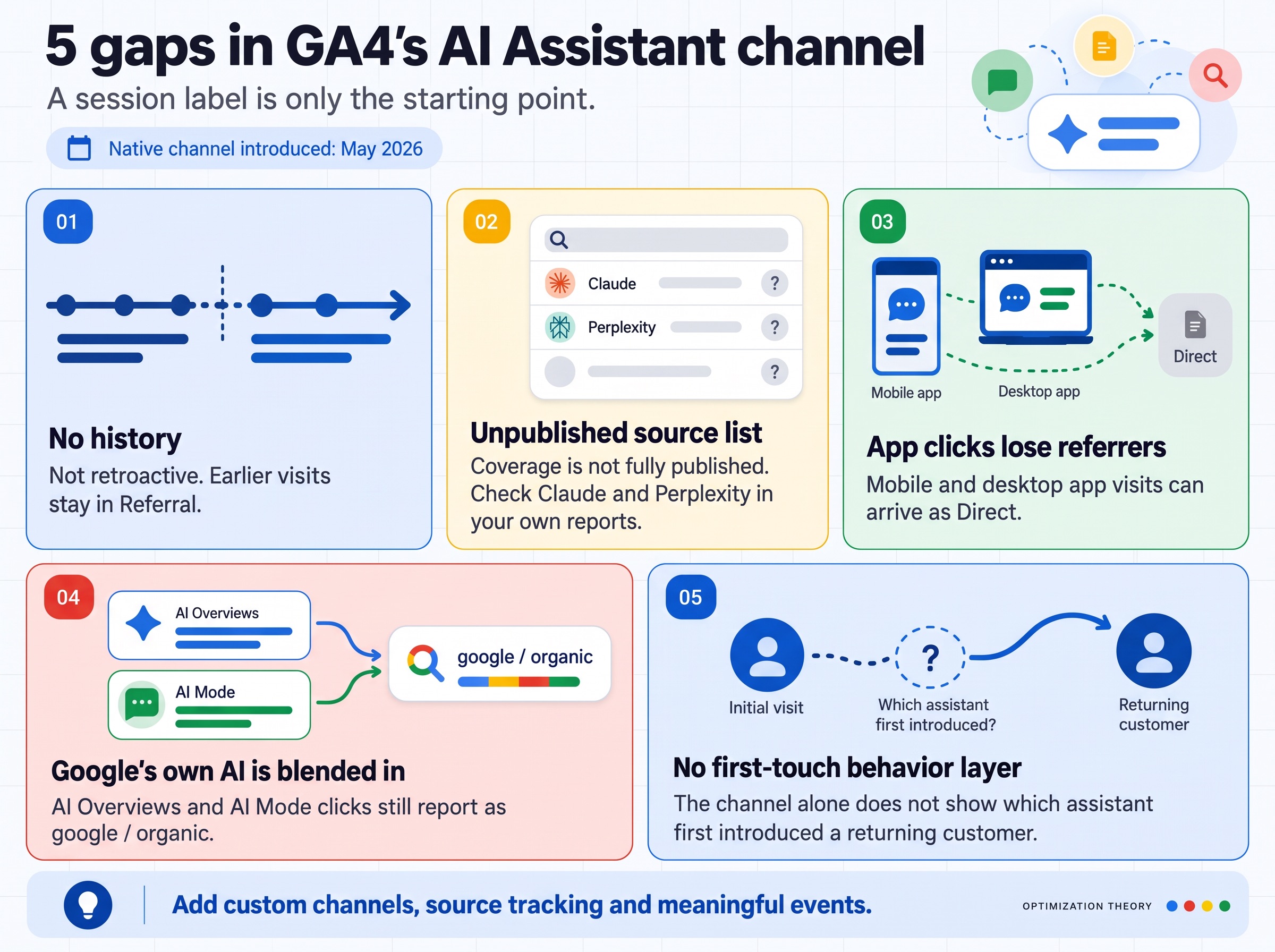
Google added an AI Assistant channel to the default channel group in May 2026. Recognized assistants get the medium ai-assistant and the campaign (ai-assistant). It is a good start, and it is not enough for GEO work:
- ✕No history. It is not retroactive. Everything before the rollout stays in Referral.
- ✕Unpublished source list. Google has not published which assistants it recognizes, and reports disagree on whether Claude and Perplexity are included. Check your own Traffic acquisition report for claude.ai and perplexity.ai with a medium of "referral."
- ✕App clicks. Clicks from mobile and desktop assistant apps often arrive with no referrer and land in Direct.
- ✕Google's own AI. AI Overviews and AI Mode clicks still report as google / organic.
- ✕No behavior layer. It labels the session. It does not tell you which assistant a returning customer first came from.
Sources: Semrush and Zeevron on the rollout and its gaps. The rest of this guide closes each one.
Keep 14 months of event data, not 2
The default event data retention is 2 months. Any exploration, funnel or path report older than that comes back empty. GEO is a trend story, and you cannot show a client that AI referrals doubled year over year with 60 days of data.
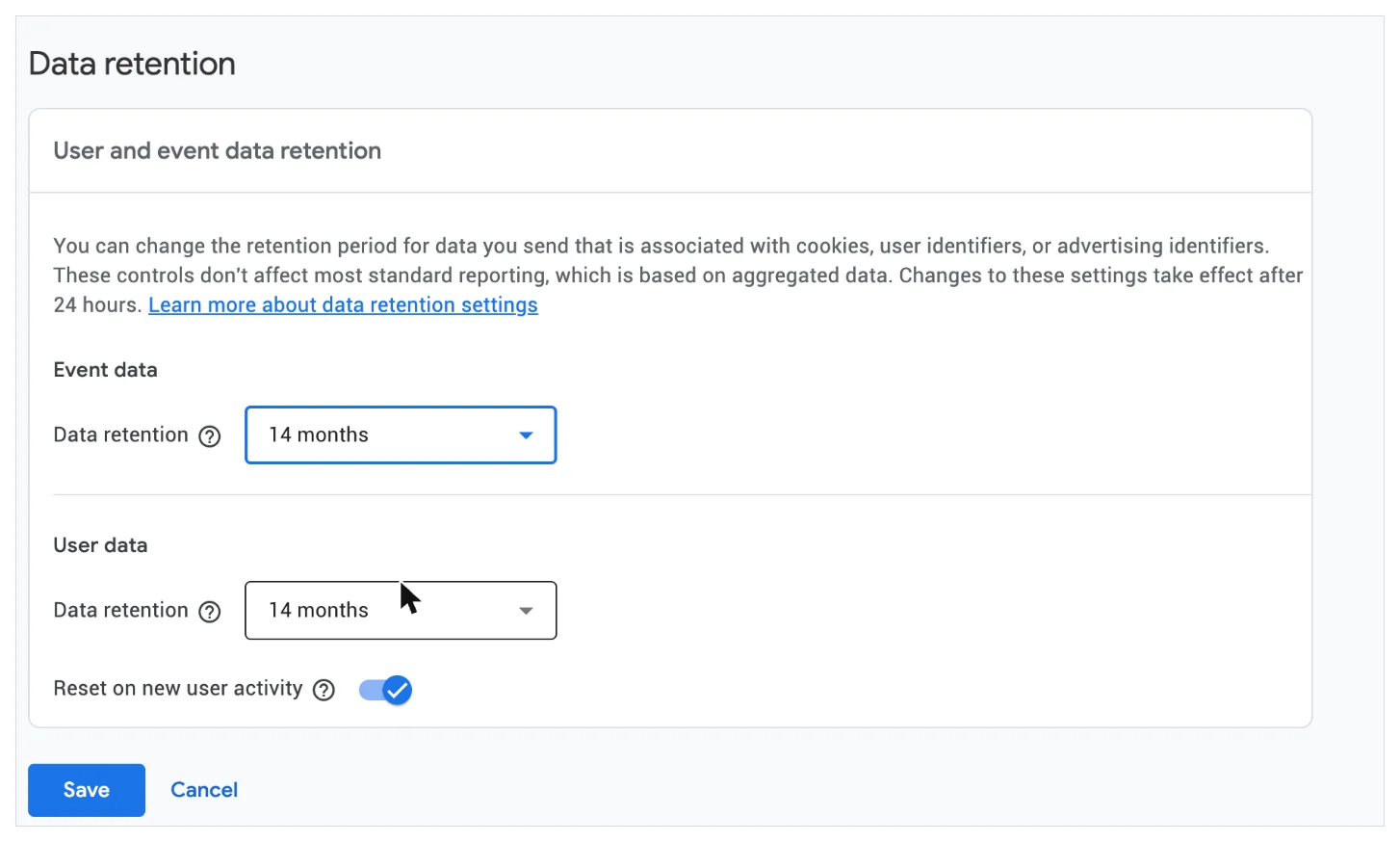
Why it matters even with BigQuery. Standard reports use aggregated tables and are not affected, but explorations, funnels and user-level analysis are. The change only applies going forward, so it is the first thing to fix in any audit.
Tune enhanced measurement for content sites
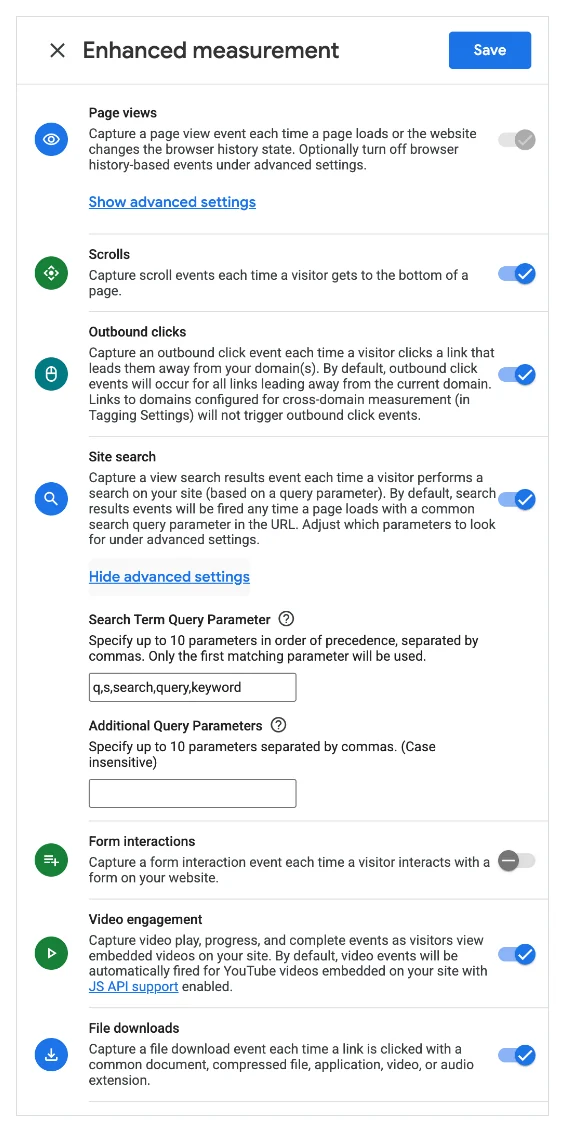
Open your web stream (Admin › Data streams › your stream). Enhanced measurement is the block of automatic events GA4 collects without any code.
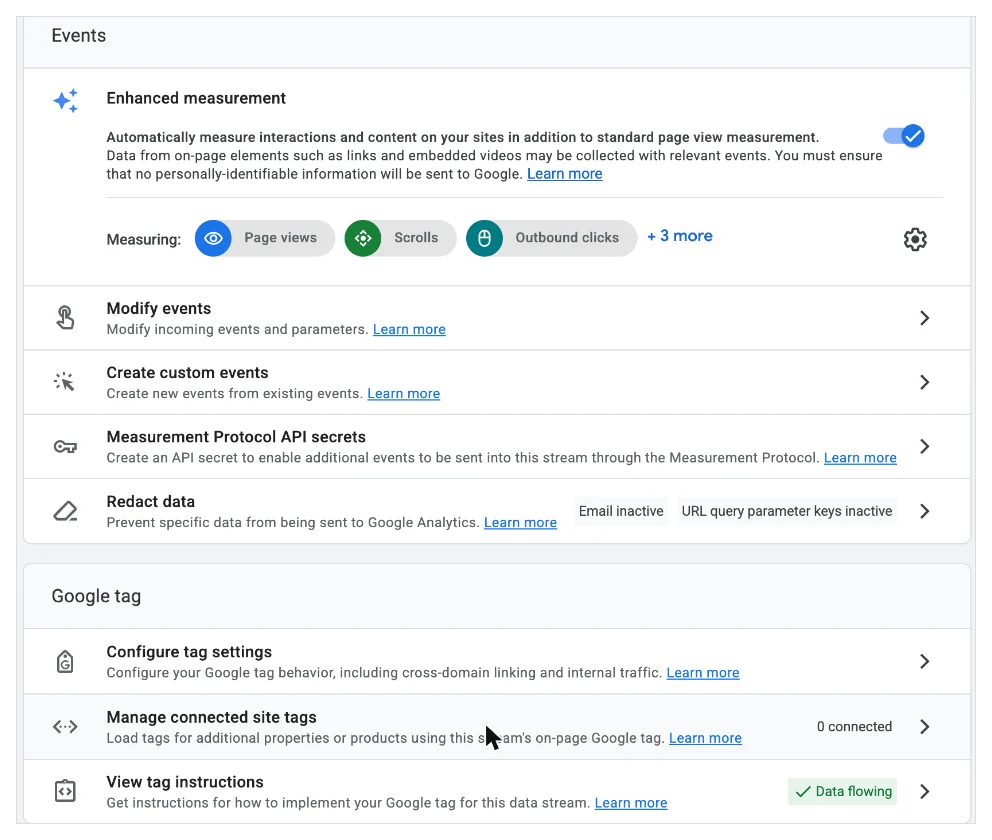
- Page views: on, including browser history changes
- Scrolls: on. This fires at 90% depth. Tag Manager adds 25, 50 and 75.
- Outbound clicks: on. You want to know when readers click your citations and sources.
- Site search: on. Include the query parameters
q,s,search,query,keyword. WordPress usess. - Form interactions: off. It fires on every form focus, including search boxes and newsletter bars. Track successful submissions instead.
- Video engagement and file downloads: on
Stop payment pages from stealing your organic credit
When a visitor who arrived from Google or ChatGPT goes to PayPal or Stripe to pay and comes back, GA4 can start a new session credited to the payment site. The channel that earned the sale loses it. "Sign in with Google" does the same.
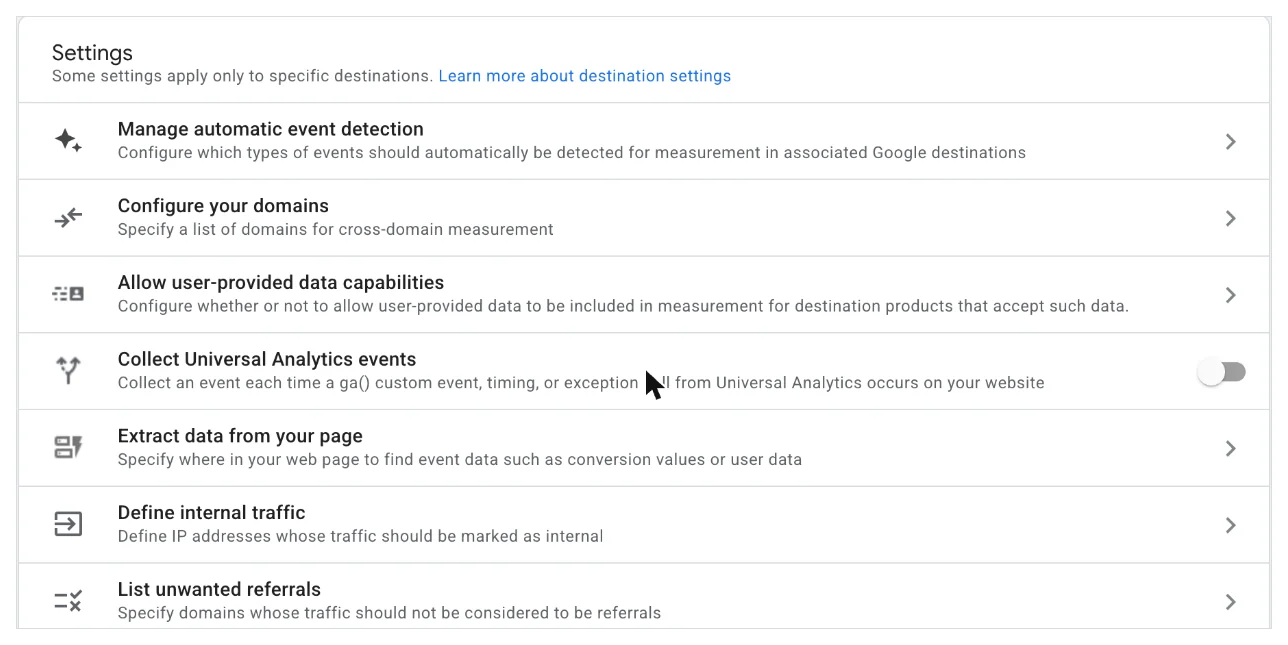
Add these as "Referral domain contains":
- paypal.com
- paypal.me
- stripe.com
- accounts.google.com
- mail.google.com
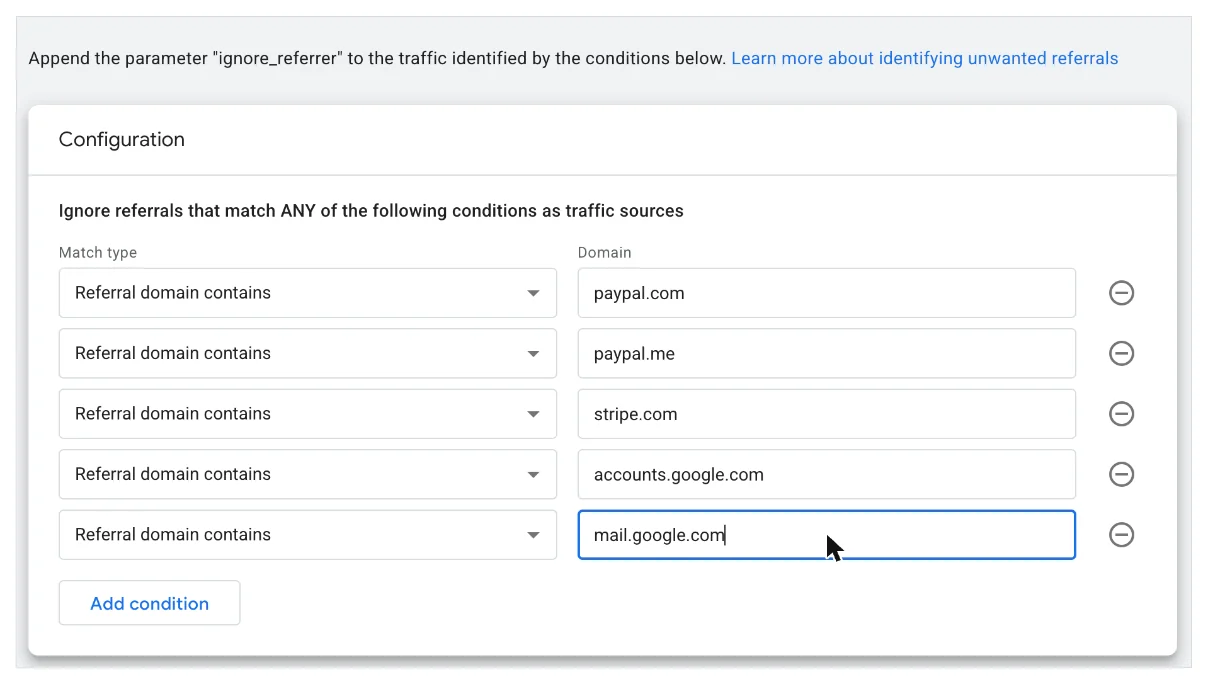
Take yourself out of the data
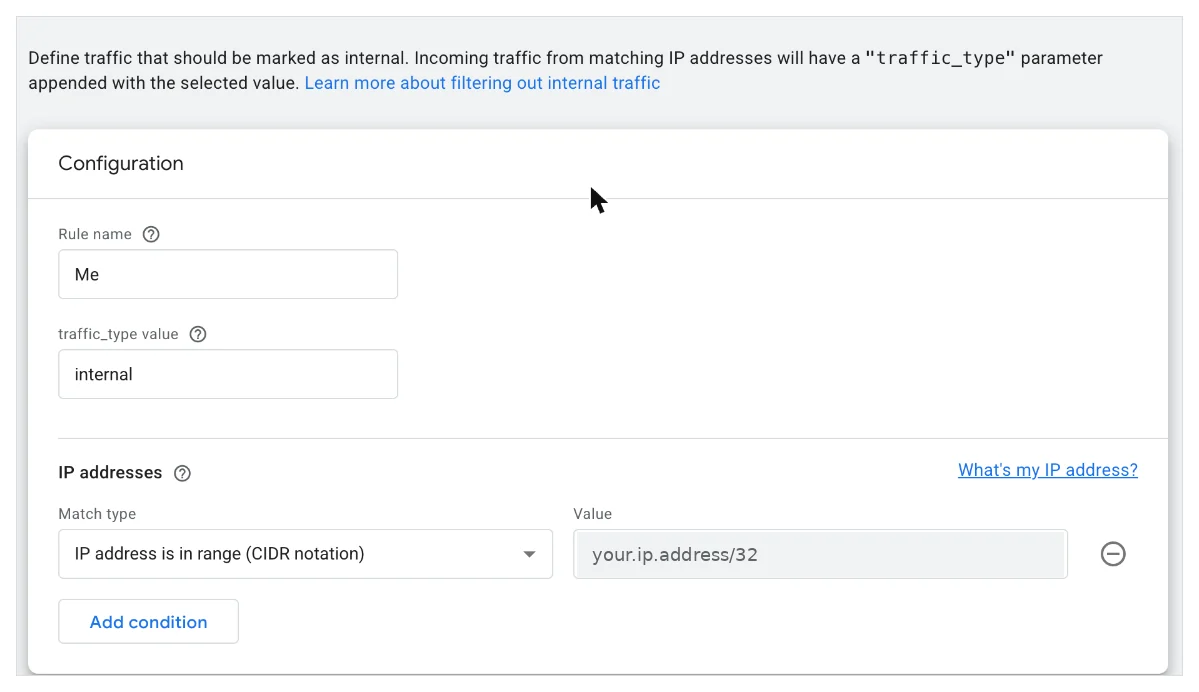
When you test your own pages in ChatGPT and click through, you become AI referral traffic. On a small site that alone can make GEO look like it is working.
Name the rule, keep traffic_type as internal, and add your IP.
Then check Admin › Data filters. GA4 creates the "Internal Traffic" filter in Testing mode, which labels your visits without excluding them. Confirm the label in DebugView, then switch it to Active.
Pro tip: IP rules miss you on your phone, on a VPN and on client Wi-Fi. In my Tag Manager setup, visiting any page with ?ot_internal=1 sets a two-year cookie that marks every hit from that browser as internal, and adds a user_type = internal user property so you can exclude yourself from audiences too.
Running more than one site? Build a Network property
If you own sites that link to each other, each property sees the others as plain referrals. You never see the full journey, like a reader who lands on one site from Perplexity and requests a quote on another.
The fix is a separate Network property that every site also sends to, with cross-domain measurement on. Each site keeps its own clean property, and the Network property is the roll-up.
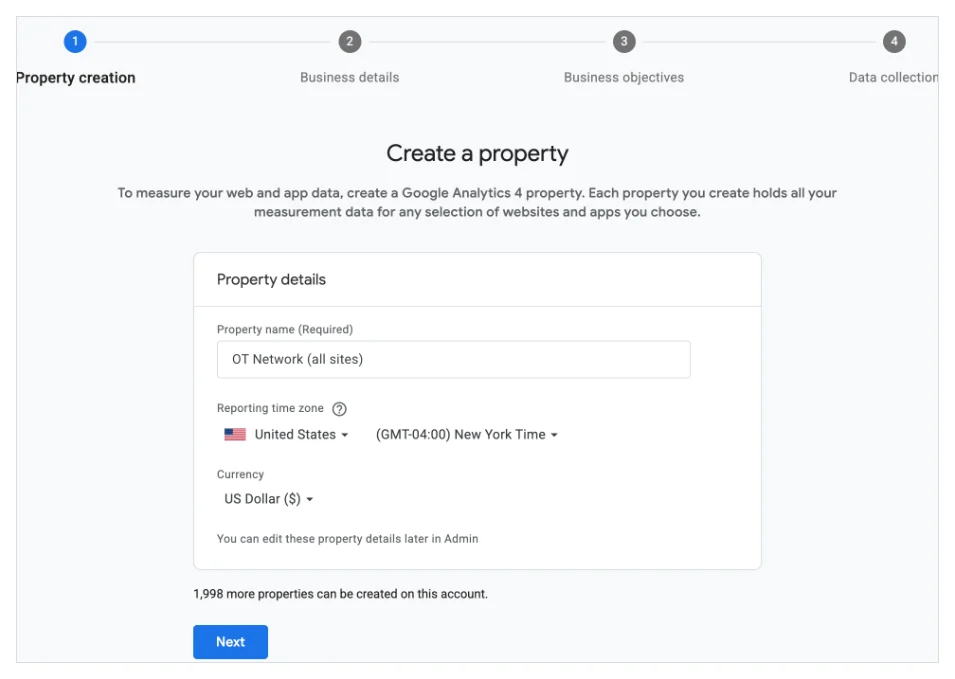
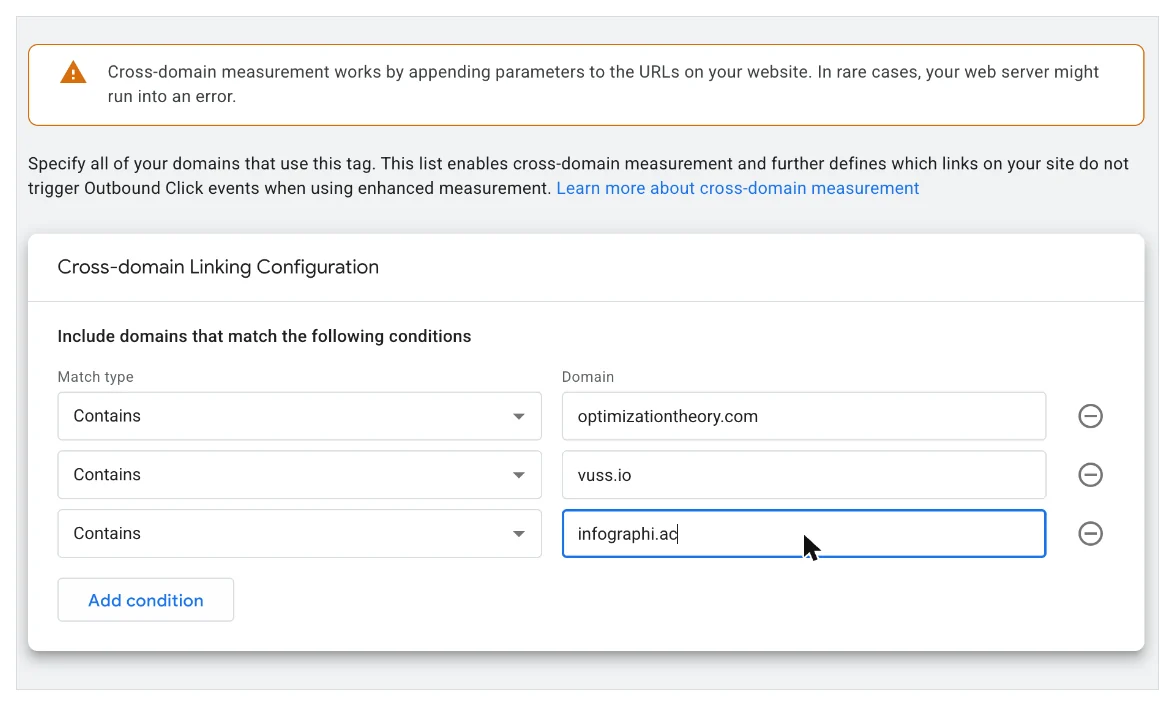
Add one web stream, then open Configure tag settings › Configure your domains and list every domain:
Give the Network property the same retention, unwanted referrals, internal traffic rules and custom definitions as the others, and add a site_name parameter to every event so one report can switch between sites.
Move tracking into Tag Manager, with Consent Mode v2
Site Kit and similar plugins are fine for page views. They cannot capture the AI source of a session, real reading behavior, tool use or where on the page a click happened. Tag Manager can.
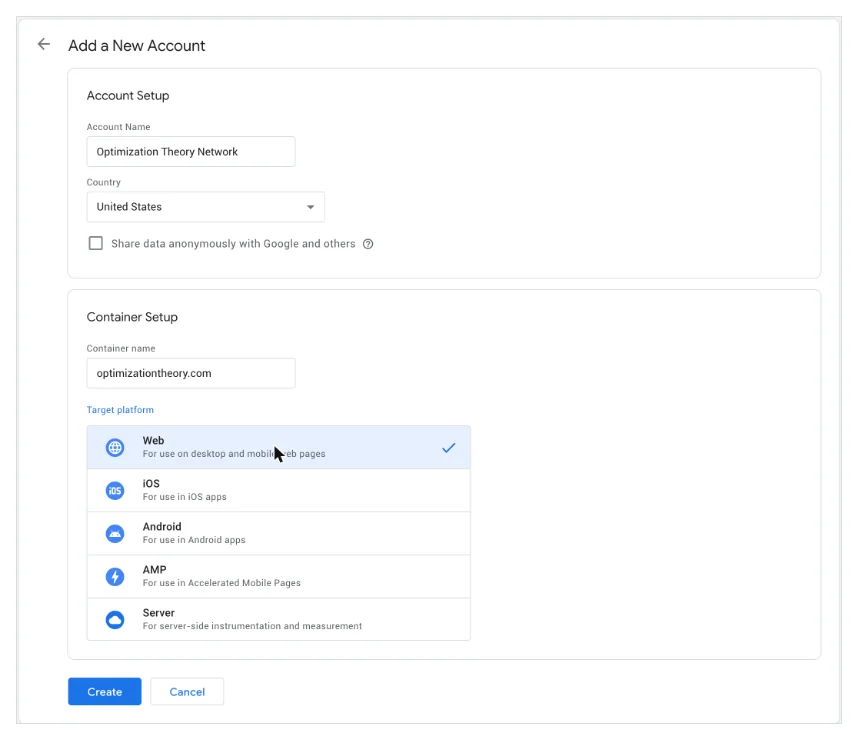
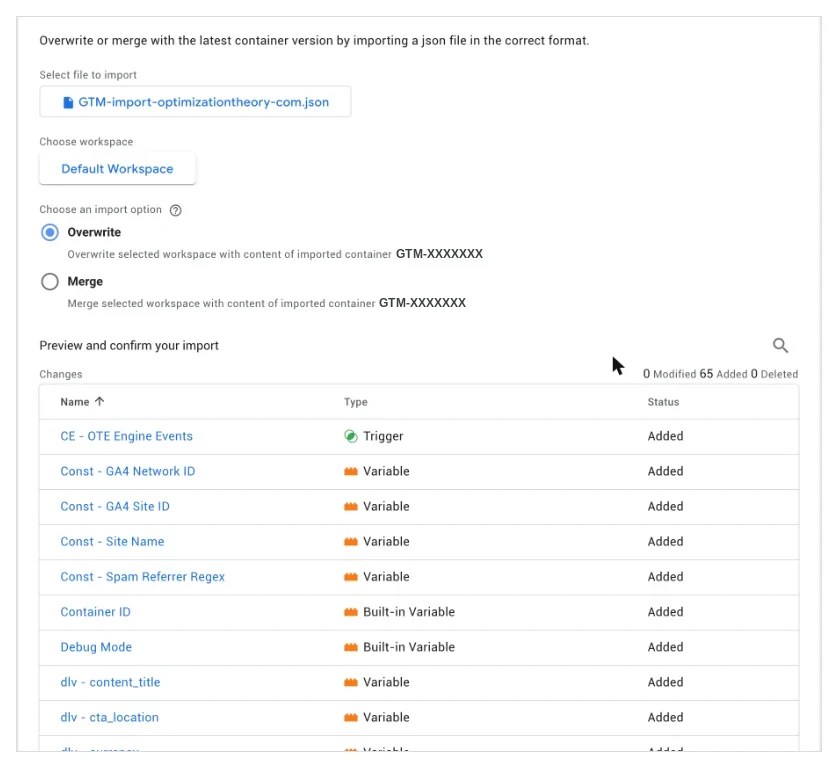
I built each container as a JSON file and imported it (Admin › Import Container), which loads every tag, trigger and variable in one pass:
Each container fires two Google tags, one for the site property and one for the Network property:
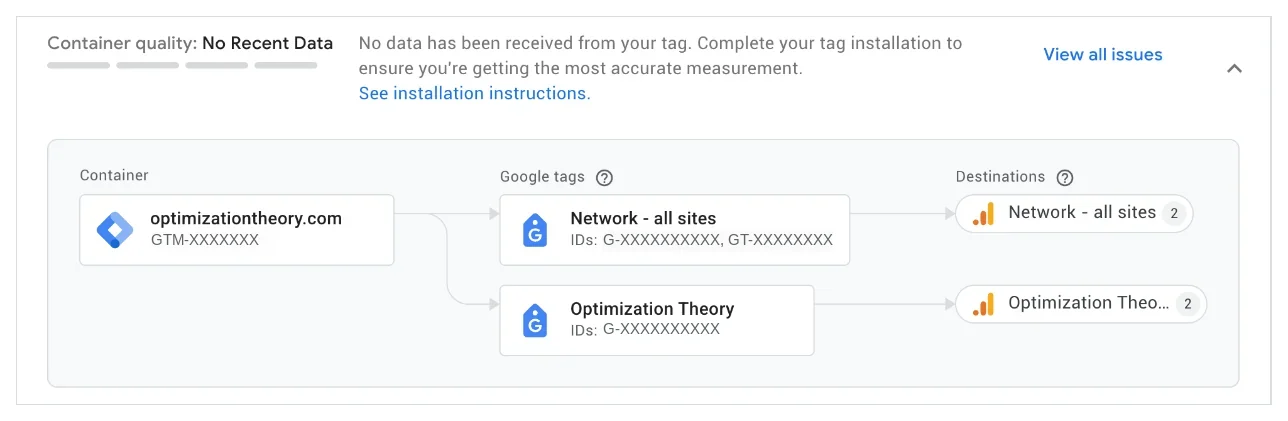
On WordPress, GTM4WP places the container and pushes post type, categories, author, publish date and logged-in state into the data layer.
Do not double count. Turn off Site Kit's "Place Google Analytics code" in the same minute you publish Tag Manager. Then hunt for static pages outside WordPress that carry their own hardcoded gtag, and purge the host and CDN cache, or the old HTML keeps serving.
Consent Mode v2 on a free consent plugin
With Consent Mode, a denied visitor still sends a cookieless ping and Google models the gap. Without it, an opt-out erases the visit, and AI referral numbers that are already small get smaller.
I use Complianz (free) with United States opt-out rules and Global Privacy Control respected. The free version does not pass Consent Mode signals to Tag Manager, so each container has a Custom HTML tag on the Consent Initialization trigger that reads the banner choice and the browser's GPC flag and sets the defaults before any Google tag fires.
| gcs value | What it means | When you should see it |
|---|---|---|
| G111 | Analytics and ads storage granted | A normal visit with no opt-out |
| G100 | Storage denied, cookieless ping only | After opting out in the banner, or with GPC on |
Build an AI Assistants channel that beats the default
A custom channel group fixes the history and coverage problems. Unlike the native channel, a custom group re-buckets historical data whenever you select it in a report or exploration.
CreateCopy the default channel group
Admin › Data display › Channel groups › Create new channel group. It starts as a copy of the default.
DefineAdd an AI Assistants channel
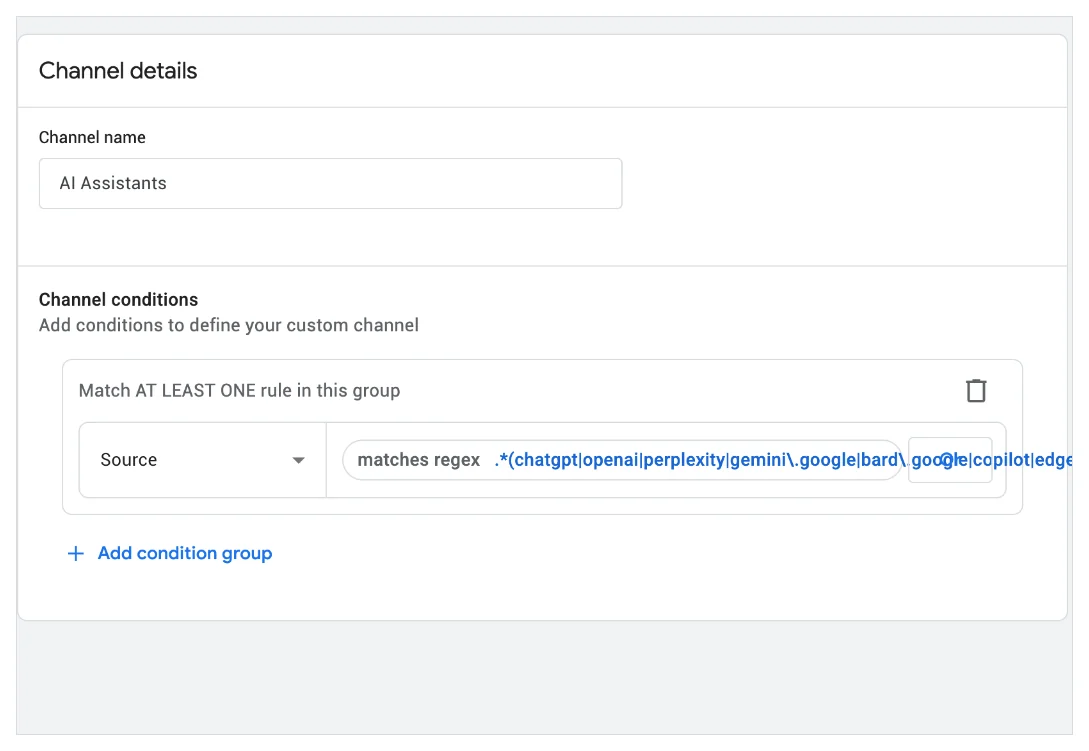
Add new channel, name it AI Assistants, condition Source matches regex:
.*(chatgpt|openai|perplexity|gemini\.google|bard\.google|copilot|edgeservices\.bing|claude\.ai|you\.com|phind|poe\.com|meta\.ai|deepseek|grok|x\.ai|mistral|kagi|duck\.ai|qwen|character\.ai).*GA4 caps a regex condition at 256 characters, so this pattern uses partial matches. It also catches tagged links, since ChatGPT appends a utm_source value containing "chatgpt" to many of the links it cites.
ReorderMove it to position 1
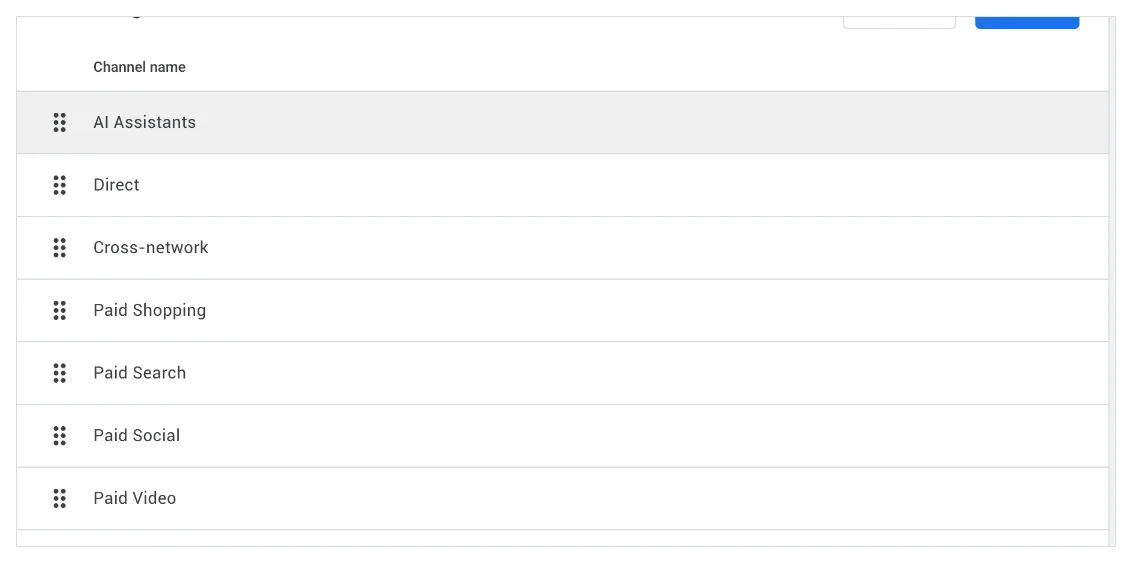
Channel rules run top to bottom and the first match wins. If AI Assistants sits below Referral, Referral takes the session.
ActivateMake it the primary channel group
Set it as the primary channel group so standard acquisition reports and attribution use it. That switch applies going forward, while the group itself stays available for historical analysis.
Capture the AI source on every hit, not just the session
A channel tells you how a session started. For GEO you also want to know, on every event, which assistant the reader came from, and for every user, which assistant first introduced them. That takes three pieces in Tag Manager:
- ai_sourceEvent parameter on every hit in the session: chatgpt, perplexity, gemini, copilot, claude and so on. Read from the referrer or utm_source, then held for the rest of the session.
- first_ai_sourceUser property saved once and kept. Shows which assistant introduced readers who return weeks later through search or direct.
- ai_landingEvent fired on the first page of an AI-referred session, with the landing page. Your list of pages AI assistants actually send people to.
Here is the Custom JavaScript variable behind ai_source, trimmed for readability. Add more assistants to the map as they appear in your referral report.
function () {
  try {
    var saved = sessionStorage.getItem('ai_source');
    if (saved) return saved;
  } catch (e) {}
  var map = [
    [/(^|\.)(chatgpt\.com|chat\.openai\.com)$/, 'chatgpt'],
    [/(^|\.)perplexity\.ai$/, 'perplexity'],
    [/(^|\.)gemini\.google\.com$/, 'gemini'],
    [/(^|\.)(copilot\.microsoft\.com|edgeservices\.bing\.com)$/, 'copilot'],
    [/(^|\.)claude\.ai$/, 'claude'],
    [/(^|\.)(grok\.com|x\.ai)$/, 'grok'],
    [/(^|\.)(deepseek\.com|chat\.deepseek\.com)$/, 'deepseek']
  ];
  function match(host) {
    host = (host || '').toLowerCase().replace(/^www\./, '');
    for (var i = 0; i < map.length; i++) if (map[i][0].test(host)) return map[i][1];
    return null;
  }
  var src = null;
  if (document.referrer) {
    var a = document.createElement('a');
    a.href = document.referrer;
    src = match(a.hostname);
  }
  if (!src) {
    var m = location.search.match(/[?&]utm_source=([^&#]*)/i);
    if (m) src = match(decodeURIComponent(m[1]))
      || (/chatgpt/i.test(m[1]) ? 'chatgpt' : null);
  }
  if (src) {
    try {
      sessionStorage.setItem('ai_source', src);
      if (!localStorage.getItem('first_ai_source')) localStorage.setItem('first_ai_source', src);
    } catch (e) {}
  }
  return src || undefined;
}
Send it as an event parameter in your Google tag's shared event settings, and send localStorage.first_ai_source as a user property. Register both as custom dimensions (step 12).
How to track traffic from AI Overviews (and why you mostly cannot)
This is the honest part. Clicks from Google AI Overviews and AI Mode arrive as google / organic, with nothing in the referrer to separate them. Pew's study of real browsing found people clicked a standard result on 8% of searches with an AI summary versus 15% without, and clicked a link inside the summary on just 1%. The traffic is small, and it is hidden inside organic.
What you can do:
- ✓Search Console's generative AI report. Announced June 2026 and rolling out from the UK, it shows AI Overviews and AI Mode impressions by page, country, device and date. It does not yet show clicks, CTR or queries. Pair its pages with GA4 landing pages to spot pages earning AI visibility.
- ✓Text-fragment landings (experimental). When Google deep-links to a passage, the URL carries
#:~:text=. Browsers hide it from page scripts, but Chrome's navigation timing entry can expose it. I log it as atext_fragment_landingevent with the quoted text. It undercounts, but every hit shows the exact sentence Google pulled. - ✓Engagement deltas. Compare engaged read rate for organic landings on queries where an AI Overview appears against those where one does not. A drop in clicks with stable or rising read rate is the AI Overview signature.
Sources: Pew Research Center (900 US adults, 68,879 searches, March 2025) and Passionfruit on the Search Console report.
Track real reads, not engaged sessions
GA4's "engaged session" is 10 seconds, two page views or one key event. For content, that tells you almost nothing about whether an AI-referred visitor found the answer they were promised. Here is what I track instead, all through one tracking script in Tag Manager:
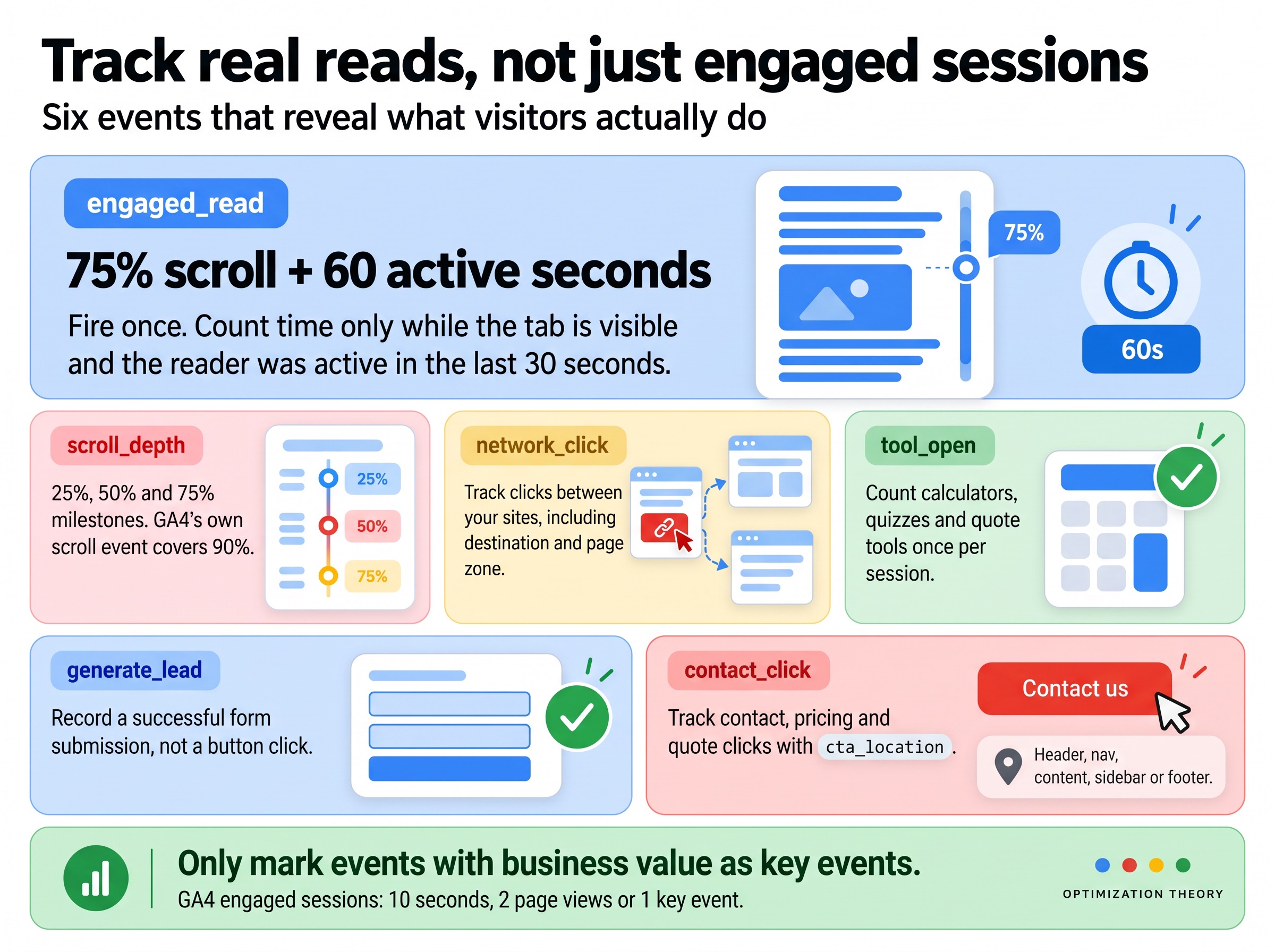
- engaged_readFires once at 75% scroll plus 60 seconds of active, visible time. Time only counts while the tab is visible and the reader moved, scrolled or tapped in the last 30 seconds.
- scroll_depth25, 50 and 75 percent. GA4's own scroll event covers 90.
- network_clickClicks between your own sites, with destination and page zone: header, nav, content, sidebar or footer.
- tool_openCalculators, simulators, quote builders and quizzes, counted once per session so multi-page tools do not inflate numbers.
- generate_leadA successful form submission from the form plugin's own success event, not a button click.
- contact_clickContact, pricing and quote clicks each get their own event with
cta_location, so you know which part of the page drives action.
Mark only the ones that represent business value as key events. On a service site that is leads, quote starts and contact clicks. On a publisher it is engaged reads, newsletter sign-ups and clicks to money pages.
Register custom dimensions for content metadata
Parameters stay invisible in reports until you register them. Go to Admin › Custom definitions › Create custom dimension, choose the scope, and type the parameter name. I registered 29 dimensions and 3 metrics in every property.
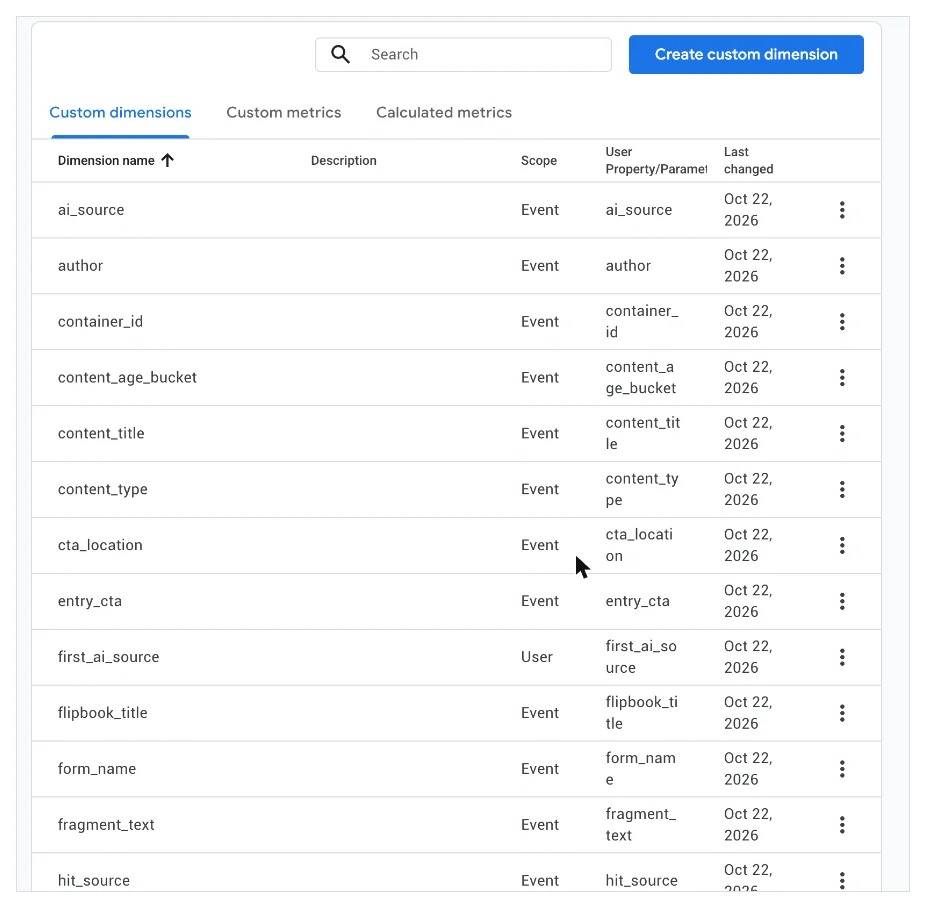
| Dimension | Scope | The GEO or SEO question it answers |
|---|---|---|
| ai_source | Event | Which assistant sent this visit, on every event in the session |
| first_ai_source | User | Which assistant first introduced this person |
| primary_category | Event | Which topic clusters AI assistants send traffic to |
| content_age_bucket | Event | Do assistants favor fresh content, or are old posts still cited |
| word_count_bucket | Event | Does long-form get read when an AI sends the visit |
| author | Event | Which writer's work gets read to the end |
| cta_location | Event | Which part of the page drives the click |
| hit_source / traffic_quality | Event | Is this hit real (step 13) |
For numbers you sum or average, create custom metrics and set the right unit. Read time should be Seconds:
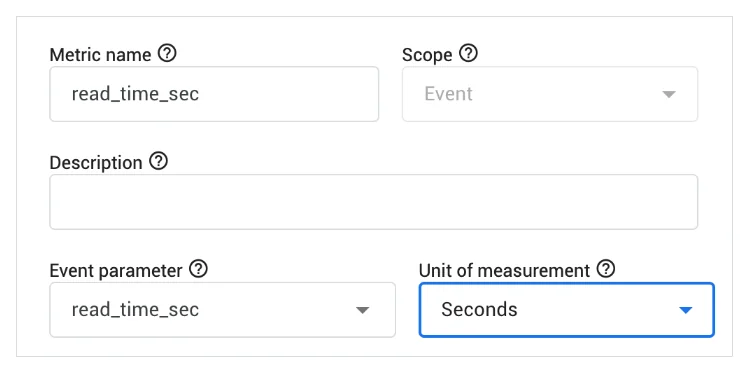
Budget your slots. Standard properties allow 50 event-scoped dimensions, 25 user-scoped dimensions and 50 custom metrics. Never register IDs, full URLs with query strings or anything with near-unlimited values, or you will hit the (other) row in every report.
Flag ghost and bot traffic instead of deleting it
AI referral traffic is a fraction of a percent of visits. A handful of bot sessions with a spoofed chatgpt.com referrer can double it. Filtering looks like the fix, but GA4 data filters are permanent: an excluded hit is gone, and so is your evidence. I label every hit instead:
1hit_source = gtm
Added to every event that comes through Tag Manager. Ghost hits sent straight to the Measurement Protocol never touch your site or container, so they arrive without it. One dimension separates real visits from ghost traffic.
2traffic_quality
clean, bot_suspect (headless browsers, automation flags, zero-size screens), spam_referrer (a maintained referrer list) or hostname_mismatch.
With the BigQuery export on, this query shows how much of your data arrived without the Tag Manager label in the last 28 days:
SELECT
  IFNULL(
    (SELECT value.string_value FROM UNNEST(event_params) WHERE key = 'hit_source'),
    'ghost (no gtm)'
  ) AS hit_source,
  COUNT(*) AS events,
  COUNT(DISTINCT user_pseudo_id) AS users
FROM `your-project.analytics_123456789.events_*`
WHERE _TABLE_SUFFIX BETWEEN FORMAT_DATE('%Y%m%d', DATE_SUB(CURRENT_DATE(), INTERVAL 28 DAY))
  AND FORMAT_DATE('%Y%m%d', CURRENT_DATE())
GROUP BY hit_source
ORDER BY events DESC;
Clean by default, evidence on demand. Every report and dashboard defaults to clean data, and the raw hits stay available. On my own sites, this surfaced a run of direct traffic from Singapore and China that looks nothing like real readers, which would otherwise have inflated every engagement metric.
The GEO reports I actually use
None of the tracking matters until it answers a client question. These are the reports I build on top, in GA4 Explorations and in a Looker Studio dashboard on the Network property.
1AI landing pages
Free-form exploration. Rows: Landing page. Columns: ai_source. Values: Sessions, engaged_read count, Key events. Filter: hit_source exactly matches gtm. This is the list of pages assistants are citing and whether those visitors read.
2AI vs organic quality
Compare the AI Assistants channel to Organic Search on engaged read rate and key event rate. If AI visitors read more and convert better, that is the budget argument for GEO work.
3AI-introduced users
Segment users where first_ai_source is set, then look at their later sessions by channel. It shows how often a ChatGPT first touch comes back through branded search or direct.
4Refresh queue
primary_category by content_age_bucket, colored by engaged read rate. Old posts that still pull AI and organic visits but lose readers are the first to update.
In Looker Studio, two calculated fields do most of the work. The first groups sources into platforms:
CASE
  WHEN REGEXP_MATCH(Session source, ".*(chatgpt|openai).*") THEN "ChatGPT"
  WHEN REGEXP_MATCH(Session source, ".*perplexity.*") THEN "Perplexity"
  WHEN REGEXP_MATCH(Session source, ".*(gemini|bard).*") THEN "Gemini"
  WHEN REGEXP_MATCH(Session source, ".*(copilot|edgeservices\\.bing).*") THEN "Copilot"
  WHEN REGEXP_MATCH(Session source, ".*claude\\.ai.*") THEN "Claude"
  WHEN REGEXP_MATCH(Session source, ".*(grok|deepseek|meta\\.ai|mistral|you\\.com|phind|kagi).*") THEN "Other AI"
  ELSE "Not AI"
END
The second turns the labels from step 13 into a single Data Quality control, defaulted to Clean:
CASE
  WHEN hit_source IS NULL OR hit_source = "(not set)" THEN "Ghost (no GTM)"
  WHEN traffic_quality = "bot_suspect" THEN "Bot suspect"
  WHEN traffic_quality = "spam_referrer" THEN "Spam referrer"
  WHEN traffic_type = "internal" THEN "Internal"
  ELSE "Clean"
END- Search Console linkAdmin › Product links. Brings queries and organic landing pages into GA4 next to engagement data.
- BigQuery linkFree daily export of raw events. Turn on billing in Google Cloud or sandbox tables expire after 60 days.
- Looker StudioOne report on the Network property with a site switcher: overview, GEO, Search Console, content, funnels, tools, cross-site flow and data quality.
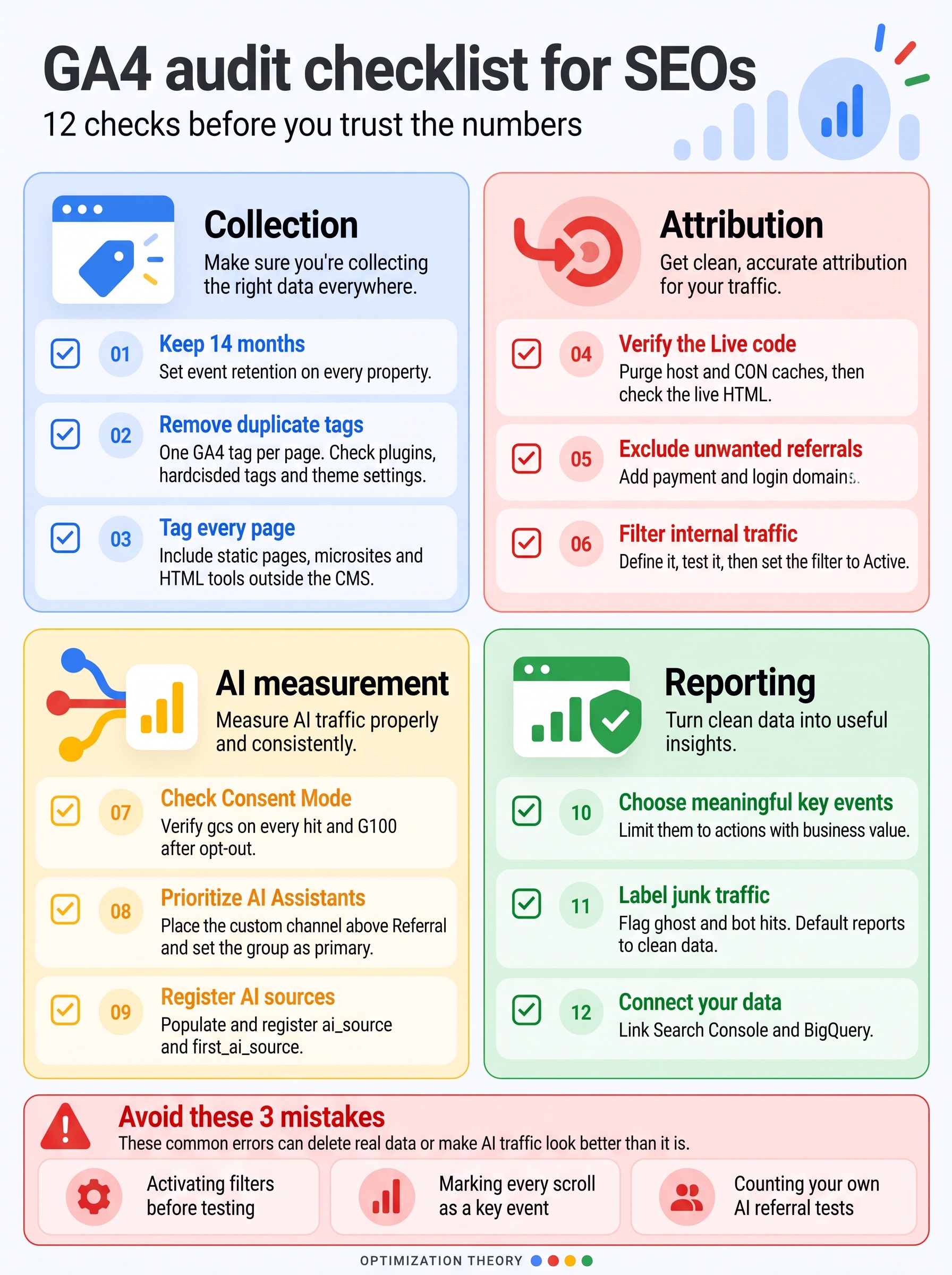
GA4 audit checklist for SEOs
Run this before you trust any number, yours or a client's:
- 1Event data retention is 14 months on every property
- 2Exactly one GA4 tag per page: no plugin plus hardcoded gtag plus theme option
- 3Static pages, microsites and HTML tools outside the CMS are tagged too
- 4The live HTML matches what you installed, after host and CDN cache purges
- 5Payment and login domains are listed as unwanted referrals
- 6Internal traffic is defined, tested, then set to Active
- 7Consent Mode sends gcs on every hit, and opt-outs show G100
- 8A custom AI Assistants channel sits above Referral and is the primary group
- 9ai_source and first_ai_source are populated and registered
- 10Key events are limited to actions with business value
- 11Ghost and bot hits are labelled, and reports default to clean data
- 12Search Console and BigQuery are linked
- ✕Filters switched to Active on day one. Test first. An active filter that matches the wrong thing deletes real data forever.
- ✕Key event overload. If every scroll is a key event, nothing is. AI traffic will look like it converts brilliantly.
- ✕Reporting AI traffic without excluding yourself. Your own ChatGPT tests can be a meaningful share of a small site's AI referrals.
Frequently asked questions
People also ask
How do I track AI traffic in GA4?
Create a custom channel group with an AI Assistants channel using a "Source matches regex" condition for chatgpt, perplexity, gemini, copilot, claude and similar sources, move it above Referral, and set it as the primary channel group. For deeper analysis, capture the AI source as an event parameter and the first AI source as a user property in Tag Manager.
Does GA4 have an AI Assistant channel?
Yes. Google added an AI Assistant channel to the default channel group in May 2026, using the medium ai-assistant. It is not retroactive, Google has not published the full source list, and app clicks without a referrer still land in Direct, so a custom channel is still worth building.
Can you track traffic from Google AI Overviews in GA4?
Not directly. AI Overviews and AI Mode clicks report as google / organic. Search Console's generative AI report shows impressions by page, and text-fragment landing URLs can reveal passage-level clicks. Together they are the best available proxies.
Why does ChatGPT traffic show as Direct in GA4?
Clicks from the ChatGPT apps and some links arrive without a referrer. ChatGPT adds a utm_source tag to many cited links on the web, which GA4 does pick up, but app traffic and copied links usually fall into Direct.
Should I set GA4 data retention to 14 months?
Yes. The 2-month default limits explorations, funnels and user-level analysis, which are the reports used for year-over-year GEO and SEO trends. 14 months is the maximum on standard properties, and the change only applies going forward.
What should a GA4 audit check for SEO?
Retention, duplicate tags, untagged static pages, stale cached HTML, unwanted referrals, internal traffic, Consent Mode, an AI Assistants channel above Referral, registered custom dimensions, a short key event list, labelled junk traffic, and Search Console and BigQuery links.
Want this on your sites?
This is the analytics overhaul I do for clients.
Retention, Tag Manager, Consent Mode, AI source tracking, ghost traffic labels and a Looker Studio GEO dashboard, set up and verified on your properties.
More Writing & Research by Jourdan Rombough
View all research

If AI can't find you, understand you and trust you, it won't recommend you.
Keywords tell you what they typed. Intent tells you what they meant. Fan-out tells you what they'll ask next.
Be a thing, not a string. AI remembers entities, not keywords.
The click isn't dead. It just has to be earned twice.
Schema is the business card you hand to every machine that reads your site.
If Googlebot can't reach it and AI can't parse it, it doesn't exist.
Good SEO grows quietly. Then all at once.
