Technical Deep Dive: Architecture, Automation & AI Processing
A complete breakdown of how I engineered a serverless automation system that scrapes YouTube comments at scale, processes them through advanced AI models, and generates comprehensive intelligence reports in real-time.
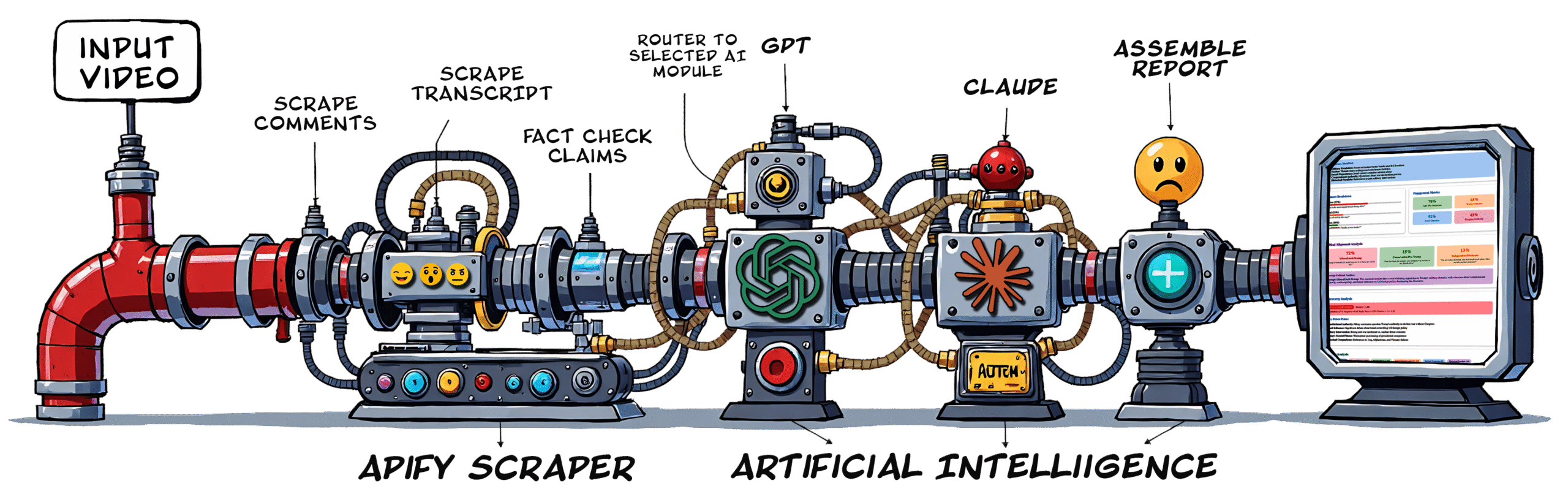
The complete technology stack and data flow architecture
🎣
Webhook Trigger Layer
Make.com custom webhook receives YouTube URL and parameters. Validates input format, extracts video ID, and initiates the automation scenario. Returns immediate 200 response while processing happens asynchronously in the background.
⚙️
Parallel Data Scraping
Two Apify actors run simultaneously via Make.com modules. First actor scrapes 1,000+ top comments with metadata (likes, replies, timestamps). Second actor extracts full video transcript. Both use headless Chrome with proxy rotation to bypass anti-bot measures.
🔀
Data Processing Router
Make.com router module evaluates analysis type and directs data flow to either Claude or GPT processing branch. Text aggregator combines raw JSON into formatted strings. Variable setters store transcript and comments for AI consumption with token counting logic.
🧠
AI Processing Engine
Anthropic or OpenAI API modules send structured prompts with full context. System prompt defines analysis framework, output format (HTML), and scoring methodology. Model processes 50k-200k tokens and returns comprehensive structured report with embedded visualizations.
💾
Report Storage System
Google Drive API uploads HTML report with timestamped filename to organized folder structure (Claude Reports / GPT Reports). Creates parallel Google Doc version for editing. Generates shareable links with appropriate permissions for distribution.
↩️
Webhook Response Delivery
Final Make.com module returns complete HTML via webhook response. Includes Google Drive links, report metadata, and processing statistics. Response arrives in browser instantly for real-time display without page refresh or redirect.
AUTOMATION BREAKDOWN
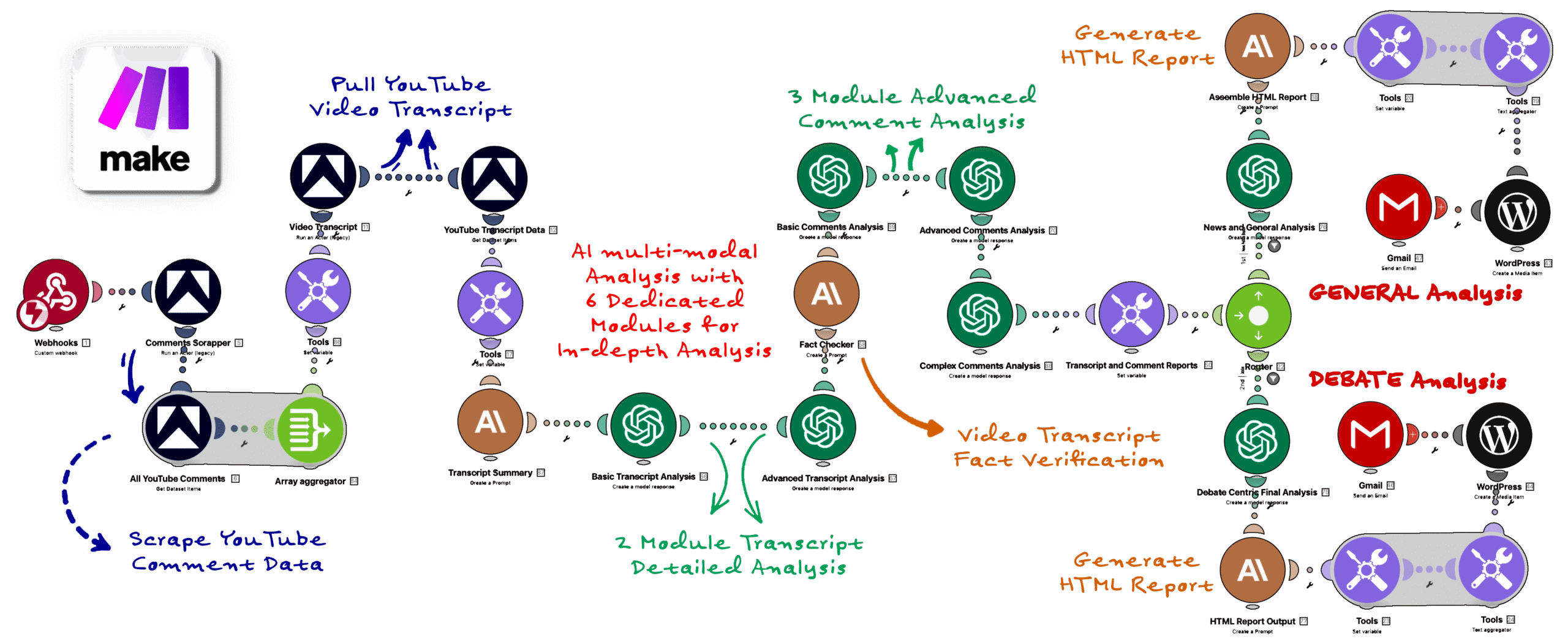
Complete module-by-module breakdown of the Make.com automation
🔴 Module 1: Custom Webhook
Purpose:
Entry point for the entire automation. Receives HTTP POST request with JSON payload containing YouTube URL, model selection, and optional custom instructions.
Configuration:
Webhook Type: Custom (generates unique URL)
Data Structure: Determined automatically
Response Method: Return a response at end of scenario
Uses regex pattern matching to validate YouTube URL format. Extracts video ID using string functions. Sets global variables {{videoId}}, {{modelType}}, and {{customPrompt}} for downstream modules to access.
🔵 Module 2-5: Apify Data Extraction
Purpose:
Four parallel modules launch Apify actors to scrape comments and transcripts, then fetch the completed datasets. Comments scraper extracts text, authors, likes, replies, and timestamps. Transcript scraper pulls full video captions with time markers.
Key Configuration:
Max Comments: 1000 sorted by relevance
Proxy: Residential rotation for bot evasion
Timeout: 45 seconds per actor
Output: Structured JSON datasets
🟣 Module 6-7: Data Formatting
Purpose:
Variable setter stores transcript text. Text aggregator combines all comments into single formatted block: [likes] author: text. This creates clean, structured input optimized for AI model consumption.
🟡 Module 8: Router - Model Selection
Purpose:
Intelligent routing based on content type. Claude branch for political/debate analysis (superior nuance detection). GPT branch for general content (faster, cost-effective). Each path has optimized prompts for that model's strengths.
🟠 Module 9-10: AI Processing
Purpose:
Sends structured prompts to Claude Sonnet 4 or GPT-4.5 with full transcript + comments + 3,000-token system instructions. Requests comprehensive HTML report with sentiment scoring, political mapping, persona clustering, thematic analysis, and visualizations. Returns 16,000-token output.
Key Settings:
Temperature: 0.3 (Claude) / 0.4 (GPT)
Max Output: 16,000 tokens
Retry Logic: 3 attempts with exponential backoff
Cost per Run: $3-8 depending on context size
🟡 Module 11-13: Storage & Distribution
Purpose:
Sets output variable, uploads HTML to Google Drive with timestamped filename, creates parallel Google Doc version, and sets sharing permissions to "anyone with link." Separate folders for Claude vs GPT reports enable easy comparison.
🔴 Module 14: Webhook Response
Purpose:
Returns complete data package: full HTML report, Drive links (HTML + Doc), video metadata, processing time, model used, and token usage. Total execution time: 45-90 seconds from trigger to completion.
ANALYSIS METHODOLOGY
How I engineered prompts to extract maximum intelligence from raw comment data
🎯
System Prompt Architecture
3,000+ token instruction set defining role, methodology, scoring rubrics, and output format. Includes example sections, edge case handling, and quality standards. Uses XML-style tags to structure different instruction types for model parsing clarity.
📊
Sentiment Scoring Framework
Instructs AI to use -10 to +10 scale with detailed descriptions for each tier. Differentiates genuine emotion from sarcasm. Weighs comments by engagement (likes) for representative scoring. Includes confidence intervals and outlier detection to flag suspicious patterns.
⚖️
Political Spectrum Mapping
Custom 7-point scale from Far Left to Far Right with Center position. AI evaluates based on policy positions, rhetoric style, and value frameworks rather than party labels. Includes "Non-Political" category for content without ideological markers.
👥
Persona Clustering Logic
AI segments commenters into archetypes: Enthusiasts (unconditional support), Critics (constructive feedback), Skeptics (questioning claims), Explainers (adding context), Trolls (bad faith), Bots (suspicious patterns). Each persona gets behavioral analysis and engagement metrics.
🔍
Thematic Extraction Method
Identifies 5-10 dominant themes with frequency analysis. For each theme: representative quotes, sentiment distribution, engagement levels, and connection to video content. Uses natural language clustering rather than rigid keyword matching for nuanced understanding.
✅
Authenticity Detection
AI flags potential bot activity (repetitive phrasing, coordinated messaging), astroturfing (manufactured consensus), and echo chamber dynamics. Evaluates linguistic diversity, account age patterns, and engagement ratios to assess comment section health.
📈
Temporal Analysis
Tracks how sentiment evolves from early comments (first hour) to later discussion. Identifies sentiment shifts, viral moments, and brigade patterns. Correlates timestamp data with video content to show which segments drove specific reactions.
🎨
HTML Report Generation
AI outputs complete HTML5 document with embedded CSS (no external dependencies). Includes responsive design, Chart.js visualizations, color-coded sentiment indicators, collapsible sections, and professional typography. Mobile-optimized with print-friendly styling.
🧪
Model-Specific Optimization
Claude prompts emphasize constitutional AI principles and chain-of-thought reasoning for political analysis. GPT prompts leverage its pattern recognition for thematic clustering and summarization. Each model gets instructions formatted for its training methodology and response patterns.
TECHNICAL CHALLENGES
Real problems I solved during development and deployment
⚠️ Challenge: Token Limit Overruns
Problem: Videos with 2,000+ comments exceeded model context windows (200k for Claude, 128k for GPT), causing API failures.
Solution: Implemented smart sampling algorithm that prioritizes top comments by engagement score, maintains distribution across time periods, and preserves controversial outliers. Token counter module estimates size before API call. If over threshold, samples representative subset while keeping full transcript.
⚠️ Challenge: YouTube Anti-Bot Detection
Problem: YouTube blocks headless browsers and rate-limits scraping, causing Apify actors to fail frequently.
Solution: Used Apify's residential proxy rotation with realistic browser fingerprinting. Added random delays between scroll events to mimic human behavior. Implemented retry logic with exponential backoff. Switched to marketplace actor maintained by Apify team with better evasion techniques.
⚠️ Challenge: Webhook Timeouts
Problem: Complete analysis takes 60-90 seconds, but most webhook receivers timeout after 30 seconds, causing connection drops.
Solution: Architected async pattern where webhook immediately returns 200 acknowledgment with "processing" status. Make.com scenario continues running in background. Final webhook response module delivers complete report when ready. For WordPress integration, used JavaScript polling to check processing status every 5 seconds.
⚠️ Challenge: Inconsistent AI Output Formatting
Problem: AI models sometimes returned malformed HTML, broken CSS, or incomplete sections despite detailed prompts.
Solution: Added validation module that checks for required HTML tags and complete sections before proceeding. If validation fails, triggers fallback prompt with stronger formatting instructions and simplified template. Implemented JSON-mode option for structured data extraction, then convert to HTML via template.
⚠️ Challenge: Cost Management at Scale
Problem: Each analysis costs $3-8 in API fees. If opened publicly, could rack up thousands in charges from spam or abuse.
Solution: Kept in alpha/beta with manual approval. Added usage tracking module that logs costs per execution. Implemented daily spend cap in Make.com that pauses scenario if threshold exceeded. Plan to add user authentication and credit system before public launch.
⚠️ Challenge: Missing Transcripts
Problem: ~15% of YouTube videos don't have transcripts available (disabled captions, livestreams, very new uploads).
Solution: Added error handling that detects empty transcript response. In these cases, AI prompt adjusts to "comments-only analysis" mode with modified instructions. Report includes notice that analysis is based solely on comments without video context.
⚠️ Challenge: Drive Link Sharing Permissions
Problem: Google Drive API defaults to private files, making links inaccessible to clients without manual permission grants.
Solution: Added Drive "Create Permission" module immediately after file upload. Sets permission type to "anyone with link" and role to "reader" for HTML files, "commenter" for Doc files. This makes every report instantly shareable without additional configuration.
Features and improvements planned for future releases
🔄
Batch Processing
Upload CSV with multiple URLs and process all at once. Generate comparative analysis across video series or competing channels.
📊
Interactive Dashboards
Replace static HTML with live dashboard where users can filter by sentiment, time period, political lean. Drill down into specific comment clusters and themes.
🌐
Multi-Platform Support
Expand beyond YouTube to Twitter/X threads, Reddit discussions, TikTok comments, and Facebook posts. Unified analysis across all social platforms.
⏰
Monitoring & Alerts
Set up recurring analysis for specific channels or keywords. Get alerts when sentiment shifts dramatically, controversy emerges, or viral moments occur.
🤖
GPT-5 Integration
Add OpenAI's upcoming GPT-5 model when released. Compare outputs across Claude, GPT-4.5, and GPT-5 for ultimate accuracy via ensemble analysis.
📱
Chrome Extension
Click button directly on YouTube video page to trigger analysis. View report in sidebar overlay without leaving the platform. One-click export to PDF or CSV.
⚠️ Important Technical Notes
Please understand these limitations and considerations
⚠️ AI Analysis Limitations
While AI models are highly sophisticated, they can misinterpret sarcasm, cultural context, or nuanced language. Reports should be used as intelligence tools to inform decisions, not as absolute truth. Always apply human judgment.
⚠️ Scraping Ethics
This tool only analyzes publicly available YouTube data. It respects robots.txt, uses reasonable rate limiting, and does not collect private information. All data is already visible to any YouTube visitor.
⚠️ Alpha Software Notice
This system is under active development. Bugs may occur, reports may have inconsistencies, and features may change. Each run helps improve the algorithms. Not recommended for mission-critical decisions without validation.